
Avoid Latency in Voice Bots, Keep Knowledge Bases Under 200 FAQs
Tradeoff first playbook for voice teams: when to add retrieval, how to chunk and tag entries, streaming RAG patterns, and a golden-set test (20–30...


Yes, use a knowledge base for voice bots that handle deep reference questions or agent-assist workflows, but skip heavy retrieval for latency-critical flows like order status checks. Our rule of thumb: keep knowledge bases small and focused, under 200 FAQ entries, favor prompt-first answers for common requests, and reserve retrieval for cases where a few hundred milliseconds of delay won’t break the conversation.
TL;DR:
- Use knowledge bases selectively for complex, long-tail questions where accuracy outweighs latency, avoiding retrieval for quick, static answers like order status updates.
- Keep knowledge base entries short, question-focused, and tag them with intent variants, ideally not exceeding 200 FAQ pairs per topic to maintain natural speech flow.
- Trigger retrieval early in the conversation and favor concise chunks to reduce latency, ensuring total response times stay below 200 milliseconds for natural interaction.
- Regularly test retrieval with a golden set, measure pipeline latency, and monitor response confidence to prevent hallucinations and maintain high accuracy.
- For e-commerce, solutions like Orphora AI integrate live transactional data with reference content, offering scalable, managed voice knowledge base deployment with built-in analytics.
Table of Contents
- When to Use a Knowledge Base for a Voice Bot
- Structuring Voice Knowledge Base Content: Chunking and Markup Rules
- Retrieval Architecture: RAG, Embeddings, and Streaming Patterns
- Testing and Guardrails: Golden Sets, Latency SLAs, and Hallucination Checks
- Implementation Checklist: From Ingestion to Ongoing Monitoring
- Connecting a Knowledge Base to Voice Platforms and APIs
- Multilingual Content and Localization in Voice Knowledge Bases
- Security and Privacy for Voice Knowledge Base Data
- Optimizing Search and Retrieval for Voice Interactions
- What We’ve Learned Building Voice Knowledge Bases
- How Orphora AI Handles Knowledge Base Integration for Voice Agents
- FAQ
- Sources
When to Use a Knowledge Base for a Voice Bot
Retrieval-augmented generation (RAG) adds real cost to every spoken exchange. Vector database lookups typically add 50 to 300 milliseconds on top of transcription and generation time, and that overhead often pushes total response time past the roughly 200 millisecond threshold listeners expect for natural back-and-forth speech. Below that line, a pause sounds like thinking. Above it, a pause sounds like a glitch.
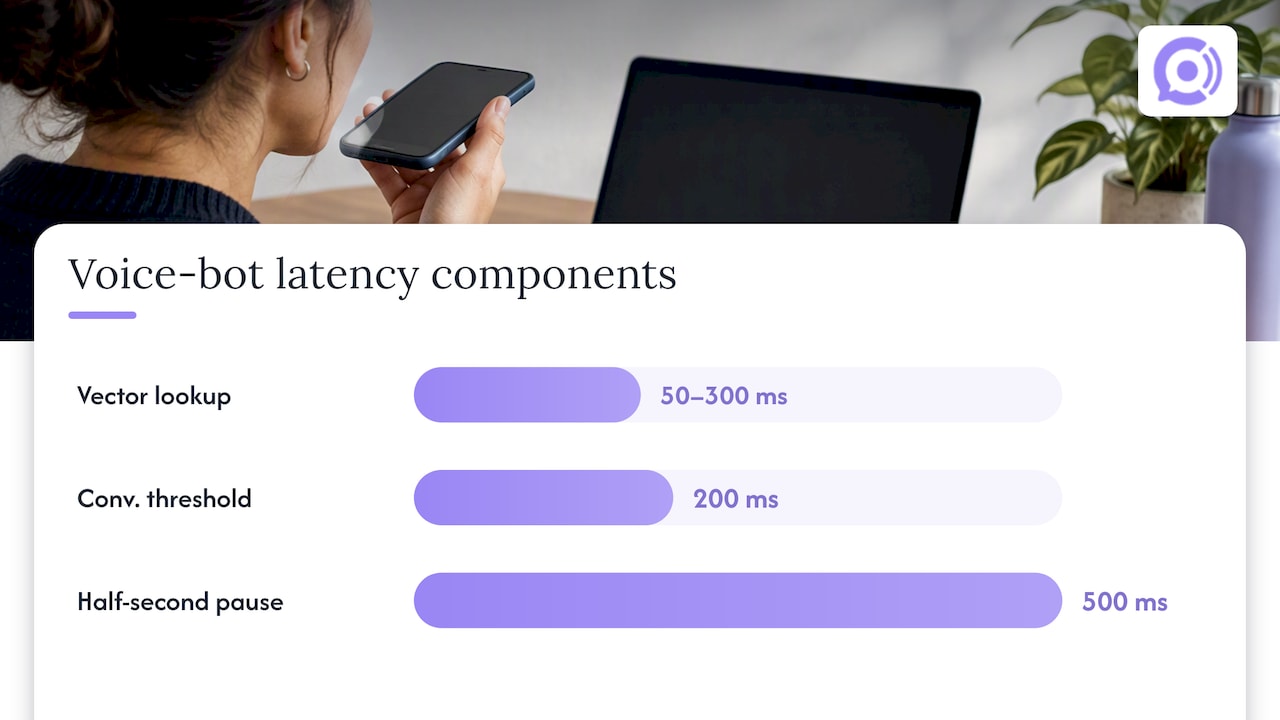
That tradeoff should drive your architecture decision, not the other way around. A support line answering “what’s your return policy” a hundred times a day benefits from a knowledge base lookup because accuracy matters more than shaving off milliseconds. A line confirming “is my order still on track” needs instant, structured data, not a vector search.
Use this checklist before adding retrieval to any voice flow:
- Is the answer static enough to live in the system prompt instead of a retrieved document?
- Does the question occur often enough to justify indexing, embedding, and maintaining it?
- Can the caller tolerate a half-second pause without the exchange feeling broken?
- Does getting this answer wrong carry enough risk to justify the latency cost of grounding it in a source?
When the answers point toward speed, keep it in the prompt. When they point toward accuracy on long-tail questions, bring in the knowledge base.
Structuring Voice Knowledge Base Content: Chunking and Markup Rules
Voice content needs different authoring rules than a help center article. Nobody can scan a wall of text while on a call, so every entry has to front-load the answer and stay short enough to speak naturally.
Follow these steps when building out entries:
- Write each entry as a tight question and answer pair, with the answer leading with the direct response before any context.
- Cap each knowledge base at 1 to 200 FAQ pairs, splitting by topic or product line once you approach that ceiling.
- Tag each entry with a canonical question and a handful of intent variants so near-duplicate phrasing still resolves correctly.
- Avoid long enumerated lists in the spoken answer itself; if a caller needs five steps, summarize the count and offer to send the detail elsewhere.
- Attach metadata to every entry: a confidence threshold, a source URI, and separate display text for channels that support a screen.
- If your content gets crawled from a website, mark it up with valid HTML5 and schema.org Question/Answer structure so it indexes cleanly.
Pro Tip: Write the spoken answer first, then add any written-only detail below it. Reading your own entry out loud catches awkward phrasing before a caller does.
Retrieval Architecture: RAG, Embeddings, and Streaming Patterns
A typical voice RAG pipeline stacks latency at every stage: speech-to-text transcription, query embedding, vector search, document retrieval, and generation. Each step adds milliseconds, and they compound into exactly the kind of lag that makes a phone conversation feel off.
A few patterns reduce that cost without abandoning retrieval entirely:
- Trigger retrieval as soon as intent becomes clear, even before the caller finishes speaking, which streaming RAG approaches show can cut perceived latency by roughly 20% in practice.
- Keep top-k small. Pulling one or two tightly matched chunks beats pulling ten loosely related ones, both for speed and for reducing the odds the model blends in an irrelevant source.
- Favor concise retrieved chunks over long documents; the generation step only needs enough context to answer the specific question asked.
- Consider aligning speech embeddings directly with your knowledge base rather than cascading through a full transcription step first, since end-to-end speech-to-speech retrieval has shown meaningfully lower retrieval latency than cascaded ASR-based models in experimental settings.
- Handle citations carefully on voice-only calls: a short spoken attribution (“according to our shipping policy”) works better than reading a URL aloud, and channels with a screen can display the source instead.
Testing and Guardrails: Golden Sets, Latency SLAs, and Hallucination Checks
Treat your voice knowledge base the way you’d treat any production system: with a repeatable test suite, not a one-time check before launch.
Build this test plan:
- Assemble a golden set of 20 to 30 representative conversational examples, each with the expected answer, the expected source, and relevant metadata.
- Measure latency at each pipeline stage separately: transcription, embedding, retrieval, and generation, so you know where time actually goes.
- Set a hard SLA target and test against it directly.
- Verify every retrieved answer traces back to a real source URI, and flag any response that falls below your confidence threshold for a safe fallback message instead of a guess.
- Schedule recurring runs of the golden set so a content update or model change gets caught before it reaches callers.
The roughly 200 millisecond threshold for natural conversational flow is the number to design around: push total response time past it and retrieval latency starts to feel like a malfunction rather than a pause.
Set up monitoring that flags drift, repeated low-confidence responses, or a rising rate of fallback messages, and use those signals to trigger a content review rather than waiting for complaints.
Implementation Checklist: From Ingestion to Ongoing Monitoring
A working voice knowledge base moves through a consistent pipeline: scope the content, author it in short Q/A form, add markup and metadata, chunk it, embed it, index it, define a retrieval policy, run it against your golden set, then monitor it in production.
Sync cadence matters as much as the pipeline itself:
- Transactional data like order status or inventory needs near real-time sync, since stale answers here cause real harm.
- Reference content like policies or product specs can sync daily or weekly without meaningful risk.
- Any index update should run through a staging check before going live, since a bad embedding job can silently degrade retrieval quality.
A minimal ingestion pattern looks like: accept common document formats, chunk by heading or Q/A boundary rather than by fixed character count, store a source URI with every chunk, and expose a runtime flag to cap retrieval depth per call.
Pro Tip: Start with a near-empty knowledge base and add entries only as real caller questions surface gaps. A small, tested knowledge base beats a large imported one every time.
Connecting a Knowledge Base to Voice Platforms and APIs
Most voice platforms expect a knowledge base to sit behind a retrieval API the dialogue manager can call mid-conversation, rather than a static document dump. Amazon Bedrock Knowledge Bases illustrates this pattern well: documents get chunked and embedded automatically, written to a managed vector index, and retrieved results come back with citations attached, so the voice layer only has to call one endpoint and handle the response.
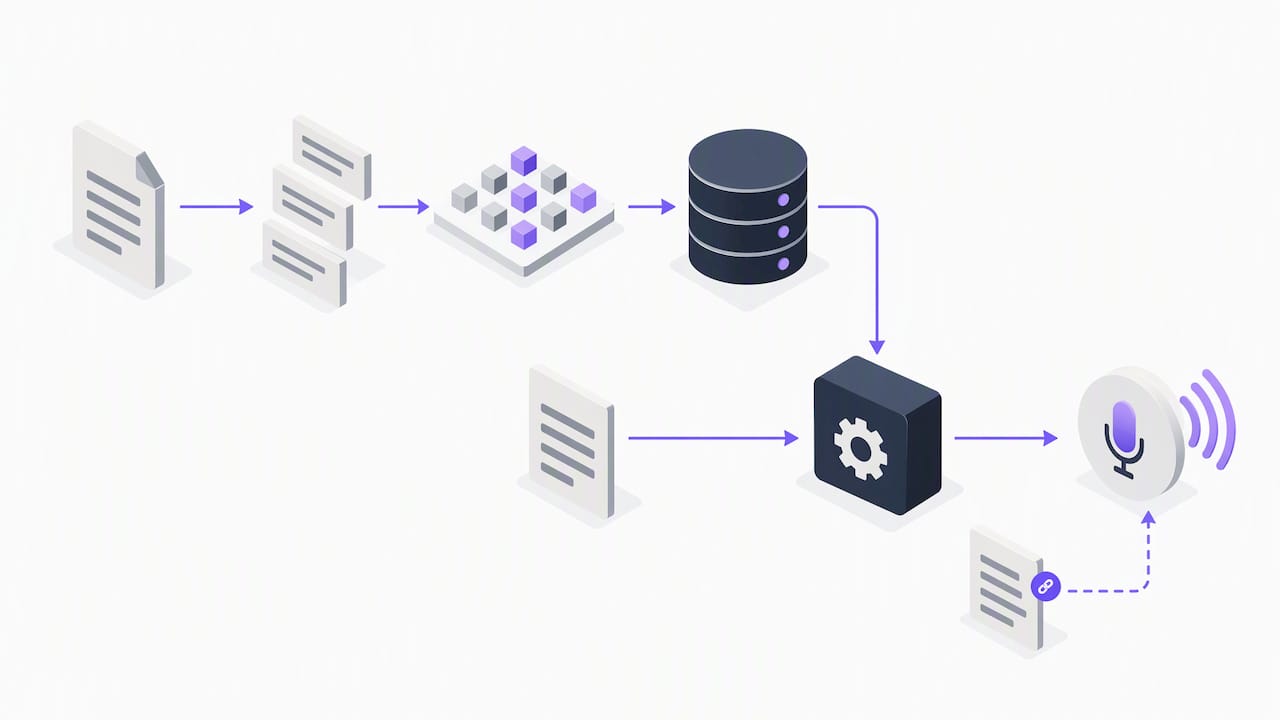
Azure Databricks’ Knowledge Assistant takes a similar approach from the documentation side: it ingests common formats like text, PDF, Markdown, and Word files, builds a searchable index, and exposes traces and citations so you can verify which source actually produced a given answer during testing.
The practical integration points to plan for are the same regardless of platform:
- An ingestion step that accepts your source formats and writes embeddings to an index.
- A retrieval call your voice runtime triggers mid-dialogue, ideally as early as intent is clear.
- A response contract that returns both the answer text and the source reference, so your testing pipeline can check accuracy later.
- A fallback path when retrieval returns nothing above your confidence threshold.
Building against a documented API contract, rather than a bespoke internal format, makes it far easier to swap vector stores or move between managed and self-hosted retrieval later without rewriting your dialogue logic.
Multilingual Content and Localization in Voice Knowledge Bases
A knowledge base built for one language rarely translates cleanly to another just by running answers through machine translation. Spoken phrasing that sounds natural in English can sound stiff or ambiguous once translated word for word, and regional phrasing variants (a caller in one region asking about “shipping” versus “delivery”) need their own intent tags rather than a single canonical question stretched across languages.
The safer pattern is to treat each supported language as its own knowledge base, or at least its own clearly tagged partition within one, with native-sounding Q&A pairs authored or reviewed by a speaker of that language rather than purely translated. Metadata should track which language and locale each entry belongs to, so retrieval only pulls matches in the caller’s detected language rather than mixing results.
Currency, units, dates, and policy specifics also need localization, not just vocabulary. A return window stated in days might carry different rules depending on region, and an entry that states a policy without tagging which market it applies to risks giving a caller inaccurate information confidently.
Test each language’s golden set independently. A model that performs well on English conversational examples will not automatically perform as well on a different language’s phonetics, intent variants, or regional phrasing, so your evaluation plan needs a parallel test set per supported language rather than one set run through translation.
Security and Privacy for Voice Knowledge Base Data
A voice knowledge base often sits closer to sensitive data than a typical web FAQ, especially once it starts pulling in order details, account information, or support history to ground an answer. That proximity raises the stakes on access control and storage practices.
Keep a clear separation between the static reference content in your knowledge base (policies, product specs, general FAQs) and any live transactional data a caller’s specific account might require. Transactional lookups should go through a scoped, authenticated API call rather than living inside the same vector index as your general content, since indexed data tends to get cached, logged, and retained longer than a live API response.
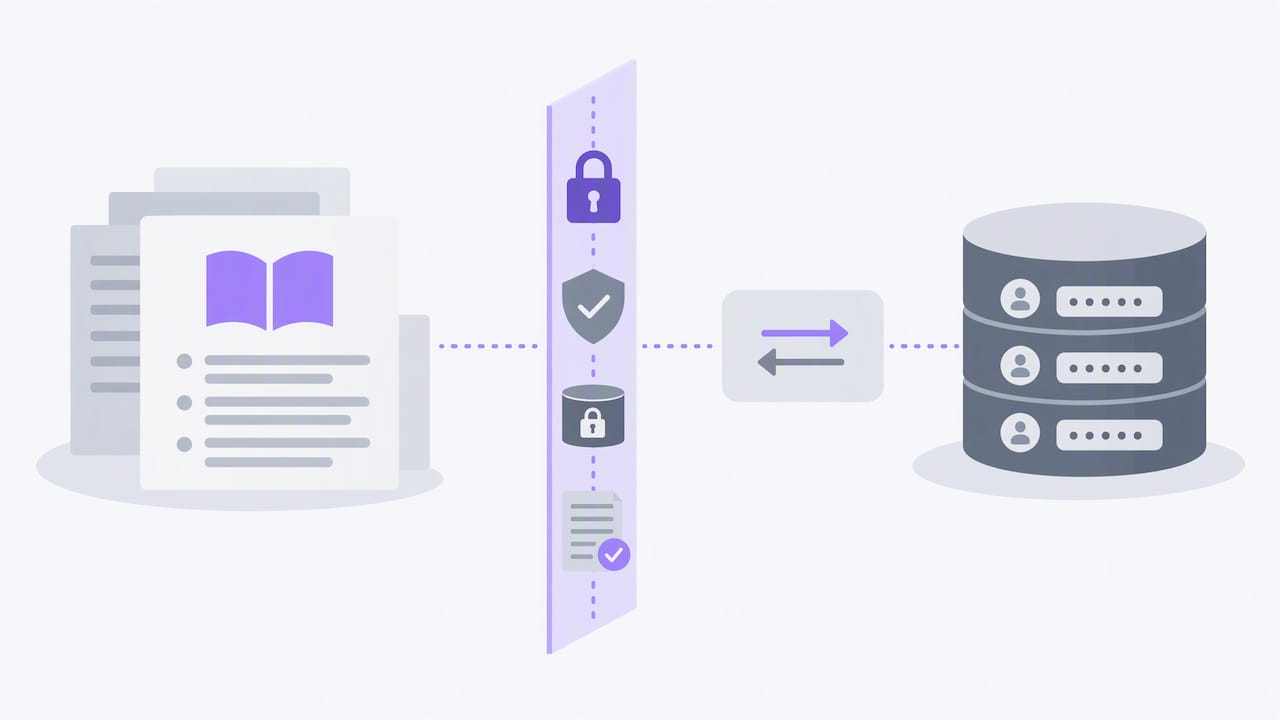
Encrypt data at rest and in transit for anything stored in the knowledge base, and apply the same access controls you’d use for any customer data store: role-based access for whoever maintains the content, audit logs for who queried what, and a retention policy that doesn’t keep call transcripts or retrieved personal data longer than necessary.
Review what gets logged during retrieval itself. A debug log that captures the full retrieved chunk alongside a caller’s phone number or account ID can turn a troubleshooting tool into a compliance liability. Strip or mask identifying details from logs used for latency and accuracy monitoring wherever possible.
Optimizing Search and Retrieval for Voice Interactions
Text search and voice search optimize for different things. A web search can tolerate a long list of results the user scans visually. A voice search has to return one good answer, spoken clearly, often within a fraction of a second.
A few adjustments make retrieval perform better specifically for spoken queries. Keep your embedding model tuned to shorter, conversational query phrasing rather than the longer, keyword-dense queries typical of text search, since callers tend to speak in full questions rather than fragments. Weight exact matches on canonical questions and tagged intents more heavily than pure semantic similarity, since a near-miss on intent in voice leads straight to a wrong or irrelevant answer with no visual cue to catch the error.
Structure spoken answers around an end-focus principle: state the direct answer first, then any supporting detail, since conversation design guidance recommends putting the core answer up front for speech and pushing peripheral information to a visual surface when one is available. This also shortens the text the generation step has to produce, which trims latency on top of improving clarity.
Finally, cap retrieval depth tightly for voice specifically, even tighter than you might for a text-based assistant on the same knowledge base, since every extra retrieved chunk adds both latency and a chance of pulling in a tangential answer that confuses rather than clarifies.
What We’ve Learned Building Voice Knowledge Bases
The teams that get this right treat latency and accuracy as a dial, not a switch. A knowledge base that’s technically correct but adds a beat of silence before every answer will feel worse to callers than a slightly less exhaustive one that responds instantly. Start by measuring where your latency actually goes before optimizing blindly, and resist the urge to import an entire help center at launch. A tight, tested set of entries that covers your real call volume beats a sprawling one that covers edge cases nobody asks about.
— Orphora AI
How Orphora AI Handles Knowledge Base Integration for Voice Agents
If building and maintaining this pipeline yourself sounds like more infrastructure than your team wants to own, we built Orphora AI specifically for e-commerce stores running WooCommerce that want this handled without hiring a voice engineering team.

The voice agents can connect directly to your store’s order and customer data in real time, so transactional questions like order status or return eligibility get answered from live data rather than a static knowledge base, while reference questions about policies pull from a knowledge base structured and maintained for you.
- We handle the telephony provisioning, WooCommerce integration, and knowledge base setup so you’re not assembling a retrieval pipeline from scratch.
- Call recordings, transcripts, and analytics come built in, giving you the monitoring layer this kind of system needs without extra tooling.
- Pricing runs on a per-agent monthly subscription plus per-minute usage, so costs scale with actual call volume rather than a flat enterprise contract.
Check our features page for the full integration details, or see our installation guide if you’re ready to connect a voice agent to your store.
FAQ
How can I create a knowledge base for a chatbot?
Start by writing short, answer-first Q&A pairs scoped to one topic area, capped at 1 to 200 entries per knowledge base, then add metadata like source URIs and confidence thresholds before indexing. Test the result against a small set of real conversational examples before deploying it.
What is the knowledge base in chatbot systems?
A knowledge base in a chatbot is the structured set of reference content, usually organized as Q&A pairs or indexed documents, that the bot searches to ground its answers in real information rather than generating them from memory alone. Platforms like Amazon Bedrock Knowledge Bases handle this by chunking documents, embedding them, and retrieving relevant pieces at query time.
How can I create a voice bot?
Creating a voice bot involves connecting speech-to-text and text-to-speech to a dialogue system, defining the flows and knowledge sources it draws on, and testing it against real call scenarios before launch. For e-commerce specifically, a managed option like an AI Voice Agent can connect directly to store data without building the integration layer yourself.
What is an example of a knowledge base?
A support knowledge base might include entries like “what’s your return window” or “how do I track my order,” each paired with a direct answer and a source reference. Azure Databricks’ Knowledge Assistant shows this pattern applied to ingested documents like PDFs and text files, indexed and retrieved with citations attached to each answer.
Sources
- arXiv: Retrieval latency effects on conversational agents (2603.02206v2)
- Voice agent design best practices | Dialogflow ES | Google Cloud Documentation
- Use Knowledge Assistant to create a high-quality chatbot over your documents – Azure Databricks | Microsoft Learn
- Build a contextual chatbot application using Amazon Bedrock Knowledge Bases — AWS Machine Learning Blog