

Stop WISMO Calls: Order Tracking Automation for Ecommerce Ops
Ecommerce ops playbook: wire webhooks and carrier APIs, apply Baymard’s six tracking details, and add real-time voice agents to reduce WISMO contacts.


Automated order tracking gives customers near-real-time status updates without a support agent touching the order, cutting “where is my order” (WISMO) contacts and speeding up every reply that does need a human. Stores that wire up webhooks between their platform, carriers, and notification tools see fewer complaints and faster resolutions, and conversational tools like Orphora AI extend that same real-time data into phone and chat support.
TL;DR:
- Webhooks provide near-instant order status updates, reducing WISMO tickets and improving response times compared to polling methods.
- Integrating multiple carriers through aggregators streamlines data normalization, but direct API links offer more control for high accuracy and low latency.
- Tracking pages with six key details, such as delivery date and a clickable tracking number, lower customer support issues and site abandonment.
- Exception management, including anomaly detection and proactive escalation, is critical because most support volume stems from stalled or conflicting carrier events.
- Conversational tools like Orphora AI can drastically cut WISMO inquiries by delivering real-time order data during voice or chat support interactions.
Table of Contents
- What order tracking automation actually means
- Benefits and KPIs: what you improve and how to measure it
- Core architecture: webhooks, carrier APIs, aggregators, and notifications
- Step-by-step implementation checklist for operations teams
- Order-tracking UX and notifications that keep customers on-site
- Security, fraud avoidance, and regulatory guardrails
- Orphora AI: applying real-time order data to voice and conversational channels
- Best practices for data synchronization frequency and latency
- Handling exceptions and errors in tracking data
- Strategies for integrating multiple carriers and international shipping
- Monitoring and analytics for tracking performance
- Automating escalation triggers based on tracking status
- Cost considerations and trade-offs
- What the data actually tells us about this problem
- A faster way to handle tracking questions by phone and chat
- FAQ
- Sources
What order tracking automation actually means
Order tracking automation connects your order management system to carriers and customer-facing channels so status changes flow out without anyone manually checking a carrier site and typing an update. It rests on an event lifecycle: order placed, payment confirmed, fulfillment started, shipment created, carrier scan events, out for delivery, delivered. Each step is a trigger, not a task.
Two mechanisms move that data. Webhooks push events to you the moment they happen, which is the right choice when customers expect near-instant updates. Polling checks a carrier or aggregator on a schedule, which is simpler to build but introduces lag between what happened and what your customer sees.
Most setups combine three touchpoints:
- Platform webhooks fire when an order’s status changes internally (paid, fulfilled, shipped).
- Carrier APIs report scan events directly from UPS, FedEx, USPS, or regional carriers.
- Tracking aggregators consolidate multiple carriers into one feed so you integrate once instead of per carrier.
Benefits and KPIs: what you improve and how to measure it
The operational payoff is straightforward: fewer manual status lookups, fewer WISMO tickets clogging the queue, and fewer errors from agents copying tracking numbers by hand, thanks to tools like automated reimbursement recovery and accounting software for e-commerce sellers. Customers get transparency instead of silence, which tends to lower anxiety and support higher satisfaction scores. On the financial side, fewer support hours per order and fewer refund requests tied to “I thought it was lost” complaints both move the needle.
Baymard’s usability research found that integrated tracking pages covering the key order details reduce friction and keep customers from abandoning the site to search elsewhere. Baymard’s order-tracking examples show how much friction a missing detail creates.
Track these KPIs once automation is live:
- WISMO ticket rate as a share of total orders.
- Average first response time for tracking related questions.
- Update latency between a carrier scan and the customer notification.
- CSAT or NPS specific to post-purchase experience.
- Delivery SLA compliance against promised windows.
Core architecture: webhooks, carrier APIs, aggregators, and notifications
A working system has five pieces: an event source, a tracking layer, a central event store, a notification engine, and a customer-facing tracking page. The event source is usually your platform’s webhooks, firing on order and fulfillment changes. The tracking layer is either a carrier API (direct, more accurate, more integration work) or an aggregator (one integration, broader carrier coverage, slightly less granular control). The event store reconciles raw carrier events into normalized internal states so you can troubleshoot without re-querying every carrier. The notification engine decides what to send, when, and through which channel. The tracking page renders the current state for the customer.
Three design decisions shape the whole build:
- Webhooks versus polling. Webhooks give you low latency with more upfront engineering; polling is easier to stand up but trades timeliness for simplicity.
- Aggregator versus direct carrier integration. An aggregator cuts integration work when you ship with several carriers; direct integration gives tighter control over data accuracy and edge cases.
- Reconciliation strategy. Decide early whether you store raw carrier payloads, normalized states, or both. Both is more storage but far easier to debug a customer complaint six weeks later.
Whichever path you pick, build in signature verification on incoming webhooks, idempotency keys so a retried event does not trigger a duplicate notification, retry with backoff for failed deliveries, and logging that lets you trace a single order’s event history end to end. WooCommerce’s webhook documentation lays out the payload structure and delivery headers that make signature checks possible, and the Order Shipment Tracking plugin adds REST endpoints for pushing tracking numbers programmatically.
Pro Tip: Store both the raw carrier event and your normalized internal state. When a customer disputes a delivery, you need the original scan data, not just your interpretation of it.
Step-by-step implementation checklist for operations teams
Treat this as a sequence, not a wish list.
- Audit first. List every carrier you ship with, identify current tracking gaps, confirm API or webhook access for each carrier, and pull a handful of sample order events to see what data actually arrives.
- Design the event model. Map your internal order states to customer-facing language (an internal “manifested” status might just read “preparing to ship” to the customer). Decide which notification channels you will support and whether you need an aggregator or can integrate carriers directly.
- Build the pipeline. Enable platform webhooks, add signature verification, write normalization logic that maps carrier-specific event codes to your internal states, and set up retry and error logging so failed deliveries do not silently disappear.
- Integrate the customer surfaces. Add a linked tracking number, a visual progress bar, an expected delivery date, and full shipping history to your order confirmation page and account dashboard.
- Test before rollout. Verify the full pipeline in staging with real carrier test events, roll out to a small batch of live orders first, set monitoring thresholds for failed notifications, and keep a rollback plan ready.
- Operate daily. Check exception queues each morning, define who handles lost-package or delayed-shipment escalations, and set an SLA for how fast a manual review happens once an order flags as stuck.
Pro Tip: Run your small-batch rollout on your slowest-moving SKUs first. A bug in your notification logic does less damage when it only touches a handful of orders per day.
Order-tracking UX and notifications that keep customers on-site
Baymard’s research identifies six details that satisfy most customers looking up an order: expected delivery date, a status progress bar, the carrier name, a linked tracking number, detailed shipping history, and a package contents summary. Baymard’s order-tracking research ties each one to a specific friction point: customers without a delivery date assume something went wrong, and a tracking number that is not clickable sends them to a search engine instead of the carrier’s site directly.
Build each element from a clear data source:
- Expected delivery date comes from the carrier’s estimate, refreshed as scans update.
- Progress bar maps your normalized internal states to a visual sequence.
- Carrier name and linked tracking number should deep link straight to the carrier’s own tracking page.
- Shipping history lists every scan event in plain language, newest first.
- Package contents pulls from the order line items so customers do not have to guess what is in a box with three items.
Pair this with a notification cadence: order confirmation, shipment created, meaningful transit updates, out for delivery, and delivery confirmation. Keep every message responsive on mobile, since most customers check tracking from a phone, and make sure status text works with screen readers rather than relying on color alone.
Security, fraud avoidance, and regulatory guardrails
The FTC warns that scammers routinely impersonate shipping notifications to steal personal information, and recommends businesses avoid sending links that could be mistaken for phishing attempts. The FTC’s consumer alert on fake shipping notifications also points customers toward verified account pages rather than embedded links, a practice worth building into your own notification design.
Separately, the FTC’s Mail or Telephone Order Rule requires sellers to have a reasonable basis for any promised shipment date and to notify customers with a refund option if a shipment is delayed beyond that window.
Build these controls into your system:
- Avoid embedding raw action links in SMS messages; point customers to an authenticated account page instead.
- Sign outbound notification emails and monitor for spoofed reply addresses.
- Keep a documented process for responding to phishing reports tied to your brand.
Orphora AI: applying real-time order data to voice and conversational channels
Phone and chat support are the channels most WISMO contacts land in first, and they benefit the same way a tracking page does from direct, real-time order data. We built Orphora AI’s voice agents to pull live order status from WooCommerce during the call itself, so a customer asking about a delayed package gets an answer sourced from the same event pipeline your tracking page uses, not a script.
A pilot is the way to see whether those numbers hold for your order volume: watch WISMO call volume, average handle time, and how often the agent resolves a status question without escalating to a human.
Best practices for data synchronization frequency and latency
How often your system checks for updates determines how “real-time” your tracking actually feels. Webhook-driven architectures push updates the moment a carrier reports a scan, which keeps latency to seconds or minutes rather than hours. If you rely on polling instead, because a carrier does not support webhooks, set the interval based on how time-sensitive the shipment stage is: poll more frequently during the out-for-delivery window than during a multi-day transit leg where nothing changes for hours at a time.
Latency problems usually trace back to one of three causes: a webhook endpoint that is slow to acknowledge receipt and triggers carrier-side retries, a polling interval set too wide for the shipment stage, or a normalization step that queues events instead of processing them as they arrive. Monitor the gap between when a carrier event timestamp occurs and when your system reflects it to the customer. That gap, not the raw volume of events processed, is the number that tells you whether your pipeline is actually real-time.
Batch processing has a place for non-urgent reconciliation work, like nightly syncs that cross-check your event store against a carrier’s full manifest for discrepancies, but it should never be the primary path for customer-facing updates. Keep your customer-facing notification engine on the event-driven path, and reserve batch jobs for backstopping data integrity rather than driving what the customer sees.
Handling exceptions and errors in tracking data
Every tracking pipeline eventually has to deal with a package that stalls, a carrier that reports conflicting events, or a shipment that simply goes dark. Design for exceptions from the start rather than treating them as edge cases. Set a threshold, for example no scan activity for 48 to 72 hours during an active transit window, that automatically flags an order for review instead of waiting for the customer to notice and contact you first.
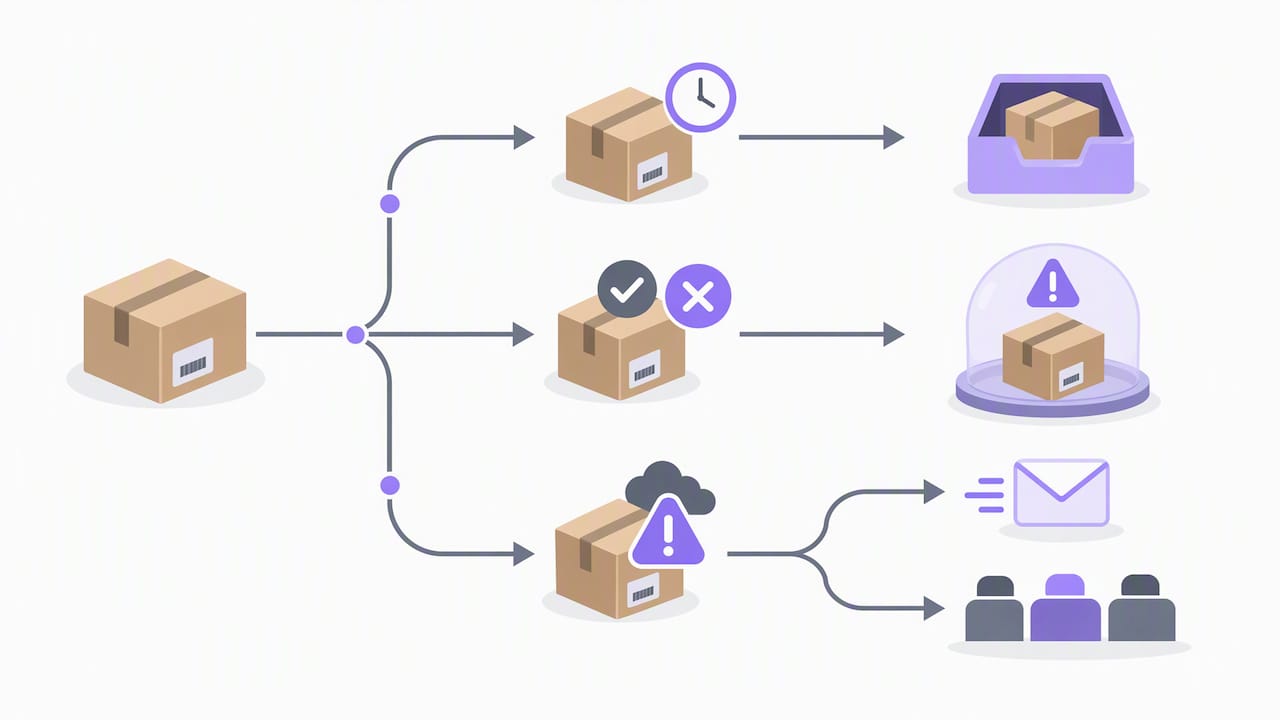
When a carrier reports an event that contradicts your current internal state (a “delivered” scan on an order you still show as “in transit”), do not auto-resolve silently. Log the conflict, hold the more cautious status, and route it to a human if the discrepancy persists past a short grace window. This is where idempotency and event deduplication matter most: if two carriers or an aggregator and a direct API both report overlapping events, your system needs event IDs and timestamps to avoid sending the customer two different stories about the same package.
For genuinely lost or significantly delayed shipments, your escalation path should trigger proactively rather than waiting for an inbound complaint. A proactive “we noticed a delay” message, even without a resolution yet, measurably reduces the anxiety that drives a WISMO contact in the first place. Build a clear internal SLA for how long an exception sits before a human has to act on it, and make sure whoever owns that queue has the authority to issue a refund or replacement without a multistep approval chain, since delay disputes are exactly where the Mail or Telephone Order Rule requires a timely response.
Strategies for integrating multiple carriers and international shipping
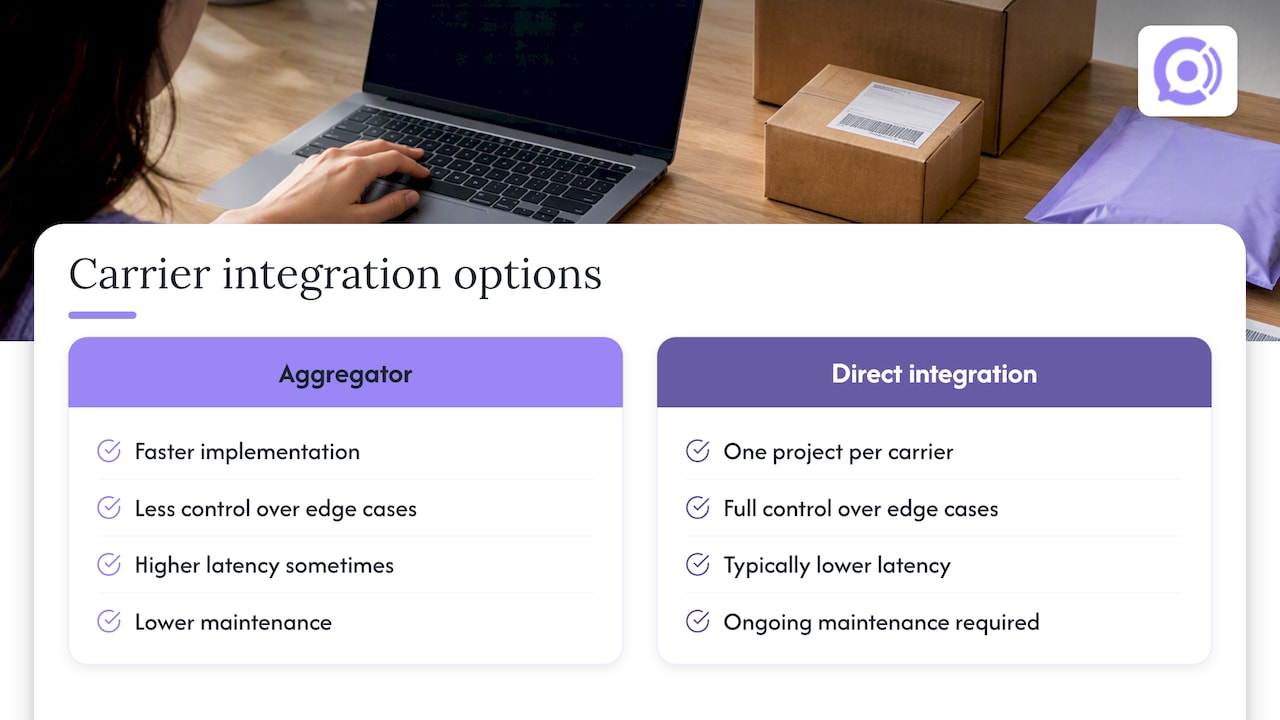
Most stores ship through more than one carrier, and each one formats event data differently. A tracking aggregator solves the integration problem by normalizing multiple carriers’ feeds into a single format, which is the faster path if you are working with limited engineering time. Direct carrier integration gives you more control over edge cases and typically lower latency, but you pay for that with one integration project per carrier and ongoing maintenance as each carrier updates its API.
International shipments add another layer. Cross-border packages often pass through a regional carrier for the final leg after an international carrier like a postal service handles the initial transit, which means your event stream may show a gap while the package is in customs or being handed off. Set customer expectations for that gap explicitly rather than letting a silent stretch look like a lost package. A status like “in customs clearance” communicates more than no update at all.
Whichever approach you choose, normalize every carrier’s event codes into the same internal state model described earlier. A “package handed to final-mile carrier” event from a cross-border shipment and a straightforward “out for delivery” scan from a domestic carrier should both map to a status your customer recognizes, not a carrier-specific code they have to decode. This is also where storing both the raw and normalized event pays off: when an international shipment runs into a dispute, you need the original carrier payload to trace exactly where the gap occurred.
Monitoring and analytics for tracking performance
Treat your tracking pipeline itself as something to monitor, not just the orders flowing through it. Track delivery success rates for your notification engine, since a webhook endpoint that silently fails to acknowledge events can go unnoticed for days if nobody is watching failure rates. Alert on a rising rate of failed webhook deliveries, growing notification queues, or an increase in the latency gap between carrier events and customer notifications.
On the customer experience side, the KPIs introduced earlier, WISMO ticket rate, update latency, and CSAT, should be reviewed together rather than in isolation. A spike in WISMO tickets alongside a spike in update latency usually points to a pipeline problem, not a customer behavior problem, and the fix is technical rather than a support-staffing response.
Build a simple dashboard that pairs technical health (webhook success rate, average processing time, exception queue size) with customer-facing outcomes (WISMO rate, CSAT, delivery SLA compliance). Reviewing both together each week makes it far easier to catch a carrier integration quietly degrading before it shows up as a wave of complaints.
Automating escalation triggers based on tracking status
Not every tracking exception needs a human, but the ones that do should reach a person automatically rather than waiting for the customer to call. Set clear trigger conditions: no scan activity past a defined window, a delivery exception reported by the carrier, or a customer reply to a notification that your system cannot parse. Each of these should create a support ticket automatically, pre-filled with the order’s full event history so the agent does not start from zero.
Route tickets by severity. A shipment running a day behind schedule can wait for the next support shift; a shipment flagged as lost after an extended silence should escalate immediately and carry authority to issue a resolution without extra approval steps. Tie your support tooling directly into the same event store that powers customer notifications, so an agent looking at a ticket sees the identical status a customer would see on the tracking page, never a stale or conflicting version.
This is also where conversational channels add value: a voice agent with real-time order access can resolve a share of tracking inquiries without creating a ticket at all, reserving human escalation for cases that genuinely need judgment, like a customer disputing a delivery confirmation.
Cost considerations and trade-offs
Building order tracking automation in-house means engineering time for webhook handling, carrier integrations, retry logic, and a UI team to build the tracking page elements. That cost scales with how many carriers you support and how much customization your tracking UI needs. A tracking aggregator shifts much of that integration cost into a subscription fee, trading a smaller upfront engineering investment for an ongoing cost per order or per shipment.
The real trade-off is accuracy and control versus speed to launch. Direct carrier integrations give the most granular data and the lowest latency, but adding a new carrier later means a new integration project each time. Aggregators get you live faster, with coverage across carriers out of the box, but you depend on how quickly the aggregator itself picks up a given carrier’s new event types.
Notification channel choice carries its own cost structure too. Email is close to free at scale; SMS carries a per-message cost that adds up across a large order volume; voice support, whether staffed or automated, carries the highest per-contact cost of the three but resolves the most ambiguous cases. Budget for a mix, not a single channel, and weigh the cost of each against how much WISMO volume it actually removes from your support queue.
What the data actually tells us about this problem
Most of the advice circulating about order tracking automation treats it as a notification problem: send more updates, more often, through more channels. That misses the actual lever. Baymard’s usability testing is clear that customers do not want more messages, they want fewer reasons to ask a question at all, which means the six-detail tracking page matters more than notification frequency.
The second thing conventional advice underrates is exception handling. Most of the engineering effort in a tracking build goes toward the happy path, the clean sequence from order placed to delivered. But WISMO volume concentrates almost entirely around exceptions: stalled scans, conflicting carrier events, and international customs delays. A pipeline with excellent webhook latency and a weak exception process will still generate support tickets.
If you are prioritizing, start with the tracking page and exception detection before investing in additional notification channels. A customer who can self-serve a clear answer never generates a WISMO contact in the first place.
— Orphora AI
A faster way to handle tracking questions by phone and chat
Building the full pipeline above, webhooks, normalization, exception handling, a six-detail tracking page, takes real engineering time, and most small and mid-sized WooCommerce stores do not have a team sitting idle to build it. We built Orphora AI to give you the conversational layer on top of that same real-time order data without the integration project: our voice agents connect directly to WooCommerce and answer order status, shipping, and return questions around the clock.

A pilot typically starts with connecting your WooCommerce store, customizing the agent’s responses to match your brand, and letting it handle a slice of your incoming calls. Pricing runs per agent with a per-minute usage fee, detailed on our plans and pricing page, and our installation guide walks through the WooCommerce connection step by step. If you want to see how real-time order lookup performs on your own call volume, our features page is the place to start.
FAQ
What is order tracking automation?
Order tracking automation connects your store’s order and fulfillment events to carrier data and customer notifications so status updates reach customers without manual work. It typically relies on webhooks or carrier APIs feeding a notification engine and a customer-facing tracking page.
How do webhooks improve order tracking compared to polling?
Webhooks push an event to your system the moment it happens, which keeps customer-facing updates close to real time. Polling checks for updates on a fixed schedule instead, which is simpler to build but introduces a delay between the actual event and when the customer sees it.
What are the six key details customers expect on a tracking page?
Baymard’s research identifies expected delivery date, a status progress bar, carrier name, a linked tracking number, detailed shipping history, and a package contents summary as the details that satisfy most customers. Pages missing several of these tend to push customers to contact support or search for the tracking number elsewhere, according to Baymard’s findings.
How can I avoid sending tracking notifications that look like scams?
Avoid embedding clickable action links directly in SMS or email notifications, since the FTC warns that scammers mimic exactly this format. Point customers to a verified account page instead, and sign your outbound messages so customers can tell legitimate updates from phishing attempts.
Can conversational tools like voice agents reduce WISMO volume?
Yes, when a voice or chat agent has real-time access to order and shipping data, it can answer a tracking question during the same call instead of routing it to a human. Our Orphora AI agents pull live WooCommerce order status during calls, which we report reduces response times and WISMO related escalations for the stores using them.
Sources
- Fake shipping-notification emails and text messages: What you need to know (FTC)
- Webhooks | WooCommerce developer docs
- Order Shipment Tracking Documentation – WooCommerce