

Local Caller ID Setup: Numbers, CNAM and Branding
Set up a local caller ID for your U.S. business: pick the number, register a CNAM name, test across carriers, and stay within the Truth in Caller ID rules.

To set up a local caller ID in the U.S., pick a number you own with the area code your customers recognize. Set it as the outbound number in your phone system. Then register a business name (CNAM) for that number with your provider. The first step takes minutes. The name registration takes days to weeks to show up on phones, and it will not appear on every recipient’s screen.
This guide walks through each step in order: choosing numbers, registering a name, what providers ask for, testing, fixing mistakes, and the rules that apply. It is written for store owners and e-commerce managers who want customers to recognize and answer their calls.
TL;DR
- Use numbers your business owns, with an area code your customers recognize, as the displayed outbound number. Avoid shared pools.
- CNAM is the text name (15 characters at most with most providers) shown next to your number. Registration needs your legal business name, address and EIN or DUNS.
- Expect roughly two to three business days for review, then up to several weeks for the name to spread across carriers.
- The name will not show for every recipient. Mobile display often depends on the carrier and the subscriber.
- Showing a local number is legal. Showing misleading information with intent to defraud is not.
Table of Contents
- Local presence, CNAM and branded calling: three different things
- Step 1: Choose the numbers you will display
- Step 2: Set the number as your outbound caller ID
- Step 3: Register your business name (CNAM)
- What providers ask for
- How long it takes
- Will every customer see your name?
- Test your caller ID before you rely on it
- Fixing a wrong name or a spam label
- The rules for showing a local number
- Perspective
- Handling the calls once customers ring back
- Put an AI voice agent on your local number
- FAQ
- Sources
Local presence, CNAM and branded calling: three different things
People use these terms interchangeably, but they do different jobs.
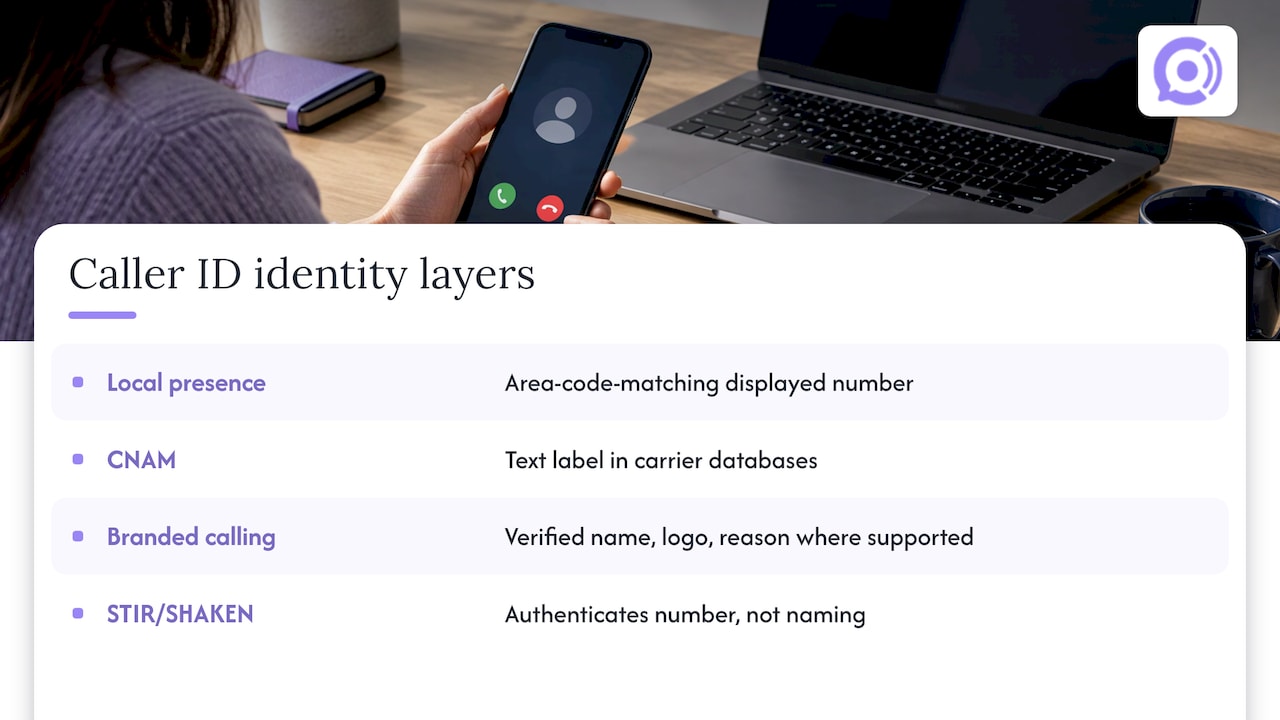
Local presence dialing picks a displayed number that matches the recipient’s area code. As one provider’s product page puts it, local presence changes how local the number looks, not necessarily who the business is. It is a number decision.
CNAM (caller ID name) is the text label attached to your number in carrier databases. CNAM is text only, with no logo or call reason. It is the baseline identity layer.
Branded calling is the richer layer. Where participating carriers and devices support it, a verified name, logo and call reason can display. It is separate from CNAM, and STIR/SHAKEN is a different thing again: an authentication layer that vouches for the number, not a naming service.
The keyword “caller ID branding” usually means CNAM, or CNAM plus branded calling. For most small stores, CNAM on a local number is the right starting point.
Step 1: Choose the numbers you will display
Start with the numbers, because everything else attaches to them.
- Decide which area codes matter. Look at where your orders ship. If 60% of your customers sit in two metro areas, two local numbers cover most of your volume. You do not need a number for every area code.
- Use numbers you own. One provider that sells local presence dialing recommends owned local numbers over shared pools. The reasons it gives: with a shared number, reputation, callback routing, branding control and spam-label exposure can affect every user of that number.
- Make sure callbacks work. A customer who sees a missed call and dials back should reach your business, not a dead line. If you are managing several owned numbers with callbacks and one consistent outbound identity, a business phone system setup with ring groups, voicemail-to-email and call queues keeps return calls from falling through.
- Check CNAM eligibility. CNAM is available only for U.S. numbers. Canadian numbers and U.S. or Canadian toll-free numbers are not eligible for CNAM profiles. If your support line is toll-free, your branding will work differently from a local line.
Step 2: Set the number as your outbound caller ID
The exact clicks depend on your phone platform, but the pattern is the same everywhere.
In a typical business phone platform, an administrator selects the number to display for all phones, or assigns numbers to individual apps, devices or features, and can restrict which numbers each user is allowed to pick. Other platforms work per extension: one provider lets an administrator choose the outbound caller ID number per extension and set a caller ID name in the number settings.
A sensible configuration for a small store:
- Support line: one main local number, displayed on every outbound call from the support team or voice agent.
- Sales or wholesale line: a separate number, so a spam label on one never contaminates the other.
- Restrictions: lock the list so staff cannot pick a random number from a drop-down.
Keep the displayed number and the number printed on your website, packing slips and email signatures the same. Customers who look you up after a missed call should find the number that called them.
Step 3: Register your business name (CNAM)
A number alone shows up as a bare string of digits, or as a city and state. CNAM adds your name.
The sequence is broadly consistent across providers. One carrier-grade provider describes it this way: complete the U.S. business profile, attach eligible U.S. long-code numbers, create and submit the CNAM product, then register the numbers once approved. Its flow also includes enabling caller name lookup where required.
Other platforms wrap the same process in their own settings. A business-phone app has you create a caller ID name in workspace settings, assign it to selected U.S. local numbers and wait for approval. A CRM-based phone system has you go through Settings, Phone System, Trust Center, CNAM Voice, then Start Registration. There you enter business details, address and representative, choose the CNAM name, certify that your business originates the calls and submit.
What to pick as your name
CNAM fields are short. Several providers cap the displayed name at 15 characters, including the 15-character limit on one provider’s CNAM field. Practical rules:
- Use the name customers know from your storefront and emails, shortened if needed. “Acme Outdoors Inc” becomes “ACME OUTDOORS”.
- Match it to your legal name or a documented DBA. Mismatches are the most common reason for rejection.
- Skip taglines, promotional words and special characters. Keep to letters, numbers and spaces.
What providers ask for
Registration is a business verification, so have this ready before you start. One provider’s form asks for legal business name, address, entity type, industry, EIN or DUNS, operating regions, website, authorized representative, contact details, estimated U.S. call volume, company size and the CNAM name.
A provider that onboards CNAM requires a business profile tied to an Employer Identification Number or DUNS number. Another gives practical guidance for U.S. applicants: match the legal name and address to official tax records, provide the nine-digit EIN, avoid a P.O. box, and use the verified contact details of an authorized representative.
| Item | What to prepare |
|---|---|
| Legal business name | Exactly as on your IRS records |
| Address | A physical street address, not a P.O. box |
| Tax ID | Nine-digit EIN (or DUNS where accepted) |
| Representative | Someone authorized, with a working email and phone |
| Website | Live site that shows the business name |
| CNAM name | 15 characters or fewer, letters and numbers |
| Call volume | A realistic monthly estimate for U.S. calls |
If you trade under a store name that differs from your legal entity, gather your DBA paperwork now. You may need it later.
How long it takes
Plan in weeks, not hours. Timelines differ by provider:
- One business phone app says approval typically takes 48 hours, then another two to three days for carrier propagation, and up to two weeks for consistent display.
- Another provider says review commonly takes two to three business days, sometimes five to seven, and approved names may need two to four more weeks to propagate across U.S. carriers.
So register before a launch, a holiday sales push or a campaign, not during it. If you are adding a number ahead of Black Friday, the time to submit is well before the season starts.
Will every customer see your name?
No, and it helps to set expectations early. Whether a registered name appears depends on the receiving carrier and on database participation. According to one provider’s documentation, landlines generally have CNAM enabled by default, while mobile display commonly depends on subscriber opt-in.
Because most of your customers are on mobile, a share of them will see only a number, or a city and state. That is why the number itself matters as much as the name. A local, consistent, recognizable number carries the identity when the name does not show.
To raise the odds that a call gets picked up, combine these:
- A local number your customers have seen before.
- A registered CNAM name.
- A text message or email before calls that tells customers which number will call them, for example a shipping update that says “we may call from (512) 555-0148 about your return.”
- Branded calling, where your provider and the carrier support it.
Test your caller ID before you rely on it
Once the propagation window has passed, test with real phones.
- Place calls to phones on different carriers, including at least one landline if you can find one.
- Try both iPhone and Android devices.
- Record what each phone displays: name, number, city or nothing.
- Repeat after a week, because propagation is uneven.
Provider guidance is to test calls to recipients across different carriers before concluding anything is wrong.
Fixing a wrong name or a spam label
If the wrong name shows after the propagation window, check these in order. The same provider’s troubleshooting guidance lists them: the legal name and DBA match, business profile approval, the 15-character and character-set rules, and DBA documentation where applicable.
Spam labels are a separate problem. A “Spam Likely” tag comes from carrier and analytics-app reputation systems, not from CNAM, so a registered name does not clear it. The same help article lists the relevant caller registries as a separate step. Contact your provider for the current list and process.
To keep labels from appearing in the first place:
- Keep calls tied to real customer events, like an order or a return, rather than cold outreach.
- Do not rotate through many numbers to avoid blocks.
- Keep volume per number reasonable and steady rather than bursty.
- Make sure callers who ring back reach a person or an agent that identifies your store.
The rules for showing a local number
You can display a local number legally. The FCC’s Truth in Caller ID rule bars knowingly transmitting misleading or inaccurate caller ID information with intent to defraud, cause harm, or wrongfully obtain anything of value, and the agency’s rulemaking states that showing a local number is not inherently unlawful. The deciding factor is intent.
Telemarketers have further duties under the same document: they must transmit caller ID information and a number recipients can call to ask to be placed on a company-specific do-not-call list. If any of your outbound calls are marketing rather than service, talk to a telecommunications attorney about the Telephone Consumer Protection Act and state rules before you scale.
The safe approach for a store: display a number you own, that rings back to your business, under a name that is truthfully yours.
Perspective
Most guides on caller ID assume an outbound sales team dialing cold lists. Our customers are different: WooCommerce store owners whose customers already know them and who call about orders they placed.
That changes the setup. The goal is not to disguise a number as local. It is to make sure a customer who just bought something recognizes the call and can call back and reach the same place. Our voice agents are designed to answer those calls around the clock, with real-time access to order and customer data, so a returning call about an order status or a return gets handled instead of going to voicemail.
We provision U.S. numbers for each agent, so your support line can live on a number tied to your business from day one. Pair that with a registered CNAM name from your telephony provider, and the call looks like what it is: your store, following up or picking up.
Our view: identity on a call is built from a stable number, an accurate name, and a person or agent who answers well when someone rings back. Pay attention to all three.
Orphora AI
Handling the calls once customers ring back
Caller ID gets customers to answer. What happens when they call you back decides whether the setup was worth it. For a WooCommerce store, the callbacks are predictable: where is my order, how do I return this, when does it ship.
If the person who answers cannot verify who is calling, you risk giving out order details to the wrong person. Our guide on what identity verification by phone proves and where it stops covers how to think about that.
Put an AI voice agent on your local number
Our AI Voice Agent answers your store’s phone line 24/7 and looks up orders in WooCommerce in real time. It handles order status, returns and shipping questions, keeps call recordings and transcripts, and shows call and usage analytics. We provision U.S. telephony for you, and you can customize the agent and connect your knowledge base.
Pricing is published: $9.99 per month per agent, plus $0.10 per conversation minute. There is also an Enterprise plan with no published price. See the details at Orphora AI.

Bring your local number plan and your CNAM registration, and give customers someone to talk to when they call back.
FAQ
Why does my business name not show on some phones?
CNAM display depends on the receiving carrier and on database participation. Landlines generally show it by default, while mobile display often depends on the subscriber’s carrier and settings. Allow for the propagation window, then test across carriers before assuming something is wrong.
Is it legal to show a local number that is not where I am?
Yes, as a general matter. Federal rules target misleading caller ID information sent with intent to defraud, cause harm or wrongfully obtain something of value. Use a number you own that connects to your business, and if you make telemarketing calls, check the additional telemarketing and do-not-call duties with an attorney.
How long does CNAM registration take?
Providers quote about two to three business days for review, sometimes five to seven. After approval, the name can take from a few days to several weeks to appear across U.S. carriers. Register well ahead of any launch or seasonal peak.
Can I register CNAM for a toll-free number?
Not with every provider. One major provider says U.S. and Canadian toll-free numbers are not eligible for CNAM profiles. If you want a branded name, use a U.S. local number for outbound calls.
Sources
- Setting up your caller ID in the admin portal
- Updating an outbound caller ID number or name
- What is local presence dialing
- Custom caller ID product overview
- What is branded calling and CNAM
- Brand your calls using CNAM
- Caller ID resource center
- How to register and manage CNAM
- Display your business name as caller ID
- CNAM registration setup and requirements
- Federal Register: Truth in Caller ID rule