

947ms to First Audio: Voice Agent Customization for WooCommerce
Build production voice agents for WooCommerce with a cascaded streaming pipeline, function call safety, and testing to hit subsecond audio.


The right approach combines three things: a streaming cascaded pipeline (speech-to-text into a streaming language model with function calling, into streaming text-to-speech), and three customization levers layered on top of it. Those levers are the system prompt and persona, the function/tool registry, and voice, and knowledge base configuration. Get the architecture right first, because no amount of prompt tuning fixes a pipeline with a two-second delay before the agent starts talking. Then prioritize low time-to-first-audio, confirmation gating on risky actions, and a real regression test suite before you ship anything to a live phone line.
TL;DR:
- Customization should focus on retrieval and model tuning only when extensive, verified data supports it, not on prompt changes or fine-tuning for small datasets.
- Use strict safety measures with layered validation and explicit confirmation prompts to prevent accidental order placements during function calls.
- Keep knowledge base entries short, scoped with metadata, and only retrieve information when necessary to minimize latency impact.
- Conduct comprehensive pre-launch testing on key metrics like response speed, entity error rate, tool success rate, and escalation frequency to ensure reliability.
Table of Contents
- What Does Voice Agent Customization Actually Mean?
- How Do You Architect a Low-Latency Streaming Voice Agent?
- Building Safe Function-Calling for Commerce Actions
- Designing a Brand Voice That Doesn’t Sound Robotic
- How Should You Structure a Knowledge Base for Voice?
- What Should a Pre-Launch Testing Checklist Cover?
- How We Approach Voice Agent Customization at Orphora AI
- Get a Voice Agent Built for Your Store, Not a Generic Bot
- Sources
- FAQ
What Does Voice Agent Customization Actually Mean?
Most teams think customization means writing a better prompt. That’s one lever out of three, and often not the most important one.
Voice agent customization operates on three independent layers, and each has different costs, latency effects, and maintenance burdens. Confusing them is the most common mistake in this field.
Layer one: instructions. The system prompt shapes tone, defines the persona, and sets behavioral rules. It’s cheap to change, takes effect instantly, and has zero training cost. It’s also limited: a prompt can’t reliably encode thousands of product SKUs or a 40-page returns policy.
Layer two: retrieval. A knowledge base or RAG system feeds the model facts it wasn’t trained on: your return window, your shipping carriers, your specific troubleshooting steps. Retrieval adds a network hop, which matters enormously for voice because every hundred milliseconds is audible dead air.
Layer three: model tuning. Fine-tuning changes the model’s actual weights so it produces your phrasing and judgment by default rather than through instruction. It’s the most expensive and slowest lever to change, and according to CallSphere’s guidance on training voice agents, it’s rarely necessary. Most production agents never need it.
Decide which layer to touch based on four questions: how much reference data do you have, do you need exact phrasing versus approximate meaning, what’s your latency budget, and who maintains this six months from now?
- Need to update policy text weekly? Keep it in the prompt or a lightly retrieved KB, never fine-tuned.
- Need thousands of product facts? That’s retrieval, not prompt stuffing.
- Need the model to always answer in a specific voice with zero deviation, and you have the training data to prove it? That’s when fine-tuning earns its cost.
Pro Tip: Only consider fine-tuning if you have more than 500 high-quality, verified transcript examples of the exact behavior you want. Below that threshold, a well-versioned prompt plus RAG will outperform a fine-tune trained on thin data, and it costs a fraction as much to iterate on.
How Do You Architect a Low-Latency Streaming Voice Agent?
Native speech-to-speech models sound appealing on paper. Skip the cascaded steps, generate audio straight from audio input. In practice, they fall short for commerce agents right now: they’re slow to produce a first response, and most don’t support function calling at all, which means no order lookups, no cart actions, no live data.
The pattern that works today is cascaded streaming: STT feeds a streaming LLM, the LLM’s tokens feed a streaming TTS engine, and all three stages overlap instead of running sequentially. An open tutorial building a realtime voice agent from scratch documents exactly why: native S2S models currently lack the streaming output and function-calling support that enterprise workflows require.
The engineering trick that makes this fast is sentence aggregation. Instead of waiting for the LLM to finish a full response before synthesizing audio, you buffer tokens until a sentence boundary hits (punctuation plus a pause heuristic), then push that chunk to TTS immediately while the LLM keeps generating the next sentence. Synthesis and generation run in parallel instead of back to back.
A typical implementation stack looks like this:
- STT over WebSocket for continuous partial transcripts (Deepgram is one common choice)
- A streaming LLM served over SSE, either through a cloud API or self-hosted with vLLM for cost control at volume
- Streaming TTS (ElevenLabs is one option) fed by the sentence buffer, not the full response
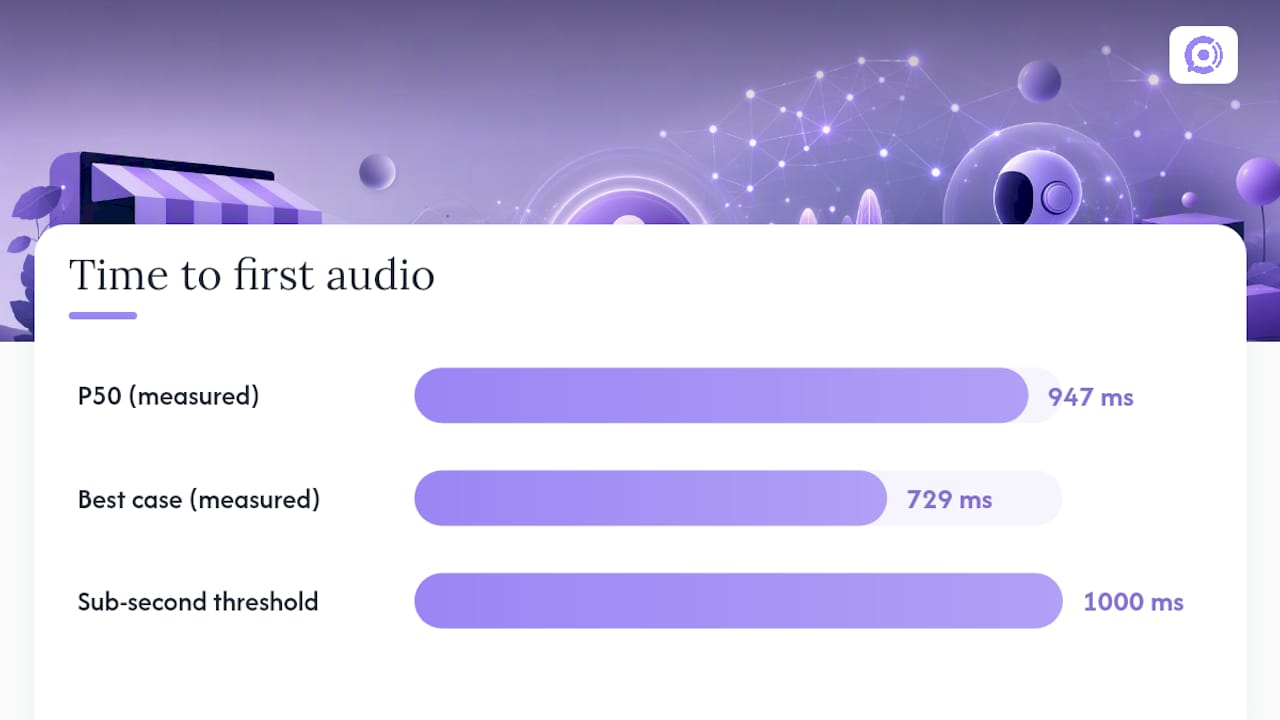
The numbers that matter: the arXiv tutorial measured a P50 time-to-first-audio of 947 milliseconds using this exact Deepgram, vLLM, and ElevenLabs stack, with a best case around 729ms. Sub-second response is the bar for something that feels conversational instead of laggy.
Building Safe Function-Calling for Commerce Actions
A voice agent that can look up an order is useful. A voice agent that can accidentally place one is a liability. The gap between those two outcomes is entirely in how you design the function registry.
Define each backend action as a JSON Schema tool with explicit required parameters. A minimal e-commerce registry typically includes:
get_order_status(order_id)— read-only, low risk, safe to auto-executelookup_account_by_email(email)— read-only, requires verification before revealing sensitive detailsadd_to_cart(sku, quantity)— reversible, moderate riskcheckout(cart_id, confirmation_phrase)— irreversible, requires a verbatim confirmation string from the caller before executiontransfer_to_human(reason, summary)— always available, receives a short context handoff
Safety runs on two layers, and skipping either one is where things go wrong. The system prompt should explicitly forbid the agent from calling checkout without first repeating the order back and getting a spoken “yes” or equivalent confirmation phrase. But prompts get ignored under adversarial or confusing inputs, so the second layer, code-level validation, is the one that actually protects you: your application code checks that confirmation_phrase and all required parameters are present and correctly formed before the action executes, independent of what the model claims it verified. AssemblyAI’s guide to building support voice agents frames this as the real safety gate, not the prompt language.
Design your error responses as structured objects the LLM can reason about, not raw exception strings. A response like {"error": "order_not_found", "suggestion": "verify_order_id"} lets the model naturally ask a clarifying follow-up instead of hallucinating a fix.
Pro Tip: Always give the agent a transfer_to_human tool it can call on its own initiative, not just as a fallback after repeated failures. An agent that can say “let me get someone who can help with that” three exchanges into a confusing call is more trustworthy than one that keeps guessing.
Designing a Brand Voice That Doesn’t Sound Robotic
Five dials control how an agent sounds, and tuning them takes an afternoon, not a training run:
- Persona and name — does it introduce itself, and as what?
- Tone — warm and casual, or precise and formal?
- Pronoun formality — “you” versus a more formal address pattern, and how that shifts across languages
- Answer length — commerce callers usually want short answers; explain-heavy callers want more
- Banned phrases and guardrails — legal language you never want spoken aloud, competitor names, discount promises
Getting the prompt right covers most of the ground, but the last stretch, the part that makes an agent sound convincingly like your team and not a generic assistant, comes from training on real data. Feed the system your team’s actual past replies and macros, then simulate the agent against a batch of historical support tickets before it ever touches a live call. That simulation step catches tone drift and awkward phrasing that no amount of prompt reading catches.
On the TTS side, custom voice cloning buys brand consistency but adds licensing complexity and sometimes latency versus a high-quality prebuilt voice. If you’re deciding between the two, the trade-offs around licensing and voice-actor alternatives are worth reading up on at VoiceBros’s comparison of AI voice-over and human voice talent.
Pro Tip: Launch in draft mode first, where the agent proposes a response a human approves before it’s spoken. Run it that way for a week of real call volume before flipping to full autonomy.
How Should You Structure a Knowledge Base for Voice?
Retrieving from a knowledge base on every single conversational turn is one of the fastest ways to wreck your latency budget. Each retrieval call is a network round trip stacked on top of your STT and LLM calls, and voice callers notice every added beat of silence.
- Write bite-sized entries. Long paragraphs confuse retrieval and confuse the model when it tries to compress an answer into speech. Keep chunk size in the 200 to 400 token range, per CallSphere’s production guidance.
- Script anything legally sensitive rather than letting the model paraphrase it, so return policies and warranty terms come out word for word.
- Scope entries with metadata (region, product line, language) so a query about a US warranty doesn’t pull a UK policy chunk by accident, a failure mode Newo flags directly.
- Expose retrieval as a tool, not a default step. Give the model a
search_knowledge_base(query)function it calls only when it actually needs external facts, and return the chunk ID in the response so you can audit which document answered which question later.
What Should a Pre-Launch Testing Checklist Cover?
Track four numbers before you trust an agent with real calls: TTFA at P50 and P95, entity error rate on SKUs and phone numbers, tool call success rate, and how often calls escalate to a human.
That entity error number deserves special attention. Alphanumeric strings like order numbers and SKUs are a documented weak point for speech recognition, and biasing your STT vocabulary toward your actual product catalog, then fuzzy-matching the transcript against that catalog before the tool call fires, cuts those errors meaningfully.
- Build a regression suite of at least 50 realistic call scenarios and track pass rate against every prompt change.
- Version every prompt change and roll out through A/B comparison, not blind replacement.
- Launch in draft-only mode, move to confidence-based routing, then progressive autonomy as pass rates hold.
- Monitor live transcripts and set alerts on handoff-rate spikes, which usually signal a regression before your metrics dashboard does.
How We Approach Voice Agent Customization at Orphora AI
Orphora AI builds this pattern specifically for WooCommerce stores: live order lookups instead of static FAQ answers, guardrail workflows that gate checkout and refund actions behind explicit confirmation, and analytics that feed back into prompt and tool tuning over time. Customers report 85% faster response times and a 95% satisfaction rate with agents built this way, numbers we track precisely because “sounds right” isn’t a metric.
If you’re evaluating this pattern for your own store, simulate first, measure TTFA before launch, and stress-test your handoff logic before a real caller does.
— Orphora AI
Get a Voice Agent Built for Your Store, Not a Generic Bot
Most voice AI platforms make you build the WooCommerce integration yourself: wiring order status lookups, cart actions, and return workflows from scratch on top of a general-purpose agent framework. Orphora AI skips that step entirely. It connects directly to your store’s live order and customer data, so the agent answers “where’s my order” and “can I return this” correctly on day one, not after weeks of custom tool development.

Pricing runs on a straightforward model with a monthly fee per agent and a usage fee per conversation minute, so you pay for actual usage instead of a flat enterprise contract sized for call volume you may not have. Enterprise pricing is available on request for larger stores needing custom SLAs. Walk through the guardrail workflows and analytics tools on the features page, or head straight to the Orphora AI homepage to start building an agent around your own catalog and return policy.
Sources
- From-scratch realtime voice agent tutorial (arXiv)
- Build an AI voice agent for customer support — AssemblyAI blog
- How to train an AI voice agent on your business — CallSphere
- Alphanumeric speech recognition: why voice assistants mangle SKUs and how to fix it — Speechmatics
FAQ
What is the difference between prompt engineering and fine-tuning for voice agents?
Prompt engineering shapes behavior through instructions given at runtime, with no training cost and instant iteration. Fine-tuning retrains the model’s weights, which is slower and more expensive, and per CallSphere’s guidance, it’s rarely necessary unless you have a large corpus of verified examples.
How fast should a voice agent respond to feel natural?
Sub-second time-to-first-audio is the target for a conversational feel. A tested cascaded pipeline achieved a P50 TTFA of 947 milliseconds, roughly 17 times faster than a native speech-to-speech approach in the same test.
Why do voice agents mess up order numbers and SKUs?
Alphanumeric strings are a known weak spot for speech recognition models because they lack the linguistic context that helps predict normal words. Speechmatics recommends biasing the recognizer with your product vocabulary and fuzzy-matching transcripts against your catalog before any tool call executes.
Does Orphora AI support custom voice and persona configuration?
Yes. Orphora AI lets store owners configure tone, persona, and guardrail rules alongside live WooCommerce order data, with pricing starting at $9.99 per month per agent plus $0.10 per conversation minute. Full configuration details are on the features page.
Should a voice agent retrieve from a knowledge base on every turn?
No. Per-turn retrieval adds a network round trip on top of every other pipeline stage, which hurts latency noticeably. The better pattern exposes retrieval as a callable tool the model uses only when it actually needs outside information, keeping chunks in the 200 to 400 token range for clean, unambiguous answers.