

Launch a Compliant WooCommerce Voice Pilot in 4–8 Weeks for U.S. Stores
Build WooCommerce voice integration with webhooks and the REST API, meet U.S. telephony and FTC rules, and run a 4–8 week pilot using Orphora AI.


Yes, you can give a WooCommerce store round-the-clock phone support and order self-service, and Orphora AI is the practical, WooCommerce-native way to do it. The reason it works is real-time order access paired with tight WooCommerce integration and built-in guardrails for risky actions. Before you start, confirm you have webhook and REST API access on your store and can provision a dedicated phone number.
TL;DR:
- Only automate order-status and shipping inquiries initially, and build trust with low-risk, high-volume calls before expanding to refunds or account changes.
- Use webhooks for real-time event tracking and the REST API for data retrieval during live calls, ensuring API keys are scoped narrowly for safety.
- Comply fully with US regulations by implementing SHAKEN/STIR authentication, obtaining explicit customer consent, and avoiding automatic handling of high-risk actions.
- Start with a small pilot of 50 calls in a sandbox to measure containment and false escalation rates before scaling to live data.
- Cost depends on per-minute charges and subscription fees, with $9.99/month per agent and $0.10 per call minute being typical for platforms like Orphora AI.
Table of Contents
- What AI voice agents actually do for a WooCommerce store
- How to integrate webhooks, the REST API, and call flows for order lookup
- SHAKEN/STIR, call recording, and FTC consent rules you need to know
- Building guardrails that keep automated actions safe
- What voice support costs and how to measure a pilot
- Handling multiple languages and accessibility on voice calls
- Designing a voice experience that actually works for shoppers
- What successful WooCommerce voice deployments look like
- Vendor perspective: mistakes we see and quick wins to prioritize
- Orphora AI: next steps for a pilot
- Sources
- FAQ
What AI voice agents actually do for a WooCommerce store
An AI voice agent connected to WooCommerce answers the phone, understands the caller’s question, and pulls live order data to respond, all without a human on the line. That covers the bulk of what shoppers call about: where’s my order, how do I start a return, when will this ship.
Here’s what these systems handle well, and where they should hand off to a person.
- Order status and tracking: the agent looks up the order by number or phone match and reads back status, carrier, and estimated delivery.
- Return and exchange initiation: it starts the process and explains next steps, then routes the actual refund approval to a human queue.
- Shipping and policy questions: answered directly from store data and a connected knowledge base.
- Call transcripts and analytics: every call is logged so you can review volume, common questions, and resolution rates.
- Escalation for high-risk requests: refunds above a set amount, account changes, or anything the caller disputes gets routed to a human.
Orphora AI builds its agents specifically for WooCommerce stores, with real-time order data access and natural voice conversation rather than a scripted phone tree, according to the company’s own product description. Transcription and voice recognition still have limits with heavy accents or poor call quality, so plan for a fallback path on every call.
How to integrate webhooks, the REST API, and call flows for order lookup
Connecting a voice agent to WooCommerce comes down to two mechanisms: webhooks that push events out in real time, and the REST API that lets the agent pull data on demand during a live call. WooCommerce’s own automation documentation confirms that webhooks can be created and managed from WooCommerce > Settings > Webhooks, and that they fire on events like order creation, order updates, and refunds.
A basic setup looks like this:
- Create webhooks for
order.created,order.updated, and refund events, and point them at your voice platform’s endpoint. - Generate a REST API key scoped to read-only order access unless the agent needs to write updates.
- Sandbox test the integration with a handful of test orders before connecting a live phone number.
- Build the call flow: verify the caller, fetch the order by number or matched phone, present available actions, and escalate anything outside the approved list.
- Log every action taken during the call against the order ID for later review.
Keep webhook payloads signed and verify the signature on receipt so you’re not processing spoofed events. Scope API keys narrowly: an agent that only needs to read order status shouldn’t hold write access to customer accounts.
Pro Tip: Run your first 50 calls in a sandbox environment with test orders before you point a real phone number at production data.
SHAKEN/STIR, call recording, and FTC consent rules you need to know
Automated phone support in the United States sits inside a real regulatory framework, and skipping it is the fastest way to get calls blocked or land in legal trouble. Three things matter most here.
- SHAKEN/STIR attestation: carriers use this framework to verify caller identity, and Twilio’s trusted calling documentation explains that Programmable Voice and Elastic SIP Trunking perform this verification for calls in the United States. Implementing attestation and using verified numbers reduces the risk that carrier spam filters block your outbound automated calls before they ever reach a customer.
- Recording and transcription: Twilio’s voice recording documentation shows how the
<Record>verb supports transcription flags and callback URLs, but notes that transcription availability and maximum durations vary by account and configuration, so check your setup before promising a feature to customers. - Consent for telemarketing calls: the FTC’s March 2024 announcement confirms that existing Telemarketing Sales Rule protections apply to AI-driven calls, and sellers must obtain express informed consent and avoid deceptive robocalls.
A store’s telemarketing compliance obligations apply to AI-generated calls the same way they apply to human-dialed calls, per the FTC’s guidance, which means consent can’t be inherited from a third-party list or assumed from a past purchase alone.
Building guardrails that keep automated actions safe
The safest voice deployments draw a hard line between what the agent can do on its own and what needs a person. That line should be explicit, not implied.
- Automate low-risk, information-only actions: order status, shipping timelines, return policy explanations.
- Require human review for anything that moves money or changes an account: refunds above a threshold, address changes, cancellations on unshipped high-value orders.
- Verify identity before revealing order details, using a combination like the order number plus the last four digits of the payment method, or a one-time code sent by SMS.
- Confirm sensitive actions out of band when possible, such as an SMS confirmation before a return ships back.
- Run a staged pilot with simulated calls first, then monitor containment rate (calls resolved without a human) and false escalation rate (calls sent to a human unnecessarily) before expanding scope.
WooCommerce’s order documentation notes that order statuses like pending, processing, and completed drive which actions should even be offered, so pull live status rather than caching it.
Pro Tip: Start every pilot with order-status and shipping questions only. Add returns and refunds after two to three weeks of clean containment data.
What voice support costs and how to measure a pilot
Cost has a few clear drivers: per-minute conversation charges, phone number provisioning, setup and integration hours, and any per-agent subscription fee. Orphora AI, for example, charges $9.99 per month per agent for its AI Voice Agent plan plus $0.10 per conversation minute, which makes it straightforward to estimate monthly spend against expected call volume.
To know if a pilot is working, track a small set of metrics rather than everything at once.
- Containment rate: the share of calls the agent resolves without human handoff.
- Average handle time: how long calls take compared to your current human-staffed baseline.
- Customer satisfaction: a short post-call rating or survey.
- Cost per contact: total spend divided by calls handled, compared against your current support cost.
A pilot running 4 to 8 weeks with a meaningful slice of your real call volume gives enough data to see patterns without waiting a full quarter to decide.
Handling multiple languages and accessibility on voice calls
A phone line doesn’t know what language the caller wants until they start talking, so your agent needs a way to detect and switch early in the call, usually within the first exchange. Most voice platforms support multiple language models, but accuracy still drops with heavy accents, background noise, or code-switching mid-call, so build in a clear path to a human agent when confidence is low.
Accessibility matters here in ways text-based support doesn’t touch. Callers who are blind or have low vision, who have motor impairments that make typing difficult, or who simply prefer talking over typing all get a channel that text chat or a web form can’t offer. That’s a real advantage of phone-based support, not a side note.
Keep prompts short and avoid stacking more than two choices in a single sentence: a caller listening on a phone can’t glance back at a menu the way they can scan a screen. Repeat back key details like order numbers before acting on them, since a misheard digit on a phone call is easy to make and hard to catch otherwise. If your store serves customers who primarily speak a language other than English, confirm your voice platform actually supports natural conversation in that language rather than just translated prompts, since scripted translations often sound stiff and confuse callers more than they help.
Designing a voice experience that actually works for shoppers
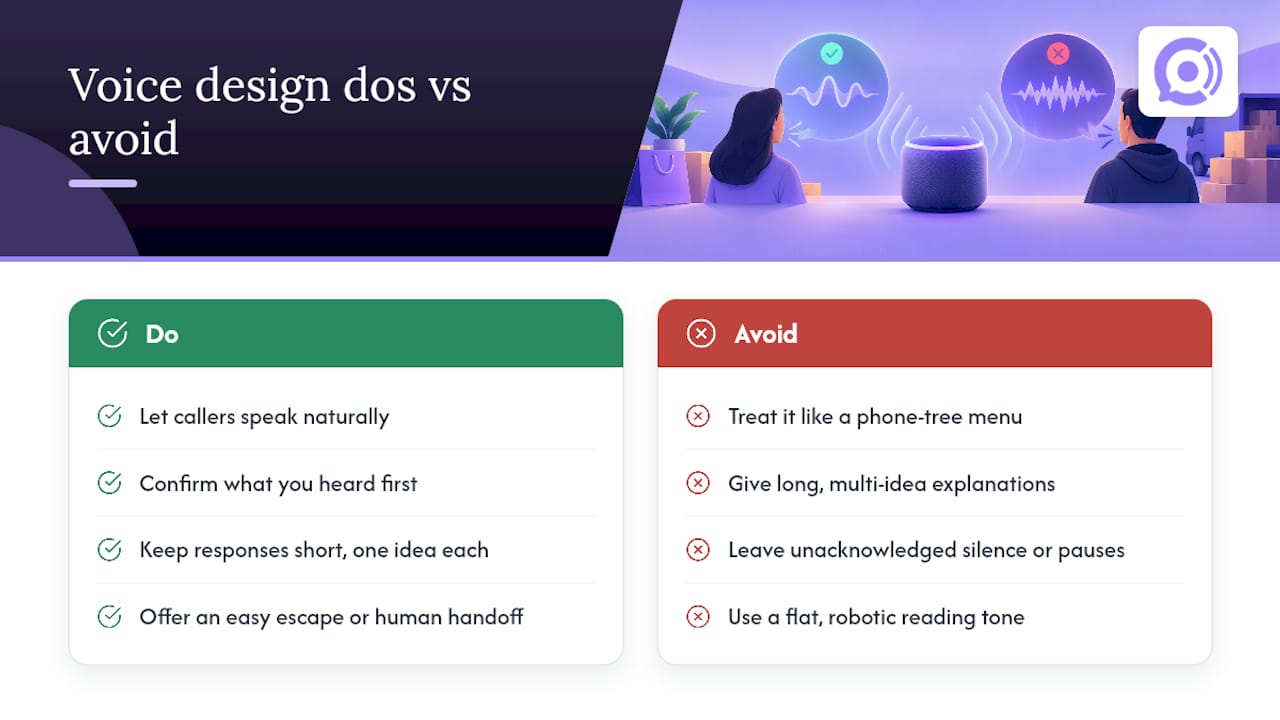
Voice interfaces fail when they’re treated like a phone tree with better technology. The design goal is closer to a helpful conversation than a menu: let the caller say what they want in their own words instead of forcing them through a sequence of button-press style prompts.
A few patterns make a real difference. Confirm what you heard before acting on it, especially for order numbers or addresses, since a caller can’t see a screen to catch your mistake. Keep responses short: a caller processing spoken information can hold less in their head than a reader scanning text, so one idea per sentence works better than a long explanation. Offer a way out at every step, whether that’s repeating the last option or asking for a human, so no caller feels stuck in a loop.
Silence and pacing matter more on voice than in chat. A pause that feels natural in text reads as a system freeze on a phone call, so the agent needs to acknowledge it’s working (“let me pull that up”) rather than leaving dead air. And because there’s no visual menu to fall back on, the agent’s tone and clarity carry the entire experience: a flat, robotic voice reading a long list of options loses callers fast, while a natural-sounding conversation that gets to the point keeps them on the line.
The stores that get the most out of voice support treat it as a genuine channel, not a stopgap, and design call flows around the three or four questions that make up most of their call volume rather than trying to handle everything on day one.
What successful WooCommerce voice deployments look like
The stores that get the most value from voice self-service tend to start narrow and expand deliberately. A common pattern: launch with order-status and shipping questions only, since those are low-risk, high-volume, and easy to measure. Once containment on those calls is solid, stores add return initiation, then eventually refund requests within a defined dollar threshold.
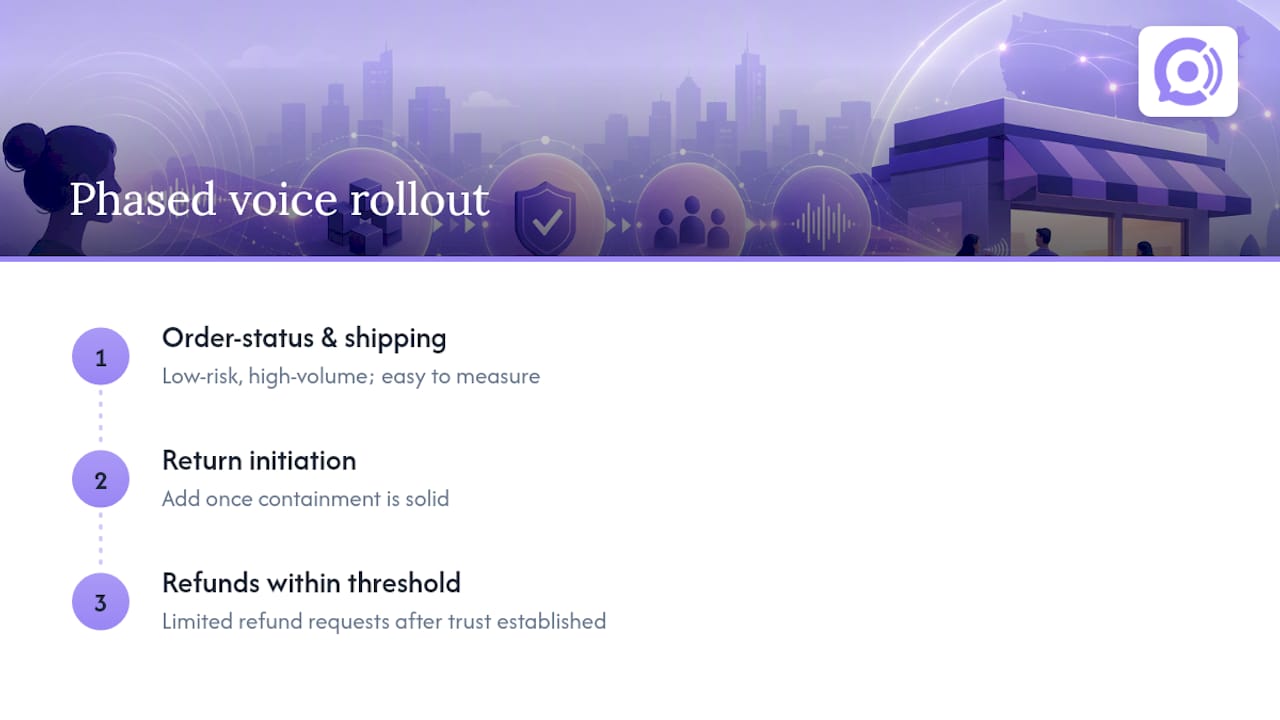
The stores that struggle usually skip that sequence and try to automate everything at once, including account changes and billing disputes, before they’ve built the verification and escalation logic to handle them safely. That’s less a technology problem than a rollout problem: the agent can only be as careful as the guardrails it’s given.
The practical lesson is that voice self-service earns trust the same way a new hire does. It handles the routine questions well first, and only takes on more responsibility once there’s a track record showing it can be trusted with them.
Vendor perspective: mistakes we see and quick wins to prioritize
The mistakes we see most often are skipping consent flows, automating refunds or account changes before the guardrails are tested, and never checking carrier attestation until calls start getting flagged as spam. The fastest wins go the other way: automate order-status lookups first, provision a verified number, and keep the pilot to low-risk flows. Run it monitored, watch containment, then expand.
— Orphora AI
Orphora AI: next steps for a pilot
If you’re ready to move past research and into a working pilot, Orphora AI gives WooCommerce stores real-time order lookups, natural voice conversation, and guardrail workflows for refunds and account changes built in from the start, rather than bolted on later.

- Check the feature overview for details on WooCommerce integration and order data access.
- Start with a small, monitored pilot on order-status calls, then expand once containment looks solid.
For a broader look at consent and privacy considerations when recording automated calls, the pilot-first guide to AI cold calling covers useful ground, and stores weighing telephony authentication setup may find Chrome Cactus Studio’s overview helpful context on carrier trust requirements. Set your pricing plan, provision a number, and book a demo through the Orphora AI product page to get a pilot running this month.
Sources
Consult WooCommerce’s webhook documentation, Twilio’s SHAKEN/STIR and recording guides, and the FTC’s telemarketing guidance before launch.
- Automation Documentation – WooCommerce
- Trusted calling with SHAKEN/STIR — Twilio Docs
- FTC press release on telemarketing protections (March 2024)
- TwiML Voice record — Twilio Docs
FAQ
What is WooCommerce voice integration?
It’s the connection between an AI voice agent and a WooCommerce store that lets callers get order status, returns help, and shipping updates by phone, without waiting for a human agent. The agent pulls live data through WooCommerce’s REST API and webhooks rather than working from a static script.
Do I need consent before calling customers with an AI voice agent?
Yes, the FTC has confirmed that Telemarketing Sales Rule protections apply to AI-driven calls the same way they apply to human-dialed ones. You need express informed consent that you control directly, not one inherited from a third-party list.
How much does an AI voice agent for WooCommerce cost?
Pricing typically combines a per-agent monthly fee with a per-minute usage charge. Orphora AI’s AI Voice Agent plan runs $9.99 per month per agent plus $0.10 per conversation minute, with an Enterprise option available for larger deployments at custom pricing.
What is SHAKEN/STIR and why does it matter for voice support?
SHAKEN/STIR is a telephone carrier framework that verifies a call’s identity before it reaches the recipient. Twilio’s documentation notes that proper attestation and verified numbers reduce the risk that carrier spam filters block your automated support calls.
Which actions should stay human-only in a voice self-service flow?
Refunds above a set dollar amount, account changes, and disputed charges should route to a human rather than be handled automatically. Low-risk actions like order-status lookups and shipping questions are safe to automate first, then expand scope once containment data supports it.