

Knowledge Base Governance: Owners, Reviews and Gap Checks
Knowledge base governance made practical: who owns each article, how often to review, how to find coverage gaps, and which metrics show it works.


Knowledge base governance is the set of rules that decide who owns each article, how it gets approved, when it is reviewed or retired, and how you make sure that actually happens. APQC describes it as the ownership, approval, review and enforcement practices that keep content accurate, trusted and easy to find. For a small online store, it comes down to a short list of named owners, a review calendar tied to risk, and a monthly look at what customers searched for and did not find.
TL;DR
- Give every article one accountable owner. Programs with content owners are 30% more likely to perform effectively against their goals, according to APQC research.
- Review by risk and by change, not just by age. Pricing, shipping, returns and billing content gets looked at far more often than background pages.
- Find gaps from real signals: failed searches, thumbs-down ratings, repeated tickets and recurring questions on calls and chats.
- Track a few monthly numbers: stale content rate, ownership coverage, time to update and unanswered questions.
- If an AI agent answers customers from your knowledge base, governance matters more, because the agent repeats whatever the content says.
Table of Contents
- Why a customer-facing knowledge base needs governance
- The four parts of a workable governance framework
- Start with one domain and five decisions
- How often to review articles
- Finding and prioritizing coverage gaps
- Metrics that show governance is working
- What changes when an AI agent reads your knowledge base
- Our perspective
- A 30-day rollout plan
- Put your knowledge base to work on the phone
- FAQ
- Sources
Why a customer-facing knowledge base needs governance
A knowledge base does not stay accurate by itself. Without rules, articles go stale, contradict each other and keep being served to employees, customers and AI agents as if they were true. Nobody decides to publish a wrong answer. A return window changes, a carrier changes, a promotion ends, and the old article stays where it was.
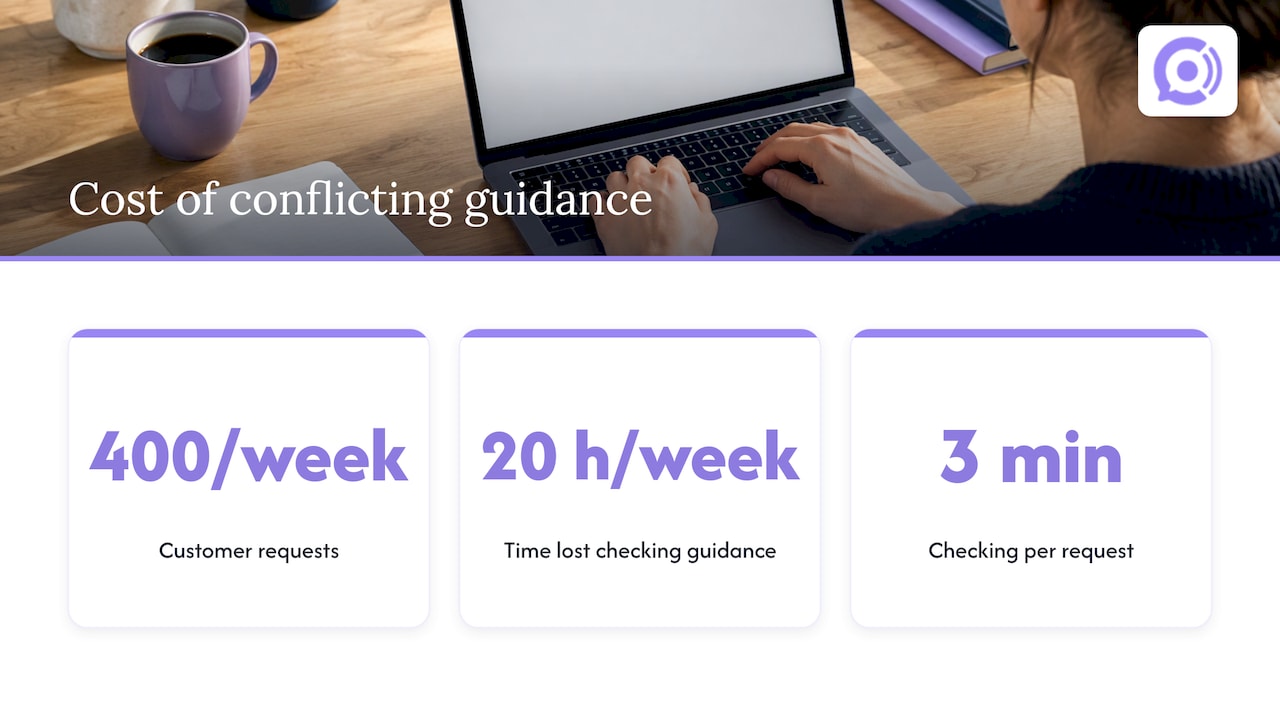
The cost is easy to underestimate because accurate and inaccurate guidance often look identical on the page. ONES gives a worked example: a service team handling 400 customer requests a week loses 20 hours weekly if agents spend three minutes checking conflicting guidance. That is the internal cost. The external cost is a customer who acts on the wrong policy and writes in, calls in, or disputes a charge.
It helps to keep three things apart. Liferay frames governance as the accountability layer of a knowledge program. Strategy sets the goals, the platform stores and delivers content, and governance makes sure the rules are followed. A store can have a great help center tool and a clear goal and still fail at the third part.
Size is not the protection people hope it is. As one analysis puts it, it is possible to have a massive knowledge base without governance, and that is precisely how it turns into a repository of outdated content. For a WooCommerce store, a leaner base that someone owns beats a sprawling one nobody checks.
The four parts of a workable governance framework
Most frameworks, however many pillars they claim, reduce to four components. Liferay’s guide lists ownership, lifecycle, access and audit, and measurement. Here is what each means for a store with a small team.
Ownership
Every article has one named person accountable for whether it is still right. Permissions are not ownership. Folder permissions say who can open or edit a file, while they do not say who is accountable for whether it is still right.
APQC adds that the business, not a central documentation team, should own content, because only people in the business have the function-specific knowledge to validate it. In a store, that usually means:
- Shipping and delivery articles: whoever manages fulfillment.
- Returns, refunds and warranty: whoever sets the policy, often the owner.
- Product care and sizing: whoever handles merchandising.
- Payments, billing and account access: whoever manages the storefront and payment setup.
In a three-person shop, one person may own all four. That is fine. What matters is that the name is written down.
Lifecycle
Content moves through a defined path: draft, approved, published, reviewed, and eventually archived or merged. Spell out who approves a change before it goes live. Automating routine checks is reasonable, but Ferndesk’s guide advises keeping a person approving every answer. APQC found that programs with standard lifecycles to review, update and archive content are 33% more likely to deliver a lot of business value.
Access and audit
Decide who can edit what, and keep a record of changes. This is also where it pays to track three separate dates for each article: last edited, last reviewed and last verified. Fixing a typo is not the same as confirming that the policy is still true. Treating the dates as one field hides stale content behind recent edits.
If you also handle customer data in connection with support, a security and compliance review of the systems around the knowledge base is worth doing alongside the content audit. This enterprise security checklist is one place to see which controls larger organizations check.
Measurement
Pick a handful of indicators and look at them on a schedule. The metrics section below lists the ones worth using.
Start with one domain and five decisions
Do not try to govern the whole base in a week. Pick one domain, such as returns, and write down five things: the accountable owner, who may contribute, the approval rule, the review triggers and the escalation route when someone spots a problem. Knowledge Base Software’s guide suggests exactly this one-domain starting point. Once returns works, copy the pattern to shipping, then payments, then product content.
A one-page version looks like this:
| Item | Example for a returns domain |
|---|---|
| Owner | Store owner |
| Contributors | Support lead, one part-time assistant |
| Approval | Owner approves any change to time windows, fees or exclusions |
| Review triggers | Policy change, carrier change, repeated customer question, seasonal return window |
| Escalation | Anyone flags the article; owner responds within a set number of business days |
The numbers in the last row are yours to set. What matters is that they exist and someone checks them.
How often to review articles
A single calendar for everything fails. Reviewing every article monthly drowns a small team, and reviewing everything yearly lets the important pages rot. Practitioners converge on tiers by risk and traffic.
HelpDocs suggests monthly for top-traffic articles, quarterly for evergreen basics, and review as changes ship for policy, security and legal pages. Other published schemes fit the same pattern:
| Tier | What belongs in it | Review rhythm in published guidance |
|---|---|---|
| High risk | Billing, security, account access, pricing, returns rules | Monthly, per Askbase, or every 60 to 90 days plus every policy change for regulated content |
| Operational | Troubleshooting, process guides | Every six months in LivePro’s tiering, or every 90 to 120 days plus events in ServiceAide’s |
| General reference | Background and evergreen content | Once a year, with a last verified date shown on every article |
For an online store, a practical translation is: shipping rates and times, return rules, pricing and promotions, and payment pages sit in the top tier. Product care guides and sizing sit in the middle. Brand story and general FAQs sit at the bottom.
Add triggers, not just dates
Calendars catch slow drift. Triggers catch sudden change. C2 Perform recommends setting review triggers alongside calendar reviews, noting that a policy update, product or system change, quality trend, repeated agent question or newly identified exception may require a timely review. LivePro names three trigger types: change-led reviews, audit-led reviews, and emergency updates with a fast-track path. That last one matters in retail. When a carrier delays shipments before a holiday, you need the article fixed the same day, not at the next quarterly review.
HelpDocs lists four signals that an article needs attention:
- Failed and empty searches.
- Thumbs-down ratings, especially a page that used to rate well and slips.
- Tickets on topics you have already documented.
- Traffic drops on a once-popular article.
Finding and prioritizing coverage gaps
Maintenance fixes what exists. Coverage work finds what is missing. Gaps come in four forms: missing articles, partial coverage, discoverability problems (the answer exists but people cannot find it) and stale content. SearchUnify describes grouping similar support cases and cross-referencing them against existing articles to see which gaps carry the most volume. Each form has its own fix: write a new article, expand or add a companion piece, improve titles and tags, or update the stale page.
A simple monthly routine for a small store:
- Export the past month’s support questions from email, chat, call transcripts and contact forms.
- Group them by topic. Order status, return eligibility, shipping to a given region and discount codes are typical clusters.
- For each cluster, check whether an article exists, whether it answers the question as customers phrase it, and whether it is current.
- Rank the clusters by volume and by risk. A high-volume gap on returns outranks a low-volume gap on gift wrapping.
- Assign each fix to an owner, and recheck the same cluster next month to see whether the questions dropped.
A more systematic method is synthetic query testing. Bloomfire describes having an AI model generate dozens or hundreds of question variations from a topic or policy, running each against the knowledge base, scoring the answers for existence, accuracy, currency and completeness, routing gaps to owners, and re-testing after fixes. You can do a lightweight version by hand: write twenty ways a customer might ask about returns and see whether your base answers all twenty.
When you run a content audit, C2 Perform suggests looking across six dimensions: accuracy, completeness, clarity, findability, usability and governance. That gives you a checklist for each article, rather than a vague sense that things feel old.
Metrics that show governance is working
You do not need a dashboard of twenty numbers. Nuhq recommends five monthly measures of freshness:
- Stale content rate: the share of articles past their review date.
- Ownership coverage: the share of articles with a named owner.
- Time to update: how long an article takes to change after the product or policy changes.
- Flag resolution time: how long reader-reported issues stay open.
- Unanswered questions: searches and AI questions that found no good answer.
The same guide suggests reviewing these in a monthly freshness report. Two of them, stale content rate and ownership coverage, also appear in Shelf’s short list of constantly monitored governance health metrics, along with the number of duplicates.
If you want an external reference point for knowledge-centered support, the Consortium for Service Innovation’s KCS v6 lists indicators such as link accuracy of 90% or greater and reuse and improvement of existing articles at or above the rate of new article creation. Those are designed for larger support organizations, so treat them as direction rather than targets for a three-person store.
What changes when an AI agent reads your knowledge base
A human reader skims, doubts and calls. An AI agent takes the article as the answer. Governance risk for AI-facing knowledge is the same decay problem at higher speed, which is why guides on AI knowledge bases for enterprise leaders stress controls such as audit review and human-in-the-loop checks.
For phone support the stakes include one more factor: length. A voice agent has to find the answer and speak it in real time, so a bloated base hurts. We cover that in our piece on keeping voice bot knowledge bases under 200 FAQs. Governance is also what keeps accuracy testing meaningful: testing a voice agent on orders, returns and codes only tells you something if the policies behind the test are current.
Our perspective
We build voice agents for WooCommerce stores, so we see what happens when a knowledge base meets a live phone call. A customer asks about a return, and the agent answers in seconds with whatever the knowledge base says. Speed is only an advantage when the content is right.
That is why we treat governance as part of setup, not a cleanup project for later. Our agents are designed to read real-time order and customer data, so order status comes from your store, not from an article someone wrote last spring. The knowledge base covers what the store data cannot: policies, shipping terms, product guidance. Those few pages carry the most weight, and they deserve named owners and a review rhythm.
Our advice to store owners is to keep the base small and owned. Fewer, current articles beat many approximate ones, particularly for voice. We also build guardrail workflows around order actions, so sensitive steps follow rules you define rather than improvised answers.
Call transcripts and usage analytics give you a gap-finding feed you would otherwise not have. Questions callers keep asking that no article answers are your next articles. Run that review monthly, assign each fix to an owner, and the knowledge base improves with every call cycle.
Orphora AI
A 30-day rollout plan
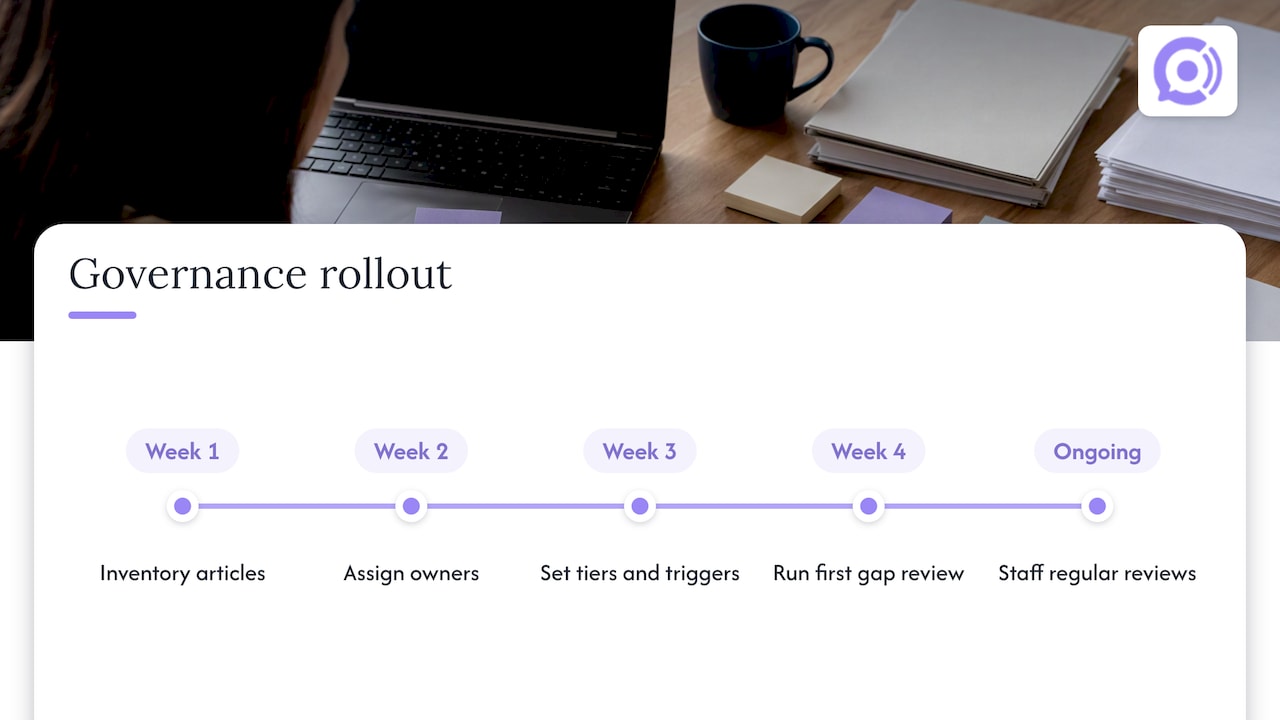
Week 1: inventory. List every article and mark the ones that carry risk: returns, shipping, pricing, payments. Archive or merge anything nobody reads and nobody needs.
Week 2: assign owners. Put a name on every article, and record the three dates (edited, reviewed, verified). Anything without an owner goes to the person closest to the policy.
Week 3: set tiers and triggers. Place articles in high, middle and low tiers, assign review rhythms, and write down the trigger events: new carrier, policy change, new promotion, repeated customer question.
Week 4: run the first gap review. Cluster last month’s questions, compare them to the base, fix the top three gaps, and produce your first freshness report. KM Insider points out that implementation ends and the work becomes an ongoing operational responsibility to be staffed. Budget a regular slot on someone’s calendar, or the process quietly lapses.
A warning sign from the same source: if fewer than 70 percent of scheduled reviews get done, the workflow has friction, reminders are being ignored, or owners are not honoring their assignments. Fix that before adding more articles.
Put your knowledge base to work on the phone
Once your policies are current and owned, a voice agent can answer them around the clock. Orphora AI offers AI voice agents for WooCommerce stores, with real-time order lookup, return and shipping help, call transcripts and usage analytics. Pricing is published: the AI Voice Agent plan is $9.99 per month per agent, and conversation minutes are $0.10 per minute. An Enterprise plan is also available, with no published price.

See how it works on the Orphora AI site, and bring your cleaned-up returns and shipping pages with you.
FAQ
What is the difference between knowledge base governance and maintenance?
Maintenance is the recurring work of updating, merging and retiring articles. Governance is the set of rules that makes that work happen: who owns what, what triggers a review, who approves changes, and how you measure results. Without governance, maintenance depends on whoever happens to notice a problem.
How often should we review knowledge base articles?
Match the rhythm to risk. Published guidance suggests monthly checks for the most-read pages and anything about billing, security or account access, quarterly for the next tier, and yearly for background content. Also review immediately when a policy, price or product changes.
How do we find coverage gaps in our knowledge base?
Start with failed searches, thumbs-down ratings and tickets on topics you thought you had covered. Group last month’s customer questions by topic and compare them with your articles. Then rank by volume and risk, and fix the biggest gaps first.
Who should own a knowledge base in a small company?
APQC recommends that the business own content, because the people closest to a function know whether an answer is right. In a small store, that may be one person per domain, or one person for all of them. The requirement is a single named owner for each article.
Which metrics prove our governance is working?
Track stale content rate, ownership coverage, time to update, flag resolution time and unanswered questions each month. Falling stale content and shrinking unanswered questions are the clearest signs that the process is working.
Sources
- APQC: What Is Knowledge Base Governance?
- Continuity Intelligence: Knowledge Base Governance, Owners, Reviews and Drift
- ONES: Governed Knowledge Base Guide
- Liferay: Knowledge Management Governance
- Shelf: Knowledge Management Governance, Policies and Compliance
- Ferndesk: Best Practices for Maintaining a Knowledge Base
- Knowledge Base Software: Governance Framework Guide
- HelpDocs: Knowledge Base Maintenance
- Askbase: How to Keep a Knowledge Base Up to Date
- ServiceAide: Knowledge Management Governance and Compliance
- LivePro: Knowledge Management Governance Model
- Nuhq: How to Keep a Knowledge Base Up to Date
- C2 Perform: Contact Center Knowledge Base Content Audit Guide
- SearchUnify: Case Cluster Recommendations for Support Knowledge Gaps
- Bloomfire: Synthetic Query Testing
- Consortium for Service Innovation: KCS v6 Indicators of Transformation
- KM Insider: Implementing Knowledge Management Software
- DocuPOW: AI Knowledge Base for Enterprise Leaders
- Bitecode: Enterprise Security Compliance Checklist