
Automate Order-Status First: Phone Support Workflows for E-commerce Managers
Practical playbook for e-commerce managers: map call intents, automate order-status (WISMO) first, set containment targets, and pilot workflows safely.


The fastest, lowest-risk path is to map call intents by volume, then automate order status (WISMO) calls first using two-way system integrations and clear escalation logic. This one move cuts hold times and frees agents for the calls that actually need judgment. A voice agent like Orphora AI shows how this plays out in e-commerce. The rest of this guide covers what to automate next, the integrations you’ll need, the metrics that prove it’s working, and a rollout plan that won’t blow up your CSAT.
TL;DR:
- Automating WISMO calls first is safest, as they are high-volume, low-risk data lookups that reduce hold times and free agents for complex issues.
- Sorting call intents into deterministic or judgment categories helps ensure automation handles only appropriate tasks with clear decision rules.
- Building workflows should include setting specific containment and escalation targets based on intent and test against historical transcripts before full rollout.
- Reliable integrations with your telephony provider, CRM, and knowledge systems are crucial for seamless, natural conversations and accurate data transfer.
- Starting with a limited pilot and continuously tuning the system based on containment, sentiment, and metrics prevents reputation damage and improves accuracy.
Table of Contents
- Which Phone Support Workflows to Automate First
- How Do You Design a Phone Support Workflow?
- What Telephony and Integrations Does This Require?
- Which Metrics Actually Prove Your Workflow Is Working
- How Do You Roll Out a New Phone Support Workflow Safely?
- Orphora AI in Practice: Mapping the Architecture to a Real Product
- What Is a Phone Support Workflow, Exactly?
- What I’d Fix First if I Were Running This
- Orphora AI: A Practical Next Step for E-Commerce Teams
- Sources
- FAQ
Which Phone Support Workflows to Automate First
Not every call belongs on the same automation timeline. Some are safe on day one; others need policy sign-off before a machine touches them. Ranking your phone support workflows by risk and volume keeps you from automating the wrong thing first and paying for it in customer complaints.
- WISMO and order status. These calls are pure lookups: order number in, shipping status out. No judgment call, no policy exception, just data retrieval. This is why most e-commerce automation guides point here first — it’s the highest volume and the lowest risk in the queue.
- Returns initiation. Automate this only after your return policy is fully codified into decision rules. A misfired return approval costs real money, so lock the flow with your policy team before you let a voice agent touch it.
- Payment and failed-charge recovery. These are time-sensitive and often reversible with a quick outbound nudge, which makes them a strong second wave once your intent classification is solid.
- Peak-season overflow and scheduled outbound. Appointment reminders, delivery confirmations, satisfaction surveys. Low emotional stakes, high scalability value.
- What stays human, always. Fraud disputes, legal threats, high-value account negotiations, and any call where the caller is visibly upset about something beyond a simple fix. Automating these erodes trust faster than any efficiency gain justifies.
The order matters because each tier builds the confidence and infrastructure the next one needs.
How Do You Design a Phone Support Workflow?
Start with data, not guesswork. Pull three months of call logs and bucket every call by intent, then rank those intents by volume multiplied by complexity.
Once you have your ranked list, sort each intent into one of two buckets:
- Deterministic intents (order status, tracking, store hours) need a database lookup and a confidence threshold. If the agent’s certainty drops below that threshold, it hands off instead of guessing.
- Judgment intents (refund exceptions, complaint de-escalation, policy disputes) need a human, at least until you’ve built and tested very specific decision rules around them.
From there, define exactly what context has to move with the caller during a handoff: order number, detected intent, sentiment score, and a transcript excerpt of the call so far. Nothing frustrates a customer more than repeating their problem to a second person because the first system dropped the thread.
Draft a decision tree per intent that spells out every allowed action: look up an order, open a return, issue a refund under $X, or transfer. Before you build anything, set your target containment and escalation rate for that specific intent. Building without a target means you won’t know if the workflow is actually working.
Pro Tip: Write your containment target down before development starts, not after launch. Teams that skip this step almost always grade their own automation as “good enough” regardless of the actual numbers.
What Telephony and Integrations Does This Require?
The architecture behind your phone support workflows determines whether callers feel like they’re talking to something competent or something broken — choosing the right AI agent inbox design can ensure seamless asynchronous follow-ups and post-call workflows. Get the plumbing right before you worry about scripts.
- Carrier path. Choose a SIP trunk or carrier API with the fewest hops between the caller and your voice agent. Sub-300 millisecond median latency is roughly the threshold where conversations start feeling natural instead of laggy.
- Two-way integrations. Your CRM, order management system, ticketing platform, knowledge base, and calendar all need to be readable and writable by the agent, not just readable. The agent needs to log outcomes back into the ticketing system, or you lose the entire point of automation: a clean record for the next interaction.
- Context on transfer. Use SIP REFER, contact attribute passing, or helpdesk ticket fields to carry the caller’s data to a human agent, and attach the transcript automatically rather than relying on the caller to explain themselves twice.
- Compliance basics. Get call recording consent language right for your state, and stay aware of TCPA rules if you’re running outbound recovery calls for missed payments.
- Voice quality testing. During vendor evaluation, test live-call latency, text-to-speech streaming quality, and barge-in support (can the caller interrupt the agent naturally?). These three things separate a workflow that feels helpful from one that feels like a phone tree with a different voice.
Which Metrics Actually Prove Your Workflow Is Working
You need a small dashboard, not a wall of numbers nobody checks. The core metrics for any phone support workflow are containment rate, escalation rate, first call resolution (FCR), CSAT, average handle time (AHT), average speed of answer (ASA), abandonment rate, and occupancy.
The benchmarks that matter: aim to answer 80% of calls within 20 seconds, with world-class FCR sitting around 80% and industry-average FCR closer to 70%. ASA averages under half a minute industry-wide, and abandonment should sit near 6%, with 3% or lower counting as world-class. As of mid-2026, AHT across the voice industry averages a bit over six minutes, and target occupancy runs between 75% and 85%.
Here’s the trap most teams fall into: chasing a lower AHT in isolation. Contact center leaders warn that cutting handle time without watching FCR and CSAT in parallel produces rushed, low-quality calls that just generate repeat contacts. Track ASA and abandonment daily, since those swing fast with staffing changes. Review containment trends weekly, since that number moves slower and needs a full week of volume to read clearly.
How Do You Roll Out a New Phone Support Workflow Safely?
Skipping straight to a full launch is how good automation gets a bad reputation. A staged rollout protects both your metrics and your brand.
- Dry-run against historical transcripts. Feed the agent months of real call transcripts to measure hypothetical containment and spot failure modes before a single live customer hears it.
- Pilot on a limited queue. Start with after-hours coverage or a single overflow queue, and collect the first 50 to 100 live calls for rapid tuning. This limits brand exposure while you’re still finding the rough edges.
- Expand intent by intent. Move from one automated intent to several, then to full number coverage, watching containment and caller sentiment at every step rather than waiting until the end to check.
- Tune on a schedule. Update scripts and decision rules weekly for the first month, then shift to monthly reviews once the workflow stabilizes. Watch containment, escalation rate, and sentiment score closely during this window, since they’ll tell you faster than CSAT surveys whether something’s off.
Orphora AI in Practice: Mapping the Architecture to a Real Product
The design above isn’t theoretical. It’s close to what Orphora AI’s voice agents already do for WooCommerce stores: real-time order lookup replaces the deterministic-intent lookup step, and hot-transfer with full context (order number, detected intent, transcript) replaces the manual handoff most teams build by hand. Orphora AI states an 85% faster response time and a 95% satisfaction rate for stores using its agents, a claim worth weighing against your own baseline metrics before you commit.
If you’re mapping this architecture onto Orphora specifically, check for:
- Live order sync so the agent never quotes stale shipping data.
- Ticket creation hooks that log every automated interaction back into your support system.
- Escalation mapping that routes sensitive intents (fraud, high-value disputes) straight to a human.
- Usage analytics that expose containment and sentiment trends without extra setup.
What Is a Phone Support Workflow, Exactly?
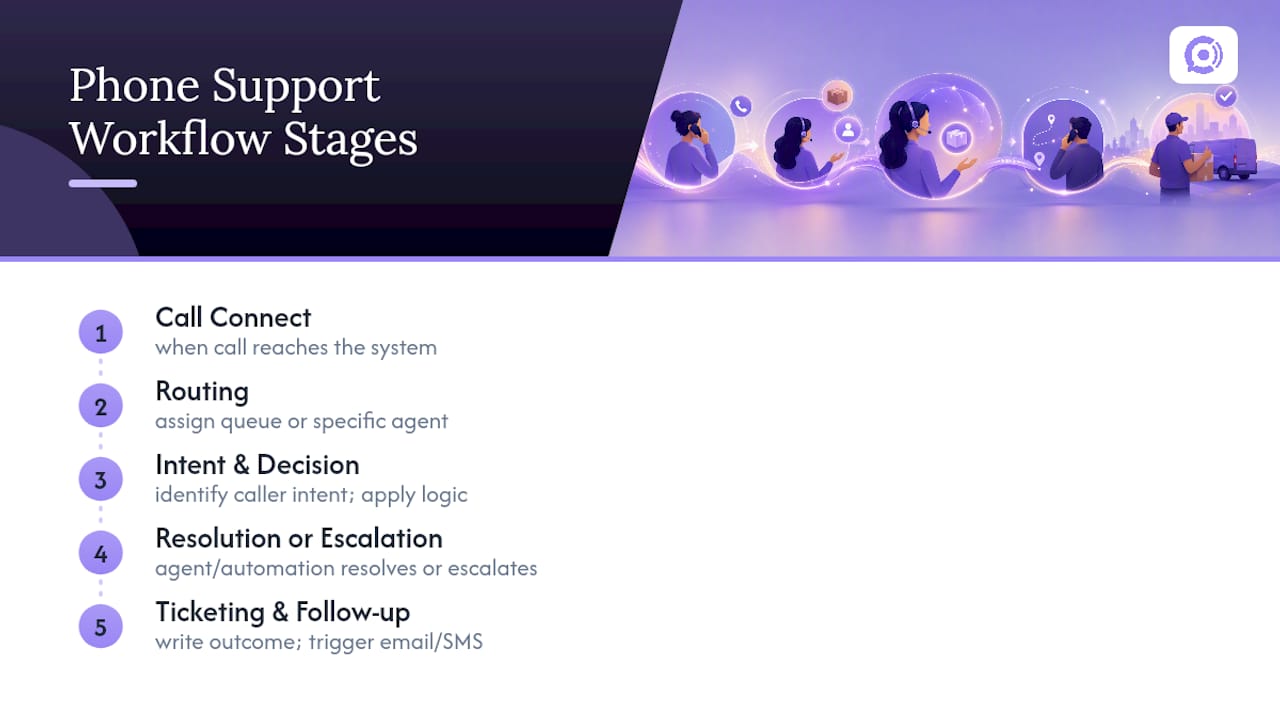
A phone support workflow is the defined sequence of steps a call follows from the moment it connects to the moment it’s resolved, whether that resolution comes from a human agent, an automated system, or some combination of both. It covers routing (which queue or agent gets the call), the decision logic applied once the caller’s intent is known, and the escalation path if the first attempt at resolution fails.
Good call flow design isn’t just a phone tree with pretty menu options. It’s the operational backbone that determines whether a customer’s order-status question takes 40 seconds or 4 minutes, and whether a return dispute gets resolved on the first call or bounces between three departments. Support ticket management and phone support processes both feed into this workflow, since a call rarely exists in isolation. It usually needs to pull data from an order system, write an outcome to a ticket, and sometimes trigger a follow-up email or SMS.
Help desk workflows and phone-specific workflows share the same DNA, but phone adds a real-time constraint that chat and email don’t have: the caller is waiting live, so every second of latency or confusion is felt immediately. That’s why call center efficiency and workflow design are inseparable. A workflow that looks efficient on paper but adds friction to the live call isn’t actually efficient at all.
What I’d Fix First if I Were Running This
Automate WISMO first, and write your containment target down before you build anything. The two mistakes that sink most rollouts: skipping the two-way integrations that let the agent actually resolve calls, and skipping transcript-based testing because it feels slower than just launching.
— Orphora AI
Orphora AI: A Practical Next Step for E-Commerce Teams
The platform is designed to run workflows with WooCommerce-integrated voice agents that pull live order data, handle returns and shipping questions, and hand off to a human with full context when a call needs judgment. Pricing details are available on the provider’s website, and costs scale with call volume rather than a flat seat price.

If you’re evaluating whether this fits your store, the practical next step isn’t a sales call. Run a transcript test against your own historical calls to see what containment rate looks like on your actual intent mix, or pilot the agent on an after-hours queue where the exposure is lowest. Check the features page for the specific integrations available, or start directly on the Orphora AI site to see setup requirements for your store.
Sources
Call center KPI benchmarks (ASA, FCR, abandonment) come from Zoom’s metrics guide. AHT and occupancy figures come from Epicenter. Metric tradeoff guidance comes from Salesforce, and the AI-assist time-savings example comes from Bank of America’s EricaAssist rollout.
FAQ
What Are Some Examples of Phone Support Workflows?
Common examples include order-status lookups, return initiation, payment-failure recovery calls, appointment reminders, and post-call satisfaction surveys. The highest-value starting point is usually order status, since it’s high-volume and doesn’t require policy judgment to automate.
What Is the 10 to 10 Rule in Customer Service?
The “10 to 10” rule generally refers to answering calls within 10 seconds and returning any follow-up messages within 10 minutes, though exact definitions vary by industry. It’s less a formal standard than a shorthand for prioritizing speed at both the first contact and the follow-up.
What Are the 7 Steps of Customer Service on a Call?
A typical seven-step call flow runs: greet the caller, verify identity, listen to the issue, confirm the intent back to the caller, resolve or escalate, confirm the resolution, and close with a summary. Automated phone support workflows follow the same sequence, just with decision rules replacing agent judgment for deterministic steps like order lookups.
What Are the 5 Steps of Building a Phone Support Workflow?
The five practical steps are: pull and bucket call logs by intent, classify each intent as deterministic or judgment-based, define the context that must transfer during any handoff, draft the decision tree with allowed actions, and set containment and escalation targets before building. Skipping the targets step is the most common reason teams can’t tell if a launch actually worked.
Does Orphora AI Handle Returns and Order Status Automatically?
Orphora AI’s voice agents connect directly to WooCommerce for real-time order lookup, letting them answer order-status and basic return questions without a human on the line. Orphora AI states an 85% faster response time and 95% satisfaction rate for stores using the platform, figures worth comparing against your own baseline before rollout.