

Hit p50 Under 500ms: Voice AI Latency Playbook for Ecommerce
Engineering playbook for ecommerce teams to measure and cut voice AI latency: streaming pipelines, semantic endpointing, warm models, and prefetching.


Voice AI latency is the time between when a caller stops talking and when the agent’s first audio reaches their ear. In production, target a p50 under 500 milliseconds and a p95 under 1.5 seconds; anything under one second reads as conversational, and anything past that starts to feel broken. The levers that get you there are streaming and pipelining, semantic endpointing, and co-locating your services.
TL;DR:
- Most voice AI pipelines see significant delays at endpointing and network stages, often adding 300 to 800 milliseconds, impacting overall response times.
- Streaming and overlapping each stage of processing can reduce latency from about one second to under 500 milliseconds at p50, especially with optimized models and infrastructure.
- Proper measurement requires tracking percentiles and timestamps at every handoff, including network, to identify and fix the largest sources of delay before launch.
- Using semantic endpointing and speculative LLM calls on partial transcripts can cut waiting time and improve conversational fluidity.
- Co-locating services, warming models, and improving transport layers like WebRTC are critical to avoiding hidden network-related delays.
Table of Contents
- Where Voice AI Latency Actually Happens
- How Do You Measure Voice AI Response Time Correctly?
- Engineering Tactics That Actually Cut Voice AI Delay
- Cascaded Pipelines vs. Native Speech-to-Speech: Which Should You Build?
- Monitoring and Load Testing to Catch Tail Latency Before Customers Do
- How E-commerce Voice Agents Handle These Tradeoffs
- The First 90 Days of Latency Work: A Practical Runbook
- Managing Latency in a Live WooCommerce Voice Agent
- Curated Primary Sources and Benchmarks
- Sources
- FAQ
Where Voice AI Latency Actually Happens
Every voice AI turn is a relay race, and most teams only time the finish line. To fix latency, you need timestamps at every handoff: the moment the caller stops speaking, the moment your endpointing logic decides the turn is over, the moment the first transcript token lands, the moment the language model emits its first token, and the moment audio starts playing back.
Break the pipeline into its real stages and you’ll find the delay is rarely where people assume:
- Endpointing/VAD: Decides when the caller has finished talking. This is often the single largest and least visible contributor, sometimes adding 300 to 800 milliseconds if you’re relying on plain silence detection.
- Speech-to-text (STT): With a streaming provider, partial transcripts arrive continuously, and final transcript latency after end-of-speech is typically well under 200 milliseconds.
- LLM time-to-first-token (TTFT): Depends heavily on model size and hosting, ranging from roughly 100 milliseconds on a fast, warm, well-served model to over a second on a cold or overloaded one.
- Text-to-speech time-to-first-byte (TTFB): A streaming TTS engine can start producing audio within 100 to 300 milliseconds of receiving the first clause; waiting for a complete MP3 file can add 500 to 2,000 milliseconds on top, according to Speko’s latency playbook.
- Network and transport: Geographic distance between your telephony provider, STT, LLM, and TTS services adds round trips that stack invisibly.
- Orchestration and tool calls: Every database lookup, order status query, or third-party API call your agent makes mid-turn adds its own round trip on top of the core pipeline.
A cascaded pipeline that streams and overlaps every one of these stages has hit a measured p50 time-to-first-audio around 947 milliseconds, with best-case runs closer to 729 milliseconds, using a combination of a fast STT engine, a self-hosted large language model, and streaming text-to-speech, according to research on streaming cascaded voice agent implementations. That’s a useful reality check against any vendor promising instant response with a stack that isn’t fully streaming.
How Do You Measure Voice AI Response Time Correctly?
Averages lie. If nine calls respond in 400 milliseconds and one takes four seconds, your average looks fine while one in ten callers is having a bad experience. That’s why production teams measure percentiles, not means, and track each pipeline stage separately.
- Define your core metrics. Time-to-first-audio (TTFA) is the full end-to-end clock, from end-of-speech to first agent sound. Time-to-first-token (TTFT) measures just the LLM’s response start. Endpointing delay measures how long your system waits after the caller stops talking before it decides the turn is over.
- Track p50, p95, and p99, not just averages. The p50 tells you what a typical caller experiences; p95 and p99 tell you how bad your worst 5% and 1% of calls get, which is usually where churn and complaints originate.
- Instrument every turn with timestamps at each handoff. Log the moment audio stops, the moment endpointing fires, the moment STT returns a final transcript, the moment the LLM’s first token arrives, and the moment TTS starts streaming audio back.
- Use distributed tracing across service boundaries. If your STT, LLM, and TTS are separate services or vendors, trace the request across boundaries so you can see exactly which hop added the delay, rather than guessing from a single client-side timer.
- Cohort your data by call type and load. A support call about order status behaves differently than one where the caller is spelling out a shipping address. Segment percentiles by intent and by concurrent call volume, since tail latency often only appears under load.
- Run production-like load tests before you trust your numbers. A p95 measured with five test calls means nothing. You need enough concurrent, realistic traffic to see how your system behaves when three tool calls and a model rate limit collide at once, as recommended in Coval’s measurement guide.
Engineering Tactics That Actually Cut Voice AI Delay
Most latency fixes fall into six categories, and they compound. Stack three or four of these and you move from a sluggish 2 to 3-second response down toward sub-second territory.
Stream every layer, and let stages overlap. Don’t wait for a complete transcript before starting the LLM call, and don’t wait for a complete LLM response before starting TTS. Feed partial STT output to the language model as it arrives, and stream LLM tokens into TTS clause by clause. This overlap, more than any single fast model, is what separates stacks stuck at 2 seconds from ones hitting 230 to 500 milliseconds at p50, according to Prodinit’s architecture guide.
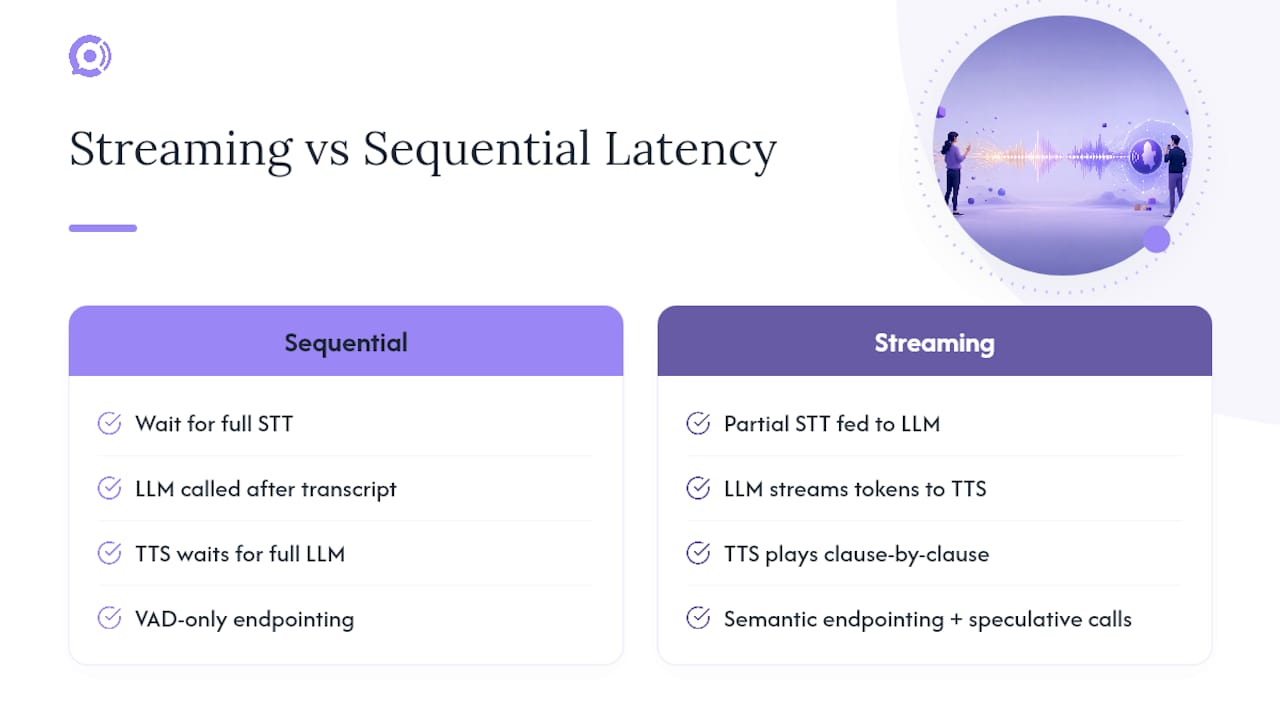
Replace silence-only VAD with semantic endpointing. A fixed silence threshold has to guess: wait too little and you cut callers off mid-sentence; wait too long and every turn feels sluggish. Semantic endpointing looks at the content of the partial transcript, not just the silence gap, to judge whether a sentence is actually finished. Practitioner testing shows this approach cuts false interruptions by around 45% compared with VAD-only detection while still enabling sub-300ms turn detection in routine exchanges, per analysis of production latency budgets.
Fire speculative LLM calls on partial transcripts. Rather than waiting for the endpointing decision to fully resolve, start a language model call on the likely-final partial transcript. If the caller keeps talking, cancel and restart. This shaves the endpointing wait almost entirely off the visible latency budget in the common case where the guess was right.
Keep models warm and pick for TTFT, not just raw quality. A cold-started model can add over a second before it emits a single token. Warm pools, or a persistent connection to a hosted low-latency model, remove that penalty entirely. Model choice matters here, but less than people assume: a mid-tier model with excellent time-to-first-token, called inside a fully streaming pipeline, usually beats a flagship model bolted onto a request/response architecture.
Stream TTS by clause, not by sentence or paragraph. Feed the TTS engine each speakable chunk as soon as punctuation allows, rather than waiting for the LLM to finish its full answer. This alone can save several hundred milliseconds versus generating one complete audio file before playback starts.
Fix your transport layer. Use WebRTC with ICE Trickle for real-time negotiation rather than older, higher-latency signaling patterns, and keep your telephony ingress, STT, LLM, and TTS services in the same region. Geographic distance and unnecessary multi-hop relays between services are frequently the largest hidden source of production delay, even bigger than model compute time, according to OpenAI’s engineering notes on low-latency voice AI.
Pro Tip: Before you touch a single model or API, trace one real call end to end with timestamps at every hop. Teams almost always find the network hop between two “fast” services is quietly costing more than the LLM itself.
The tradeoff running through all of this is accuracy versus speed. Longer endpointing waits and larger models improve comprehension but cost milliseconds; faster settings risk cut-off callers and garbled tool inputs. Build a fallback path, a smaller or cached model to switch to when your primary is slow or rate-limited, so tail latency has an escape hatch instead of a wall.
Cascaded Pipelines vs. Native Speech-to-Speech: Which Should You Build?
Cascaded architecture, where STT, LLM, and TTS are three distinct stages passing data down the chain, remains the industry standard for anything that needs to call tools, check a database, or follow business logic. That’s because function-calling, structured outputs, and integration with external systems are mature and well-understood at the LLM layer, but largely unsolved in native speech-to-speech (S2S) models today.
Native S2S models, which process audio in and audio out without an intermediate text step, promise a lower theoretical ceiling on latency because they skip two full serialization steps. In practice, current S2S models still struggle with time-to-first-audio parity against a well-tuned cascaded pipeline, and most lack reliable function-calling support, which makes them a poor fit for anything beyond open-ended conversation.
There’s also a hard physical constraint worth knowing: cascaded pipelines have an estimated latency floor around 380 milliseconds, driven by the sequential nature of the STT to LLM to TTS handoff, according to research on streaming cascaded implementations. Getting meaningfully below that typically requires either a native S2S model that collapses the stages, or specialized inference hardware most teams don’t have access to yet.
Use this rubric to decide:
- You need tool calls, order lookups, or structured business logic → cascaded pipeline, full stop.
- Your target is genuinely sub-300ms p50 → cascaded architecture likely can’t get you there; evaluate S2S, accepting the function-calling gap.
- Conversational quality and nuance matter more than shaving the last 200 milliseconds → cascaded, tuned well, is the safer production bet today.
Monitoring and Load Testing to Catch Tail Latency Before Customers Do
The calls that hurt you aren’t the median ones. They’re the 1-in-20 calls where a tool timed out, a model hit a rate limit, or your transport fell back to a relay. Catching those requires deliberate monitoring, not just a dashboard showing average response time.
Three categories of metric matter for ongoing observability:
- Component percentiles, tracked separately. Watch p50, p95, and p99 for endpointing delay, STT latency, LLM TTFT, and TTS TTFB independently, so a regression in one stage doesn’t hide inside a healthy overall average.
- Interruption and false-cutoff rates. A spike in callers getting cut off mid-sentence, or the agent responding before the caller finished, signals your endpointing configuration has drifted, often after a model or STT provider update.
- Tool and integration call latency. Any external lookup, order status, inventory check, payment verification, needs its own percentile tracking, since a single slow API can silently dominate your overall p95.
Run load tests that simulate real concurrent call volume, not sequential single calls, since tail latency almost always emerges under contention rather than in isolation. Three failure modes account for most tail spikes: VAD misconfiguration causing runaway wait times, model provider rate-limit retries, and transport falling back from a direct peer connection to a TURN relay, per Speko’s field-tested playbook. Each has a concrete fix: tighten VAD thresholds and add semantic fallback, provision burst capacity or a secondary model, and monitor ICE connection state so relay fallbacks trigger alerts instead of silent slowdowns.
Beyond 500 to 800 milliseconds of perceived delay, callers start noticing consciously, and abandonment climbs sharply past the one-second mark. That’s the number that should set your alerting threshold, not an arbitrary round figure.
Build per-turn timeouts with a defined fallback: if your primary model hasn’t returned a first token within a set budget, say 800 milliseconds, switch automatically to a faster backup model rather than letting the caller sit in silence. Regional fallback routing, if your primary region’s services degrade, reroute to a secondary region, protects the same failure mode at the infrastructure level.
How E-commerce Voice Agents Handle These Tradeoffs
E-commerce support calls have a specific shape: most turns are quick and conversational, order status, return eligibility, shipping timelines, but a handful of moments demand precision over speed. Reading back an order number or confirming a payment detail is worth an extra 300 to 500 milliseconds of endpointing wait, because a misheard digit costs far more time than a slightly slower turn.
Orphora AI’s voice agents apply that split deliberately:
- Fast conversational mode for routine questions, where semantic endpointing keeps turns snappy.
- Slower, high-accuracy capture mode for order numbers, addresses, and anything tied to a WooCommerce transaction.
- Prefetching customer context at call start, pulling order and account data the moment a call connects rather than mid-turn, so the agent isn’t waiting on a database lookup while the caller is already asking a question.
The metric that matters most isn’t raw latency in isolation, it’s the curve between latency and task success. A store tracking both should watch where response delay starts correlating with dropped calls or repeated questions, since that inflection point is usually a better tuning target than any fixed millisecond number.
The First 90 Days of Latency Work: A Practical Runbook
Start by measuring, not guessing. Instrument end-to-end p50 and p95 before touching any code, then add component-level timestamps so you know exactly which stage is slow. Most teams find quick wins in week one just by switching to streaming STT and enabling speculative LLM calls on partial transcripts.
After that, the bigger gains come from infrastructure decisions: co-locate your STT and LLM services in the same region, and keep warm model pools running so you’re never paying a cold-start penalty on a live call. None of this is exotic engineering. It’s mostly discipline: measure first, fix the biggest hop, remeasure, repeat.
— Orphora AI
Managing Latency in a Live WooCommerce Voice Agent
Most teams building voice support from scratch spend months on exactly the problems this article covers: streaming pipelines, semantic endpointing, warm model pools, and prefetch logic to avoid mid-call database delays. Orphora AI’s voice agents come with those patterns already built for WooCommerce stores specifically. Order and customer data get pulled the moment a call connects, telephony workers run co-located with the rest of the pipeline, and endpointing automatically shifts to a slower, more careful mode when a caller is reading out an order number or address.

The result is a support line that answers around the clock without the response gaps that make automated systems feel robotic, backed by Orphora AI’s WooCommerce integration and prefetch features. If your team wants a managed option instead of building and tuning this pipeline in-house, see how Orphora AI’s voice agents work for your store and get a sense of setup and deployment through the installation walkthrough.
Curated Primary Sources and Benchmarks
For deeper technical detail, the ArXiv streaming cascaded voice agent paper documents real TTFA benchmarks, and Coval’s measurement guide walks through instrumentation patterns worth reproducing against your own stack.
Sources
- ArXiv: Streaming cascaded voice agent implementation (2603.05413v1)
- OpenAI engineering notes on delivering low-latency voice AI at scale
- Prodinit: Voice AI latency architecture guide
FAQ
How Do You Reduce Voice AI Latency?
Stream every pipeline stage instead of waiting for complete outputs, replace silence-only VAD with semantic endpointing, keep models warm to avoid cold starts, and co-locate your STT, LLM, and TTS services in the same region to cut network hops.
What Is Latency in Voice AI?
Voice AI latency is the time between the moment a caller finishes speaking and the moment the agent’s first audio response begins playing, commonly called time-to-first-audio (TTFA).
Is 20ms Audio Latency Good?
Yes, 20 milliseconds refers to raw audio transport delay, not full voice AI response time, and it’s well within the range considered imperceptible for real-time audio streaming.
What Is Considered Acceptable Latency for Voice Calls?
For full voice AI response time, a p50 under 500 milliseconds feels conversational, and a p95 under 1.5 seconds keeps most callers from noticing a lag; delays past 500 to 800 milliseconds start to register consciously, and abandonment rises sharply past one second.
Why Is Endpointing Often the Biggest Source of Delay?
Silence-only voice activity detection has to guess when a caller is truly finished, so it often waits 300 to 800 milliseconds longer than necessary; semantic endpointing reads the transcript’s content to make that call faster and more accurately.