

Ecommerce Omnichannel Support: Order Context Reduces Repeat Contacts
Learn how ecommerce teams can unify phone, chat, email, and messaging around shared order context, clear escalation rules, and first contact resolution.


Omnichannel support for ecommerce means coordinated help across phone, chat, email, messaging, social, and self-service, with every channel sharing the same customer and order context. The goal to aim for is resolving the issue on first contact. We built Orphora AI around that idea: voice agents that connect to WooCommerce, so the order data is already in front of the conversation.
TL;DR:
- Zendesk reports 83% of retail leaders call resolution the new currency, while 85% say customers will leave brands that miss first contact resolution.
- Choose channels based on customer behavior; automate order status and simple returns, but confirm messaging permission because rules vary by channel and region.
- Connect commerce, helpdesk, telephony, and customer records so identity matching creates one timeline; native integrations suit lean teams, while third party connectors need monitoring.
- Automate routine tasks with order data, but transfer calls when customers ask for a person, records fail to match, exceptions arise, or privacy risks appear.
- Track first contact resolution, average time to solve, customer satisfaction, and channel volume; use handle time diagnostically, since squeezing it can leave more cases unresolved.
Table of Contents
- Why resolution-first should define your support strategy
- Which channels to support and what each should handle
- The tech stack that lets context follow the customer
- Design automation around resolution, with clear escalation rules
- Your operational runbook: routing, ownership, SLAs, and KPIs
- A 30 to 90 day implementation checklist
- Keeping the experience and your data consistent across channels
- Best practices for AI voice agents in an omnichannel setup
- Mapping the customer journey to find channel preferences
- Integrating AI voice agents with WooCommerce and other platforms
- Use cases that show what voice agents can do
- Our perspective: voice agents belong inside a commerce-aware stack
- How we help you speed up omnichannel resolution
- FAQ
- Sources
Why resolution-first should define your support strategy
Most teams start by counting channels. A better question is whether the customer’s problem actually gets solved, no matter where the conversation starts or moves. Zendesk CX Trends 2026 reports that 83% of retail leaders agree resolution is the new currency, and that 85% say customers will drop brands that miss first-contact resolution. Speed matters, but a fast reply that leaves the issue open just creates a second contact.
That is the difference between multichannel and omnichannel. In a multichannel setup, chat, email, and phone each keep their own records, so a customer who moves between them repeats everything. In an omnichannel setup, one timeline follows the person, and Shopify’s omnichannel guide offers a practical test: can an agent see prior interactions and order context when a conversation changes channels?
Aiming at resolution pays off in several ways:
- Fewer repeat contacts, because the first answer finishes the job.
- Higher customer satisfaction, since people do not re-explain their problem.
- Lower cost per resolved issue, even if a single contact takes longer.
- Stronger customer lifetime value, because a solved problem builds trust.
Which channels to support and what each should handle
Start with the channels your customers already use, then add more. Shopify’s help center recommends offering several contact methods, such as chat, email, and social, and assigning conversations to staff so nothing gets lost. You do not need every channel on day one.
Give each channel a clear job:
- Phone: complex issues, identity verification, and upset customers who want a person or a fast voice answer.
- Live chat: order status, quick product questions, and checkout help while the shopper is still on your site.
- Email: detailed cases that need attachments, such as damaged-item photos.
- SMS and messaging apps: short confirmations, delivery updates, and simple yes/no follow-ups.
- Social DMs: public-facing questions that you can move to a private channel quickly.
- Self-service knowledge base: tracking, returns policy, and how-to answers customers can find without waiting.
Choose among them using contact volume, cost per contact, and customer preference. For SMS and messaging, also confirm consent rules before you send anything, because opt-in requirements vary by channel and region.
The tech stack that lets context follow the customer
Omnichannel falls apart when systems do not talk to each other. Shopify’s contact-center stack guide describes the core challenge: connect your communication channels to the helpdesk, commerce platform, CRM, knowledge base, automation, and analytics so records sync in real time and agents see commerce context during support.
In practice, you are connecting these layers:
- Commerce platform: the source of truth for orders, shipments, and returns.
- Helpdesk or unified agent workspace: one screen where every channel’s conversations land.
- Telephony or contact-center software: carries voice calls into that same workspace.
- CRM or customer data platform: matches a phone number, email address, and order history to one person.
- Knowledge base: one set of approved answers shared by agents, chatbots, and voice agents.
- Workflow and automation engine: triggers routing, replies, and escalations.
- Analytics: shows resolution, volume, and handoff problems by channel.
The glue is identity resolution: recognizing that the caller, the chat visitor, and the email sender are the same customer. When it works, you get a single timeline, fewer repeated questions, and replies that reference the actual order.
Small teams usually face a choice between native add-ons for their commerce platform and third-party connectors. Native add-ons are faster to set up and easier to maintain. Connectors offer more flexibility but add moving parts that someone must monitor. If you run a lean team, favor the option you can keep working without a developer on call.
Design automation around resolution, with clear escalation rules
Automation should finish tasks, not just deflect them. Zendesk’s guidance emphasizes designing automation around resolution and escalation, and defining when an automated answer must hand the customer to a human. Automate tasks that are well defined and repeatable, like order status, tracking, and simple return requests. Keep people in charge of ambiguous, emotional, or high-stakes cases.
Define your escalation triggers before you launch:
- The customer asks for a human, at any point.
- The system cannot match an order ID or customer record.
- A payment, fulfillment, or delivery exception appears on the order.
- The conversation involves privacy, safety, or a complaint about the experience itself.
- The automation fails to resolve the question after a set number of attempts.
Commerce-aware automations work best because they use live data. An order lookup, a refund status check, or a shipping estimate pulls from the store, then passes a short summary to the agent if a handoff happens. Our guide on AI-to-human escalation rules covers how to stop customers from repeating themselves at that handoff.
Pro Tip: Test every escalation path with a real ticket before launch, and confirm the agent sees the full conversation history, not just the last message.
Governance matters here too. An independent review of how AI agents behave in real conversations, such as the Lexic, can check escalation handling and customer disclosure.
Your operational runbook: routing, ownership, SLAs, and KPIs
Technology only helps if people know who owns what. Set these rules early.
Routing. Use channel-aware routing so a phone call and a chat go to staff trained for them. Add skill-based queues for returns, billing, or product questions once volume justifies it. AI-assisted routing can classify intent first, but keep a clear path to a human.
Ownership. One person owns an issue until it is resolved, even when the customer switches channels. Handoffs should include a written summary, so nobody asks the customer to start over.
Starting KPIs:
- First-contact resolution rate
- Average resolution time
- Customer satisfaction (CSAT)
- Contact volume by channel
- Average handle time
Treat resolution time and first-contact resolution as your headline numbers, and read handle time as a diagnostic, not a target to squeeze. Pushing handle time too hard often lowers resolution.
Staffing and training. Train agents to work from one unified desktop, handle more than one channel, and practice escalations in rehearsals. A short weekly review of unresolved or reopened cases shows where your routing and knowledge base have gaps.
A 30 to 90 day implementation checklist
Begin with quick wins that cut repetitive contacts, then build the foundation behind them.
Quick wins (first few weeks): enable order lookup in chat, add SMS order updates, publish a clear returns FAQ, and route common “where is my order” calls to an automated flow. Our post on order tracking automation shows how.
Rollout steps:
- Map your top customer journeys and the questions that drive the most contacts.
- Connect identity resolution so one customer equals one profile.
- Turn on a unified agent desktop for every channel.
- Configure escalation routes and handoff summaries.
- Train staff, then run end-to-end test tickets across each channel.
Before launch, check data mapping, confirm consent for messaging channels, and review the WooCommerce voice bot safety checks if voice is part of the plan.
Keeping the experience and your data consistent across channels
Consistency comes from sharing one set of facts. Keep a single source of truth for orders, returns, and policies, and make every channel read from it rather than keeping its own copy. Shopify’s omnichannel strategy guidance lists the data that has to stay connected: product catalog, inventory by location, orders, customer profiles, promotions, loyalty, fulfillment logic, and returns.
A few habits make this hold up in daily work:
- Write answers once. Maintain one knowledge base that agents, chatbots, and voice agents all draw from, so a return window never differs between chat and phone.
- Sync in real time where it counts. Order status and refund status should update everywhere at once. A customer who gets a “shipped” text and then hears “processing” on the phone loses trust fast.
- Standardize tone and policy. Agree on how you greet customers, how you apologize, and what you can offer, then apply it to people and automations alike.
- Log everything to the customer profile. Every contact, whatever channel, writes back to the same timeline with a short outcome note.
- Audit for drift. Once a month, ask the same question through each channel and compare the answers. Mismatches point to stale content or a broken integration.
Watch for duplicate profiles, which are a common cause of broken context. A customer who uses one email for orders and another for support can split into two records, and the agent sees half the story. Merge rules and a regular cleanup keep the timeline whole. Observability helps too: tools like Opsphere’s operational intelligence are built to detect incidents and anomalies in a connected commerce stack, which matters when a failed sync would otherwise go unnoticed.
Best practices for AI voice agents in an omnichannel setup
A voice agent is one channel, not a separate system. It should read the same order data as chat and email and write what happened back to the same customer timeline. That way, a customer who calls about a late package and later emails gets an agent who already knows the situation.
Practices that work:
- Start with narrow, high-volume intents. Order status, shipping ETA, and return status are predictable and easy to verify against store data.
- Verify before sharing. Confirm the caller with an order number or the email on file before giving order details.
- Keep the knowledge base small and current. Voice is unforgiving of long, rambling content, so we recommend keeping the knowledge base concise to avoid latency.
- Make human transfer easy. Say plainly that the caller can reach a person, and pass a summary along when you transfer.
- Review recordings and transcripts. Real calls reveal the questions you did not plan for, and the misunderstandings worth fixing.
- Set guardrails on actions. Let the agent look things up freely, but require tighter rules before it changes or cancels an order.
Natural conversation matters. Callers will not tolerate long pauses or rigid menus, so test the agent with real accents, background noise, and interruptions before you let it answer live traffic.
Mapping the customer journey to find channel preferences
Journey mapping tells you where to invest. List the stages a shopper moves through: browsing, checkout, waiting for delivery, receiving the order, and returning or exchanging it. At each stage, note what questions come up and which channel customers choose to ask them in.
You do not need a fancy tool. Pull a sample of recent contacts from your helpdesk and tag each by stage, channel, and outcome. Patterns appear quickly. You may find that pre-purchase questions arrive by chat, that delivery questions pile up on the phone, and that returns generate the most emails. Those patterns decide your priorities.
Then look for friction:
- Handoff points: where do customers switch channels, and do they have to repeat themselves?
- Repeat contacts: which stage produces second and third contacts about the same issue?
- Dead ends: which questions bounce between self-service and a live agent?
Fix the worst friction first. If most “where is my order” contacts happen after the shipping confirmation, put tracking in that email and add an automated phone and chat flow. Ask customers directly, too: a short post-contact survey asking why they chose a channel gives you preference data that logs alone cannot. Revisit the map each quarter, because channel habits shift with seasons, promotions, and your own product mix.
Integrating AI voice agents with WooCommerce and other platforms
Integration is where voice projects succeed or stall. The usual challenges are predictable, and each has a practical fix.
Data access. The agent needs live order, customer, and return data. Connect through the platform’s supported interfaces and confirm what fields the agent can read, so you do not discover gaps on a live call.
Customer matching. Callers rarely type an email address. Match on the phone number tied to the order, then fall back to an order number and a second identifier.
Stale or inconsistent data. If your store, shipping provider, and helpdesk disagree, the agent will repeat the wrong answer confidently. Decide which system wins for each field, and test with orders in every status.
Actions and permissions. Reading an order is low risk. Issuing refunds or changing addresses needs approval rules, limits, and logging. Start read-only, then add actions one at a time.
Telephony setup. You need a number, call routing, and a fallback to your team when the agent cannot help. Test overflow, after-hours behavior, and what happens if the integration goes down.
Other platforms. The same principles apply beyond WooCommerce: confirm data access, matching, permissions, and fallback before you go live. Work through the WooCommerce launch checks and plan your payback using the AI voice ROI inputs so you know what success looks like.
Use cases that show what voice agents can do
Voice agents earn their place on repetitive, data-driven calls. These are the scenarios we see most often.
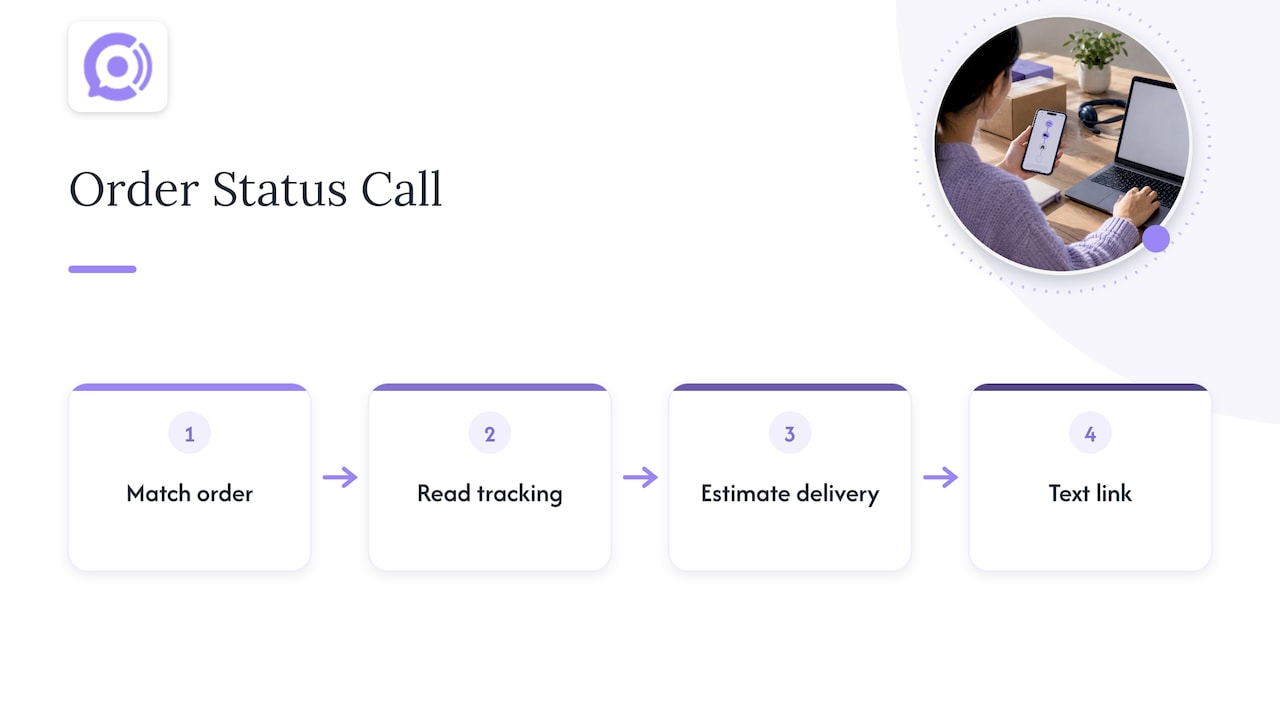
Order status calls. A customer asks where a package is. The agent matches the order, reads the tracking status, gives an estimated delivery, and offers a text with the tracking link. No queue, no hold music, and no staff time spent on a question the store already knows the answer to.
Return and refund status. Instead of waiting on email, the caller hears whether the return was received and whether the refund is processing. If the status shows an exception, the agent escalates with the order details attached.
After-hours coverage. Small stores cannot staff phones overnight. A voice agent can answer outside staffed hours, resolve the simple questions, and leaves a clear summary for the morning team on anything it could not finish.
Peak-season overflow. During sales and holidays, call volume spikes. Automating the predictable calls keeps your people free for the cases that need judgment.
Cross-channel follow-up. A caller who asks about a delayed order gets an SMS confirmation, and the call summary lands on the same timeline as their earlier chat. The next agent sees all of it.
We publish our pricing so you can estimate the effect: the AI Voice Agent plan is $9.99 per month per agent, with conversation minutes at $0.10 per minute. Current pricing details are on our site. Measure results against your own baseline: first-contact resolution, resolution time, and repeat contacts before and after launch.
Our perspective: voice agents belong inside a commerce-aware stack
We think voice works best when it is treated as one part of the whole, not a replacement for chat, email, or self-service. A voice agent that cannot see the order is just a script reader. One that reads real order data can answer the calls that clog phone lines every day: where an order is, whether a return arrived, and what happens next.
That is why we focus on round-the-clock availability and real-time order access, and why we insist on clear guardrails and a clean handoff to your team. A well-designed setup lets each channel do what it does best and keeps one customer record underneath all of them.
— Orphora AI
How we help you speed up omnichannel resolution
We built Orphora AI to connect with WooCommerce, so our voice agents pull live order data and answer routine calls without leaving customers waiting. Our aim is faster responses and fewer repeat contacts, and we state those outcomes as our own claims, not guarantees. If you want phone support that works with the rest of your channels, see how it works on our product page.

FAQ
Which support channels should an ecommerce store add first?
Start with the channels your customers already use, usually email and live chat, then add phone and messaging as volume grows. Shopify’s guidance recommends supporting existing channels first, then adding automation for repetitive, well-defined requests.
When should automation hand a customer to a human?
Escalate when the customer asks for a person, when an order cannot be matched, when a payment or fulfillment exception appears, or when privacy or safety is involved. Define these triggers before launch and pass the full context along.
What metrics show omnichannel support is working?
Track first-contact resolution, average resolution time, customer satisfaction, contact volume by channel, and handle time. First-contact resolution and resolution time tell you most about whether customers actually get their problems solved.
How do I keep customer data consistent across channels?
Use one source of truth for orders and policies, sync order status in real time, and write every contact back to a single customer profile. Merge duplicate profiles and compare answers across channels on a regular schedule.
Sources
- Shopify Help Center | Providing online customer service
- Retail | Zendesk CX Trends 2026
- Omnichannel Customer Service: 2026 Guide – Shopify