

Number Porting in the USA: How to Keep Your Business Number
How to port a US business phone number: your rights under FCC rules, the documents you need, realistic timelines, fees, and what to do if a port is rejected.

You can keep your business phone number when you switch providers in the US. Federal rules give you that right, as long as you stay in the same geographic area. The process is called porting: your new provider asks your old one to release the number, and the number moves over without you giving it up. A simple, single-line port can finish in one business day. Anything more complicated takes longer, and most delays come from paperwork that does not match.
This guide is written for store owners and e-commerce managers who want to move a customer-facing number to a new phone setup, including an AI voice agent for a WooCommerce store. It covers what the law says, what to gather before you start, how to run the port without dropping calls, and how to fix a rejection.
TL;DR
- Under FCC rules, businesses and consumers can keep their existing number when changing providers, provided they stay in the same geographic area.
- Simple ports (one line, no complex equipment changes) must be processed in one business day. Multi-line or complex ports take longer.
- Keep your old service active and paid until the new provider confirms the port is complete. Canceling early is the most common way to lose a number.
- Most rejections come from a name, address or account-number mismatch between your request and the old provider’s records.
- Companies may charge to port a number, so check your contract for early-termination fees and ask whether porting fees can be waived.
Table of Contents
- What porting means for a business number
- Your rights, and where they stop
- What you need before you start
- Step by step: how to port a business number
- How long a port takes
- What porting costs
- Why ports get rejected, and how to fix them
- Porting when your number will route to an AI voice agent
- Perspective: why the number is only half the project
- Getting a number and an agent running
- A pre-port checklist
- FAQ
- Sources
What porting means for a business number
Porting is the transfer of an existing phone number from one service provider to another. The number stays the same. The carrier that serves it changes. Customers who saved your number, printed it on packing slips, or found it on your Google listing keep reaching you.
For an online store, that matters more than it first seems. The number on your contact page, in your order confirmation emails, on your returns label and in your shipping notices is part of your brand. Changing it means updating every one of those places, and every old copy still in a customer’s inbox goes to a dead line.
The FCC’s consumer guide says numbers can move between wireline, IP-based (VoIP) and wireless providers. That covers most of what a small store owner might hold: a mobile number, a landline, a cloud phone line or a toll-free number from a business phone service.
Your rights, and where they stop
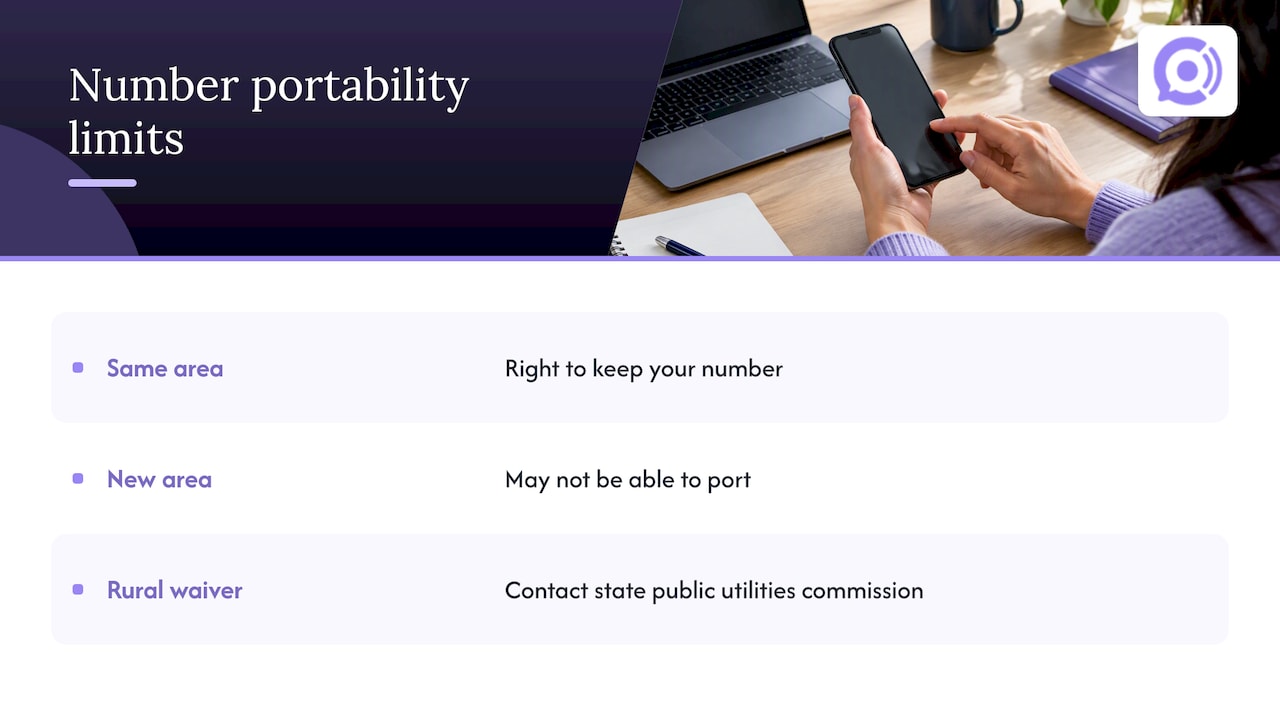
The FCC states that you have the right to keep your number when you change providers, provided you remain in the same geographic area. Two limits are worth knowing before you start.
Moving to a new area. If you relocate your business to a different geographic area, you may not be able to keep your number. For a store that sells nationwide, this rarely matters, because customers call from everywhere. It matters if your number is tied to a specific rate center and you are moving your office or warehouse.
Rural wireline carriers. The FCC notes that some rural wireline providers have state-authorized waivers. If you cannot port because of one, its guidance is to contact your state public utilities commission for local help.
The FCC also notes that your old provider cannot hold your number hostage, though your contract still applies. We cover that in the fees section below.
What you need before you start
The single best way to avoid delays is to collect the paperwork first. Providers vary in the details, but the same items come up again and again:
- The exact account name on your current phone service, spelled the way the old provider has it. “Acme Goods LLC” and “Acme Goods” can be treated as different names.
- The service address on file with the old provider. This is the address on the account, not necessarily where you work today.
- The account number, and a transfer PIN if the old provider issues one. Mobile carriers commonly require both.
- A recent bill showing the account holder’s name, address and the number you want to move. Many providers want one issued within the last 30 days or so.
- A signed letter of authorization (LOA), which is your written permission for the new provider to move the number. The name and address on it should match the old provider’s records.
- A customer service record (CSR), if your old provider will give you one. It lists exactly what the old provider has on file, so you can match it.
- The numbers to be moved, listed exactly, including any toll-free or secondary lines.
If you have several service addresses, expect to submit separate requests for each. Splitting them up at the start is cleaner than having one request rejected because it mixes locations.
Step by step: how to port a business number
1. Choose the new service before touching the old one
Pick the provider that will receive the number and confirm it accepts port-ins for your number type (local, toll-free, mobile). Not every provider supports every type. Ask whether it ports voice and text together, since some will not move text messaging on its own while leaving voice behind.
2. Do not cancel your old service
This is the rule people break. If you cancel the old account first, the number can be released back to the carrier’s pool, and you may not get it back. Keep the old account active and paid until the new provider confirms that the port is complete. In many cases the old service keeps working until the moment the port finalizes, so your calls continue in the meantime.
3. Gather documents and match the details
Pull the bill, find the account number and check the spelling of the account name. Put the details on the LOA exactly as they appear on the bill. This ten-minute check prevents most rejections.
4. Submit the port request
Your new provider files the request with your old one. Many carriers do it through an online form in your account dashboard. Some let you pick a target date. If you can, pick a quiet window instead of a Monday morning or the last days of the month, when order and call volume tend to be highest and any hiccup costs more.
5. Watch for the firm order commitment
When the old provider accepts the request, the new provider receives a confirmation with an activation date, often called a firm order commitment (FOC). That date is the one to plan around. Tell your team when it is.
6. Test on the day
Once the number is live, call it from a mobile phone and a landline. Test inbound calls, any call forwarding, and any outbound caller ID you rely on. Then place a call that triggers your actual workflow, such as asking about an order, to confirm the whole path works.
7. Cancel the old service only after the confirmation
After you have confirmed the number rings at the new provider, close the old account. Watch out for one last bill and for any notice period in your contract.
How long a port takes
It depends on how complex the port is.
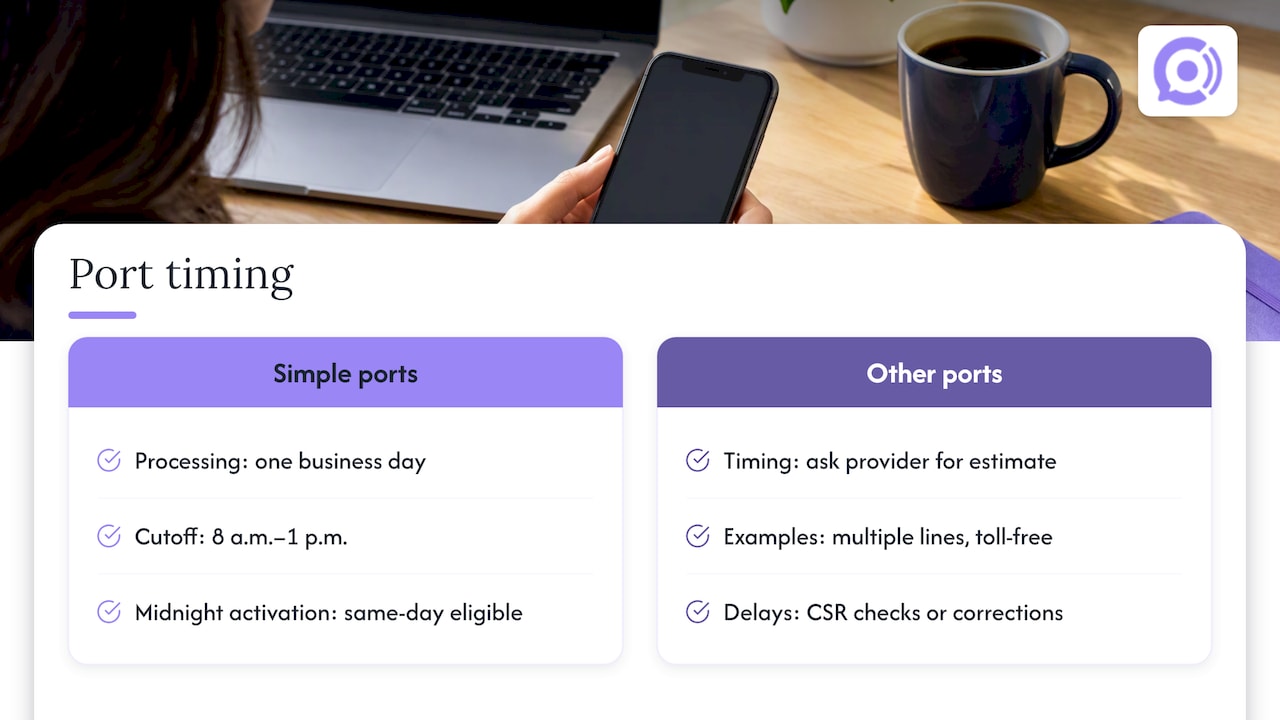
Simple ports. The FCC requires simple ports, which generally involve one line and no complex equipment adjustments, to be processed in one business day. The federal rules also set a cutoff: under 47 CFR Part 52, Subpart C, a simple port request must reach the current provider between 8 a.m. and 1 p.m. local time to be eligible for same-day activation at midnight. Submit early in the day, and early in the week, to give yourself the best chance.
Everything else. Multiple lines, toll-free numbers, numbers on business phone systems, and ports that need a CSR check or corrections often take longer. Carriers and providers quote different timelines for these, and a bulk port of dozens of numbers is slower than a single line. Ask your new provider for its own estimate, and plan your launch date after it, not before.
Wireline to wireless. The FCC warns that porting from a wireline to a wireless carrier can briefly leave two active phones with the same number. It also advises customers to check that 911 service still works during the transition. If you run a physical location with a landline, confirm emergency calling on the new setup before you retire the old one.
What porting costs
The FCC says companies may charge to port a number. It also says you can ask whether the fee can be waived or negotiated. Costs to look for:
- A port-out or release fee from the old provider.
- Early-termination fees if you are still inside a contract term. Porting does not cancel the contract.
- Outstanding balances. A valid port request generally should not be refused just because you owe money, but you still owe it.
- A setup or port-in fee on the new side, which some providers charge and some waive.
- Charges that continue after the port, if you did not send a written cancellation notice. Many business contracts keep billing until the provider receives it.
Read the cancellation and porting clauses of your current agreement before you submit anything. Some business terms say that you are responsible for the port-out and any fees tied to moving the numbers, and a few list specific charges for canceling a port after it has been scheduled. A quick call to your account rep, asking directly about fees, takes less time than finding out from the bill.
Why ports get rejected, and how to fix them
A rejection is usually a data problem, not a legal one. The most common causes are a mismatch in:
- the account name,
- the service address,
- the account number or PIN,
- the number itself (a typo, or a number that is not on that account).
The fix is almost always the same. Ask the new provider for the rejection reason. Get a CSR or a fresh bill from the old provider. Correct the LOA to match it exactly, and resubmit. If the old provider refuses a valid request or stalls, escalate to its porting department in writing and keep a record. If it still does not move, the FCC accepts consumer complaints about porting problems through its website.
If the port completes but the number does not work correctly, call your new provider first. Common causes include call routing not yet configured, forwarding rules left over from the old setup, and caller ID not yet registered. Keep the old account open a few days after the move, if your contract allows, as a fallback.
Porting when your number will route to an AI voice agent
Many WooCommerce store owners reach this question from the other direction. They have a phone number customers already call, and they want an AI voice agent to answer it. There are two paths:
- Use a new number for the agent and update your site, emails and listings. This is the fastest start, since no port is needed.
- Bring the existing number to the system that answers calls, using the porting steps above.
If you take the second path, the order matters: confirm the new setup accepts your number type, run the port while your old line stays active, and test the agent against real questions before you cancel anything. We cover which kinds of calls to automate first, and how phone support compares with text, in our comparison of SMS and voice support. If you are weighing other ways to connect phone to your store, four WooCommerce phone paths to test walks through them.
One more point for stores that take orders by phone. If callers may be asked to prove who they are before an agent discusses an order, read what identity verification by phone proves and where it stops while you plan the call flow.
Perspective: why the number is only half the project
We see store owners spend weeks on the port and then ten minutes on what happens when the call connects. We think that is backwards. The number gets the customer to you, but the answer is what they remember.
Most phone calls to an online store are the same few questions: where is my order, how do I return this, when will it ship. A caller with one of those questions does not want a menu or a callback tomorrow. They want the answer now, from something that can see their order.
That is why we built our voice agents for WooCommerce stores specifically. The agent reads order and customer data in real time, answers in a natural voice without a speech-to-text lag, and follows guardrail workflows for order actions, so it does what you have approved and nothing else. You can customize the agent and connect your knowledge base, then review recordings, transcripts and call analytics to see what customers ask.
Our advice is to treat the port as a calendar item and the call flow as the real work. Pick a quiet week, keep the old line live, and test with real order questions before you flip the switch.
Orphora AI
Getting a number and an agent running
If you want phone support for your store without a staffed phone line, our AI voice agents answer around the clock and handle order status, returns and shipping questions using your live WooCommerce data. We provision US telephony for your agents, and you can set up and customize an agent yourself.
Pricing is published: the AI Voice Agent plan is $9.99 per month per agent, and conversation minutes are $0.10 per minute. An Enterprise plan is available with no published price. See the Orphora AI site for current details, and ask us about your existing number before you cancel anything.

A pre-port checklist
Use this before you submit a request:
| Item | Done when |
|---|---|
| Old service stays active | Account is paid up and no cancellation is sent |
| Account name | Matches the old provider’s records letter for letter |
| Service address | Matches the address on the account |
| Account number and PIN | Collected from the old provider |
| Recent bill | Shows the number, name and address |
| LOA | Signed, with details copied from the bill |
| Contract review | Early-termination and port-out fees known |
| Timing | Request sent early in the day and early in the week |
| Test plan | Inbound, forwarding, caller ID and a real workflow call |
| Team notified | Staff know the activation date |
FAQ
Can I keep my business number if I switch phone providers?
Yes, in most cases. FCC rules let businesses and consumers keep their number when changing providers, as long as they remain in the same geographic area. Rural wireline waivers are the main exception, and your state public utilities commission can advise if you hit one.
How long does it take to port a business number?
A simple port, with one line and no complex equipment changes, must be processed in one business day under FCC rules. Multi-line ports, toll-free numbers and ports with corrections take longer, so ask your new provider for its estimate and schedule your launch after it.
Will my calls stop working during the port?
Usually not. In many cases the old service keeps working until the port finalizes, which is why you should keep the old account active and paid until the new provider confirms completion. Choose a quiet time for the switch and test right after it goes live.
Is there a fee to port a number?
Companies may charge for porting, and you can ask whether a fee can be waived or negotiated. Your current contract may also carry early-termination fees or an unpaid balance, which you still owe even though a valid port request generally cannot be refused for that reason.
What should I do if my port request is rejected?
Ask for the rejection reason, which is most often a mismatch in the account name, address or account number. Get a current bill or CSR from the old provider, correct your letter of authorization to match, and resubmit.
Sources
- FCC: Porting, Keeping Your Phone Number When You Change Providers
- eCFR: 47 CFR Part 52, Subpart C, Number Portability