

How to Scale Customer Support Without Scaling Headcount
A practical guide for WooCommerce store owners on how to scale customer support: what to automate, what to keep human, and what it costs, with a worked example.


You scale customer support by taking the repetitive, data-lookup contacts away from people and giving them to automation. Then you let your humans handle the conversations that need judgment. For a WooCommerce store, that usually means order status, shipping and return questions go to an automated layer connected to your order data, on every channel your customers use, including the phone.
This guide walks through the order of operations we see working for small and mid-sized online stores: measure, deflect, automate, escalate, then hire only for what is left. It ends with a worked cost example.
TL;DR
- Scaling support means decoupling ticket volume from headcount. Start by sorting contacts into routine (order status, returns, shipping) and complex (damaged goods, disputes, high-value customers).
- Automation only works when it can see live order data. A bot that cannot look up an order just moves the wait somewhere else.
- Keep a clear handoff to a human, with context passed along, so customers never repeat themselves.
- Phone is the channel most stores neglect. A voice agent can cover nights and weekends without a night shift.
- Hire people last, and for judgment work, not for answering the same five questions.
Table of Contents
- What “scaling support” actually means
- Step 1: Find out what people actually ask
- Step 2: Make answers findable before anyone has to ask
- Step 3: Automate the repetitive conversations
- Step 4: Design the handoff to a human
- Step 5: Cover the hours you cannot staff
- Step 6: Hire for judgment, not volume
- Perspective: why phone is the overlooked scaling lever
- What it costs: a worked example
- Where Orphora AI fits
- A 30-day plan to start scaling
- FAQ
- Sources
What “scaling support” actually means
Growing support is easy: add agents as orders grow. Scaling is harder. It means your support cost and response time stay flat, or improve, while order volume climbs.
For a store with two or three people, the pain shows up in predictable places:
- A promotion or holiday spike buries the inbox for days.
- Calls go to voicemail because nobody can answer while packing orders.
- Customers in other time zones wait overnight for a one-line answer.
- The owner is still the support department.
The 2025 Omnichannel Retail Index found that most brands still treat service as a cost to contain rather than a growth engine. The brands that stand out let automation handle routine tasks so human agents can focus on complex, high-value interactions. That split is the backbone of everything below.
Size also is not destiny. Deloitte Digital’s 2025 customer service research notes that scaling success depends on integrating service platforms across touchpoints. Large enterprises tend to get stuck in fragmented experiences, while mid-sized firms often lack the automated tools to scale efficiently. A small store can close that gap faster than a big one, because it has fewer systems to stitch together.
Step 1: Find out what people actually ask
Before buying anything, spend an hour with your last 100 contacts: emails, chats, voicemails, call notes. Tag each one with a topic. Most stores find the same short list:
- Where is my order?
- How do I return this, and when do I get my refund?
- Can I change the address or cancel?
- What are your shipping times and costs?
- Does this product fit, work with, or include something?
The first four are answerable from data you already have: your order records and your published policies. Only the fifth sometimes needs product knowledge, and even that is often in your catalog or FAQ.
Count how many of your 100 contacts fall into each bucket. If more than half are order status, returns and shipping, you have a clear automation target. Those contacts are high-volume, low-judgment and time-sensitive, which is the ideal profile for automation.
Step 2: Make answers findable before anyone has to ask
The cheapest contact is the one that never happens. Three low-effort moves help:
- Proactive order updates. Shipping confirmation and delivery emails or texts reduce “where is my order” contacts. If you are weighing texting against calling for different issues, our comparison of SMS vs. voice support covers where each channel fits.
- A clear returns page. State the window, condition requirements, who pays shipping and how long refunds take.
- A tight FAQ. Write answers in the way customers phrase the question, not in policy language.
Self-service will not catch everyone. Some customers want to talk to someone, especially when money or a deadline is involved. That is where the next step comes in.
Step 3: Automate the repetitive conversations
This is where most of the scaling happens. The key requirement is access to live data. An automated agent that can only recite policy will frustrate anyone with an actual order in flight.
WooCommerce makes this feasible. Its REST API lets external tools read and write store data in JSON, and the Orders endpoint covers creating, viewing and updating orders. Webhooks can push events such as new or updated orders to an outside service as they happen.
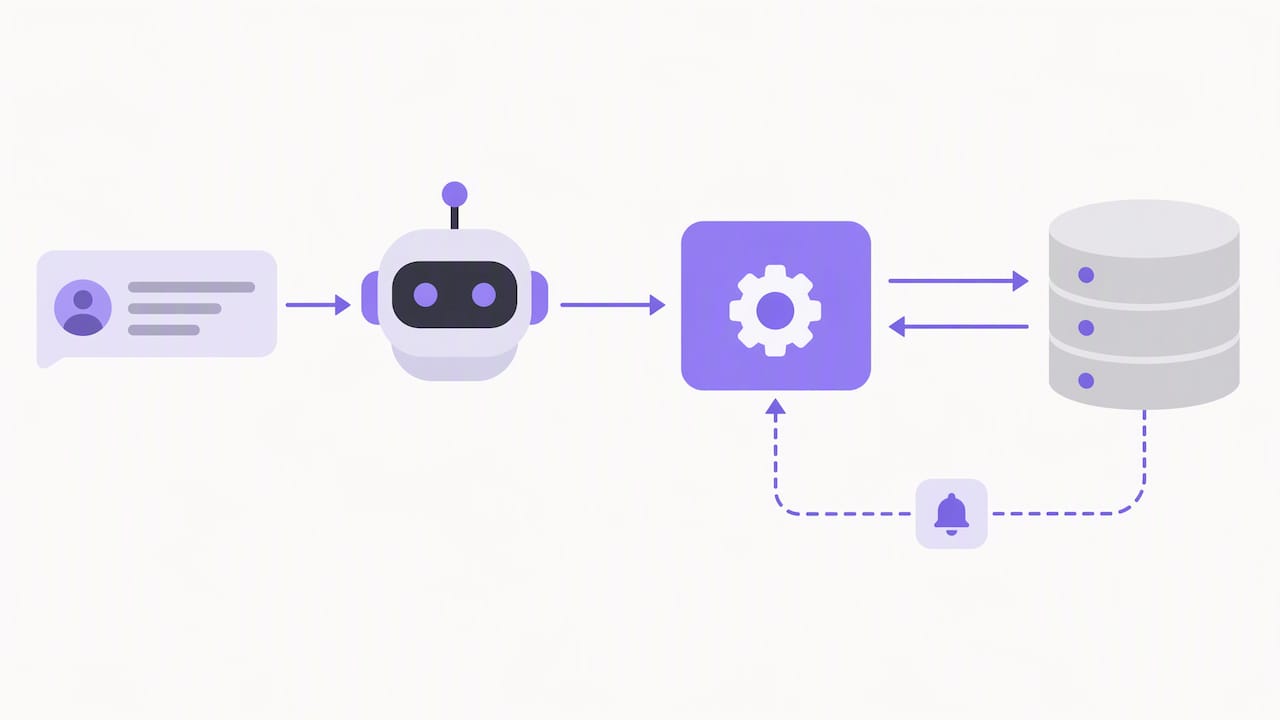
There is a catch for do-it-yourself builds: webhook delivery needs a publicly accessible URL, so you end up running and securing infrastructure, not just configuring a plugin. That is a real reason many small stores choose a managed service for the connection instead of building it.
Chat, email and phone
Most automation guides stop at chat. But phone is often where customers go when they are anxious: a late gift, a wrong item, a refund that has not arrived. Those callers are the ones most likely to remember how you treated them. We cover how to route between channels in chat vs. phone support, and the broader landscape in our guide to AI customer service for e-commerce.
What to configure first
Whichever tool you use, a few settings decide whether customers trust it:
- The allowed actions (look up, explain, initiate a return) and the ones that always go to a person (refund exceptions, disputes).
- Tone and greeting that match your brand.
- The knowledge it draws on. Smaller is better for voice, because long knowledge bases add delay. See our notes on keeping a voice bot’s knowledge base lean and what to configure first.
- Shipping rules, which need to be accurate before calls go live. Our shipping policy automation checklist lists three WooCommerce checks.
Step 4: Design the handoff to a human
Automation fails in one place above all: the moment it cannot help. If the customer then has to start over with a person, the savings are cancelled by lost goodwill.
Set clear escalation rules:
- Trigger on intent, not only on failure. Mentions of a damaged item, a chargeback or a legal complaint go straight to a person.
- Pass the context. The human should see the transcript, the order and what was already tried.
- Tell the customer what happens next. “A team member will call you back by 10 a.m. tomorrow” beats an open-ended wait.
We go into the specifics in escalation rules for AI-to-human handoffs and why shared order context cuts repeat contacts in omnichannel support for e-commerce.
Step 5: Cover the hours you cannot staff
A store that sells nationwide gets contacts from Eastern to Pacific time, and plenty after dinner. Staffing every hour with people is expensive for a small team. Automation covers nights, weekends and holidays at a usage-based cost, and the human team picks up the escalations in the morning. Our after-hours support guide for WooCommerce lays out how to set this up.
Peak seasons are the same problem compressed. A published example from NiCE, a vendor of customer experience software, describes one financial institution that cut average speed of answer from 35 to 15 seconds in peak periods after adding AI agents. That is a vendor-reported case from a different industry, so treat it as a sign of what is possible rather than a benchmark for a store. The mechanism, though, applies directly: automation absorbs the surge instead of the queue growing.
Step 6: Hire for judgment, not volume
Once routine contacts are handled, the remaining ones are different in kind. They involve upset customers, unusual orders, wholesale inquiries and product advice. These are the interactions where a skilled person adds loyalty, and where the Omnichannel Retail Index’s loyalty-engine idea pays off.
When you do add people, you have options: a part-time hire, a trained team member from fulfillment, or a distributed team. Some US businesses look abroad for support staff, for example hiring customer support staff in South Africa, which brings its own employment, payroll and compliance questions. Whatever route you choose, hiring after automation means each new person spends their day on work that needs a person.
Perspective: why phone is the overlooked scaling lever
We built Orphora AI around a simple observation: small WooCommerce stores often have a chat widget and an inbox, but the phone rings unanswered. Calls are a small share of contacts for some stores, yet they tend to be the urgent ones.
Our view is that a voice agent should earn its place the same way a good employee does: by knowing the order, answering naturally and without awkward pauses, and knowing when to stop and hand over. That is why we focus on real-time order data, guardrails around any action that changes an order, and a short list of things the agent is allowed to do.
We also think pricing should track usage. A store that gets 20 calls a week should not pay like one that gets 2,000. That is why our pricing is a small monthly fee per agent plus a per-minute rate, with no seat counts to renegotiate as you grow.
— Orphora AI
What it costs: a worked example
Here is a simple illustration using our published pricing: the AI Voice Agent plan is 9.99 USD per month per agent, and conversation minutes are 0.10 USD per minute. The call volumes below are assumptions for illustration, not a forecast.
| Monthly calls | Avg. length | Minutes | Minutes cost | Agent fee | Total |
|---|---|---|---|---|---|
| 200 | 3 min | 600 | $60.00 | $9.99 | $69.99 |
| 500 | 3 min | 1,500 | $150.00 | $9.99 | $159.99 |
| 1,000 | 4 min | 4,000 | $400.00 | $9.99 | $409.99 |
To compare with staffing, price the hours you would need to cover, not only the hourly wage. A phone line open 24 hours a day, seven days a week is 168 hours, which no small team will staff. With usage pricing, the cost rises only when customers actually call.
Where Orphora AI fits
If phone calls about orders, returns and shipping are eating your day, Orphora AI gives your WooCommerce store a voice agent that answers around the clock, looks up orders in real time, and handles routine questions without a person on the line. You get call recordings, transcripts and analytics, so you can see what customers ask and refine the agent. Larger operations can ask about the Enterprise plan on the Orphora AI site.
A 30-day plan to start scaling
Week 1: measure. Tag 100 contacts by topic. Note the busiest hours and how long customers wait.
Week 2: fix the basics. Update your returns and shipping pages. Turn on proactive order notifications.
Week 3: automate one lane. Pick the highest-volume routine topic, usually order status, and automate it on the channel with the longest waits.
Week 4: review and tighten. Read transcripts, fix wrong answers, adjust escalation rules and decide where a human hire would help most.
Track three numbers throughout: first response time, share of contacts resolved without a person, and customer satisfaction on the contacts that did reach a person. If the third drops, your handoff needs work.
FAQ
When should a small store start to scale customer support?
Start when the same few questions take a noticeable part of your week, or when contacts go unanswered at certain hours. You do not need a large team to benefit. Automating one routine topic early prevents the owner from becoming the bottleneck.
Will automation hurt customer satisfaction?
It can if the tool cannot see order data or traps customers in a loop. It tends to help when answers are fast, accurate and backed by an easy path to a person. Review transcripts weekly in the first month to catch gaps.
Can WooCommerce data be used for real-time support?
Yes. WooCommerce exposes orders and customers through its REST API, and webhooks can push order events to external services. Building and hosting that connection yourself requires a publicly reachable endpoint, so many stores use a managed service.
Should I add chat, phone or both?
Route by issue, not by what is cheapest to staff. Quick status checks suit text or chat, while urgent or emotional problems often suit a call. If your phone goes unanswered today, covering it is a sensible first step.
Sources
- Customer Support & Service in 2025: From Cost Center to Loyalty Engine (Omnichannel Retail Index)
- Deloitte Digital Customer Service Excellence 2025
- WooCommerce REST API | WooCommerce developer docs
- Orders | WooCommerce developer docs
- Webhooks | WooCommerce developer docs
- NiCE customer success announcement, October 6, 2025