

WooCommerce Voice Bot: 8 Checks for a Safer Launch
Launch a WooCommerce voice bot safely with inbound first, verified webhooks, limited API access, and consent checks grounded in FCC and FTC guidance.


A WooCommerce voice bot is a practical tool for inbound support tasks like order status, shipping updates, and return requests once it connects to the WooCommerce REST API v3 and listens to order webhooks. The safest path starts inbound only, verifies caller identity before taking any action, and treats outbound calling as a separate, consent-gated workflow.
TL;DR:
- Start with dedicated read only WooCommerce credentials, validate each webhook signature, and add retry logic, timestamped logs, and separate credentials before enabling writes.
- Treat outbound AI calls as consent gated: many require prior express consent; disclose automation, honor opt outs, and separate promotions from inbound support.
- Verify callers with an order number and the last four phone digits before accessing accounts, and require human review for refunds, cancellations, or address changes.
- Pilot on a separate test line and staging store, then review transcripts, webhook failures, verification errors, and escalation patterns before widening customer access.
- Keep the knowledge base below roughly 200 FAQ entries, translate and review each language’s responses, and track resolution, escalation, response time, and verification failures.
Table of Contents
- What to Connect: API Endpoints, Auth, and Webhooks
- U.S. Telephony Rules and Practical Compliance Steps for AI Voice Calls
- Practical Rollout Checklist From Sandbox to Production
- Tuning, Monitoring, and KPIs to Measure Success
- Handling Multilingual Support and Language Recognition
- Customization Options for Voice Tone, Personality, and Scripting
- Security Measures for Protecting Customer Data During Voice Interactions
- When to Pick a Dedicated Voice-Agent Platform vs. DIY
- Orphora AI: How We Map to Your Checklist
- FAQ
- Sources
What to Connect: API Endpoints, Auth, and Webhooks
A phone-based voice agent needs two things from WooCommerce: a way to read data on demand and a way to hear about changes as they happen. The WooCommerce orders API under /wp-json/wc/v3/ returns structured fields such as customer name, phone number, shipping address, and order status, which covers most of what a caller asks about during a support call. Customer endpoints under the same path handle simple account lookups like confirming an email on file or a shipping address.
Authentication should start narrow. Generate a dedicated API key pair for the voice agent with read-only scope for the first release, then expand to write access only for specific, reviewed actions like canceling an unshipped order.
Keeping the agent synchronized in real time depends on WooCommerce webhooks, which deliver JSON payloads for events like order.created and order.updated and include an X-WC-Webhook-Signature header for validating that the payload actually came from your store.
A few integration habits make the difference between a stable rollout and a brittle one:
- Validate every webhook signature before processing the payload, and reject anything that fails.
- Build retry and backoff logic for failed webhook deliveries instead of assuming every event arrives once.
- Log every API call and webhook receipt with timestamps for later audit and troubleshooting.
- Separate read and write credentials so a compromised read-only key can never trigger an order change.
Pro Tip: Run your webhook receiver through a signature-validation test before connecting it to live order data, since an unverified endpoint is the most common integration mistake in early rollouts.
U.S. Telephony Rules and Practical Compliance Steps for AI Voice Calls
Calling customers with an AI-generated voice is not a gray area under U.S. law. The FCC confirmed that TCPA restrictions on “artificial or prerecorded voice” calls apply to AI-generated voices, which means many outbound AI calls require prior express consent before they happen. That ruling is the reason an inbound-first design matters: a customer who calls your support line has already initiated contact, which sidesteps most of the consent questions that apply to outbound campaigns.
The FTC’s telemarketing guidance reinforces the same divide, stressing Do Not Call protections and meaningful consent, and treats promotional or reminder calls very differently from support calls a customer initiates.
A support line that only answers inbound calls and never dials out for promotions avoids the bulk of TCPA and TSR exposure, according to FCC and FTC guidance on consent and Do Not Call enforcement.
Translate that into store policy with a short list of defaults:
- Keep the voice bot inbound-only until a separate, documented consent process exists for any outbound use.
- Disclose at the start of every call that the caller is speaking with an automated agent.
- Store a transcript and timestamp for every call that touches order or account data, for audit and dispute resolution.
- Route any request to opt out of future contact to a logged, honored suppression list.
- Escalate sensitive actions, like refunds above a threshold or account changes, to a human before completion.
Practical Rollout Checklist From Sandbox to Production
Moving from an idea to a live phone number works best as an ordered sequence rather than a single launch event.
- Provision a dedicated test phone number separate from your live support line, and route all early calls there.
- Connect the agent to a WooCommerce sandbox or staging store, using the same
/wp-json/wc/v3/endpoints and webhook topics you will use in production. - Generate least-privilege API keys, scoped to read-only at first, and store credentials in a secrets manager rather than in plain configuration files.
- Validate webhook signatures end to end, including a deliberate test of malformed or unsigned payloads to confirm they get rejected.
- Build identity verification into every call that touches account data, using something like a spoken order number plus the last four digits of a phone number on file.
- Block irreversible actions, such as refunds or address changes, from completing without a logged human review step.
- Run structured QA on a sample of calls: review transcripts, track accept and reject rates for verification prompts, and replay webhook events to confirm the agent reacts correctly.
- Pilot with a limited group of real customers before opening the line to full volume, watching for escalation patterns that signal gaps in the knowledge base.
Email handoffs are often the missing piece in this sequence. When a call ends in a follow-up that needs written confirmation, routing that message through dedicated agent infrastructure like Sendmux’s mailbox tools keeps the thread tied to the original call instead of landing in a generic shared inbox.
Pro Tip: Treat your first two weeks of pilot calls as data collection, not a finished product. Review escalation patterns weekly and adjust verification prompts before expanding call volume.
Tuning, Monitoring, and KPIs to Measure Success
A voice bot that answers correctly in testing can still drift once real call volume and real customer phrasing hit it, so ongoing tuning matters as much as the initial build. Keeping the knowledge base under roughly 200 FAQ entries tends to reduce both response latency and routing errors, since a smaller, curated set of answers is easier for the agent to match confidently against a spoken question.
Observability should cover three layers: webhook delivery logs to catch missed order updates, API error rates to catch integration drift, and transcript QA to catch cases where the agent answered confidently but incorrectly. Call-quality monitoring with AI triage applied to a sample of calls each week catches problems before they show up in customer complaints.
A short set of KPIs covers most of what matters operationally:
- Touchless resolution rate: the share of calls fully resolved without human escalation.
- Escalation rate: how often the agent hands off, and why.
- Average response time: how long a caller waits for an answer once the question is understood.
| Metric | What it measures | Why it matters |
|---|---|---|
| Touchless resolution rate | Calls resolved without human handoff | Shows automation coverage |
| Escalation rate | Frequency and cause of handoffs | Flags knowledge base or verification gaps |
| Average response time | Time from question to answer | Signals latency or routing issues |
| False-acceptance incidents | Verification failures that let an unauthorized action through | Measures security risk directly |
Handling Multilingual Support and Language Recognition
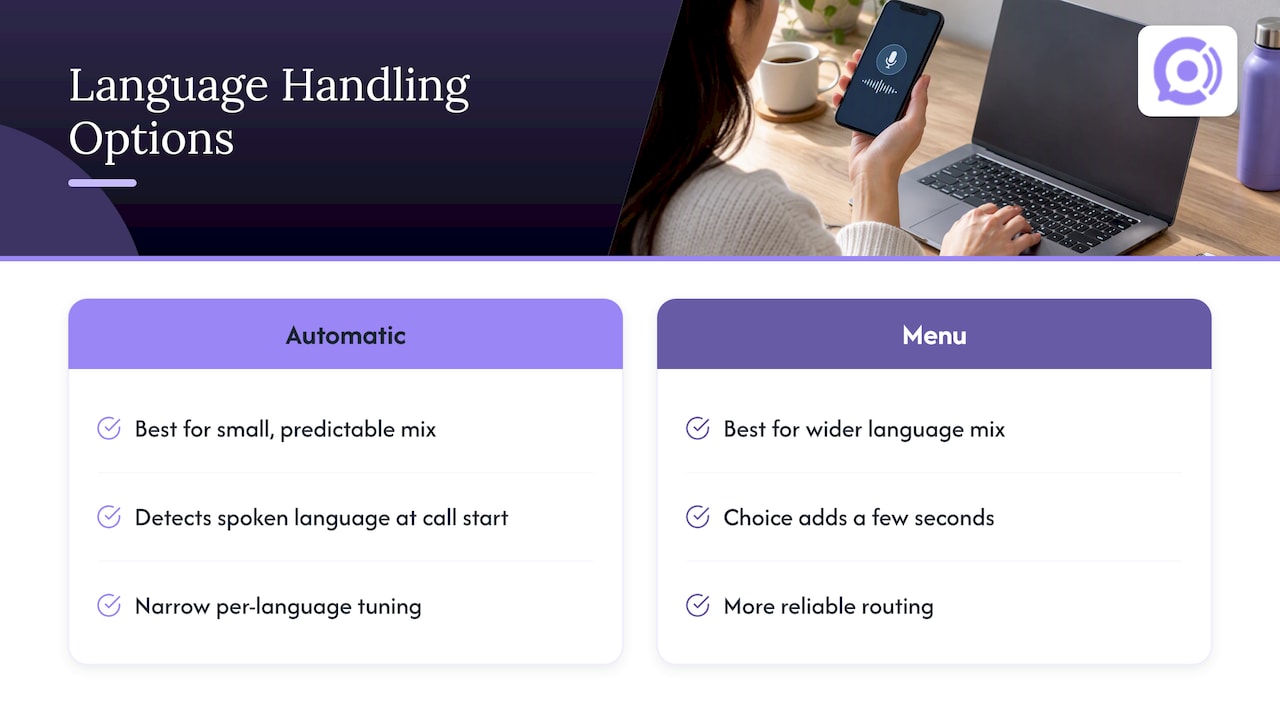
Store traffic rarely comes in a single language, and a voice agent that only understands one leaves a visible gap in coverage. Language handling for phone-based agents generally works in one of two ways: detecting the spoken language automatically at the start of the call, or offering an explicit menu choice before the conversation begins.
Automatic detection tends to work best when the store’s customer base speaks a small, predictable set of languages, since the agent can be tuned narrowly for each one rather than trying to recognize dozens of options. A menu-based approach trades a few seconds of extra call time for more reliable routing, which matters more for stores with a wider language mix.
Whichever approach you pick, the knowledge base and scripted responses need full translation, not machine-generated approximations created on the fly. A translated FAQ that was reviewed by a fluent speaker avoids the stilted phrasing that erodes trust on a support call, especially for anything involving money, like refund timelines or shipping charges.
Order data itself rarely needs translation since it is mostly structured fields like dates, amounts, and status codes. The translation work concentrates on how the agent explains that data conversationally, which means the KB sizing principle from the previous section applies here too: a smaller, well-translated set of responses per language outperforms a large one translated unevenly.
Customization Options for Voice Tone, Personality, and Scripting
A support call should sound like it belongs to your store, not like a generic phone tree borrowed from a template. Tone customization usually covers a handful of dimensions: pace, formality, and how much small talk the agent includes before getting to the question.
A store selling specialty outdoor gear might want a warmer, more conversational tone, while a business-to-business parts supplier might prefer a brisker, more formal cadence that gets to the answer quickly. Both are reasonable choices, and the right one depends on what your customers already expect from a phone call to your business.
Scripting sits underneath tone and does the heavier lifting. The opening disclosure that a caller is speaking with an automated agent, the verification prompts, and the escalation handoff language all need to be written deliberately rather than left to default phrasing, since these are the moments customers remember most clearly after a call ends.
Personality customization works best in small doses. A single recognizable trait, like consistently confirming details back to the caller or using the store’s name naturally in responses, reads as attentive. Stacking multiple personality traits on top of each other tends to make the agent sound scripted in the wrong way, which undercuts the trust a well-designed voice interaction is supposed to build.
Security Measures for Protecting Customer Data During Voice Interactions
A phone call that touches order and account data carries the same sensitivity as a web login, even though it feels more casual. Verification should combine more than one factor: a spoken order number paired with a partial identifier like the last four digits of a phone number on file gives reasonable assurance without demanding a caller memorize a password.
Every call that accesses or changes account data should produce a stored transcript and a timestamped log entry tied to the specific action taken, which supports both dispute resolution and routine audits. Credentials used to connect the agent to WooCommerce belong in a secrets manager, never in plain configuration files, and should be scoped as narrowly as the task allows.
Irreversible actions deserve an extra layer of friction. Blocking refunds, cancellations, or address changes from completing automatically, and routing them to a brief human review step instead, closes off the most damaging failure mode: a verification gap that lets an unauthorized caller alter someone else’s order. When a voice action triggers a downstream system change that fails partway through, having an automated reconciliation layer, like the exception handling Ampwise AI describes for order processing, prevents a stuck transaction from going unnoticed.
Call recordings and transcripts themselves are customer data and should be retained under the same access controls as the rest of your customer records, with a defined retention window rather than indefinite storage.
When to Pick a Dedicated Voice-Agent Platform vs. DIY
Building a phone-based voice agent from scratch means owning telephony provisioning, TCPA and FTC compliance logic, webhook infrastructure, and ongoing tuning, all before the first customer call. That is a reasonable path for a team with dedicated engineering capacity and time to spend on infrastructure rather than storefront work.
A managed platform shifts that burden. Our platform is built to integrate natively with WooCommerce, accessing order and customer data through the REST API and webhook patterns, without a store needing to maintain that pipeline internally. The agents typically run on a pay-per-minute usage model alongside a monthly per-agent fee, with escalation to a human for sensitive actions and call analytics included.
The honest trade-off is control versus speed. A custom build gives full control over every scripting and routing decision. A managed platform gets a compliant, WooCommerce-aware agent answering calls faster, which matters most for smaller teams that need the time back for running the store.
— Orphora AI
Orphora AI: How We Map to Your Checklist
Every item in this rollout checklist maps directly to how we built our platform. We connect natively to WooCommerce through the same REST API v3 and webhook patterns covered above, so order status, shipping, and return questions get answered from live data rather than a stale export. Phone numbers, identity verification prompts, and escalation rules come configured out of the box instead of requiring a custom build.

What that looks like in practice:
- Integration with WooCommerce supporting real-time order and customer lookups.
- Call answering available around the clock.
- Escalation and audit logging included for calls involving account data.
- Usage billed on a pay-per-minute basis alongside a monthly per-agent fee.
Our AI Voice Agent and Enterprise plans cover stores from early-stage to high-volume, with conversation minutes billed separately from the agent subscription. Visit the Orphora AI product page to see current setup options and request a demo for your store.
FAQ
Is a voice bot legal for WooCommerce customer support calls?
Yes, when the call is inbound and initiated by the customer, since most TCPA consent requirements target outbound calls rather than support lines a caller dials themselves. The FCC’s ruling on AI-generated voices and FTC telemarketing guidance both focus compliance attention on outbound and promotional calling.
What WooCommerce data can a voice agent access?
A voice agent typically reads order status, shipping details, and basic customer account fields through the WooCommerce orders API under /wp-json/wc/v3/. Write access to make changes like cancellations should stay limited and gated behind identity verification.
How much does a WooCommerce voice bot cost?
Pricing models vary, but our own AI Voice Agent plan runs $9.99 per month per agent plus $0.10 per conversation minute, with Enterprise pricing available on request. Costs elsewhere vary depending on call volume, telephony provisioning, and whether the platform is self-built or managed.
How do I keep a voice bot accurate and fast?
Keeping the knowledge base to a focused set, often cited as under 200 FAQ entries, reduces both latency and misrouted answers. Regular transcript review and webhook delivery monitoring catch drift before it affects customers.
What happens when the voice bot can’t answer a question?
A well-designed agent escalates to a human agent rather than guessing, especially for sensitive actions like refunds or account changes. Reviewing escalation patterns regularly helps identify knowledge base gaps that cause unnecessary handoffs.
Sources
- WooCommerce orders API (developer docs)
- FCC confirms TCPA applies to AI technologies that generate human voices
- FTC guidance on telemarketing and robocalls