
Voicemail Automation for WooCommerce Stores: What Works
Voicemail automation for online stores: compare greetings, callbacks and AI voice agents, see the TCPA rules that apply, and cut missed calls without extra staff.


Voicemail automation means that a call nobody answers still gets handled: a greeting plays, the caller is asked what they need, and the request is captured, routed or resolved without someone listening to a queue of messages the next morning. For an online store, the best version goes one step further. An AI voice agent picks up the call instead of letting it reach voicemail, looks up the order, and answers. Below we compare the options, show the costs, and explain the US rules you need to know before you automate anything.
TL;DR
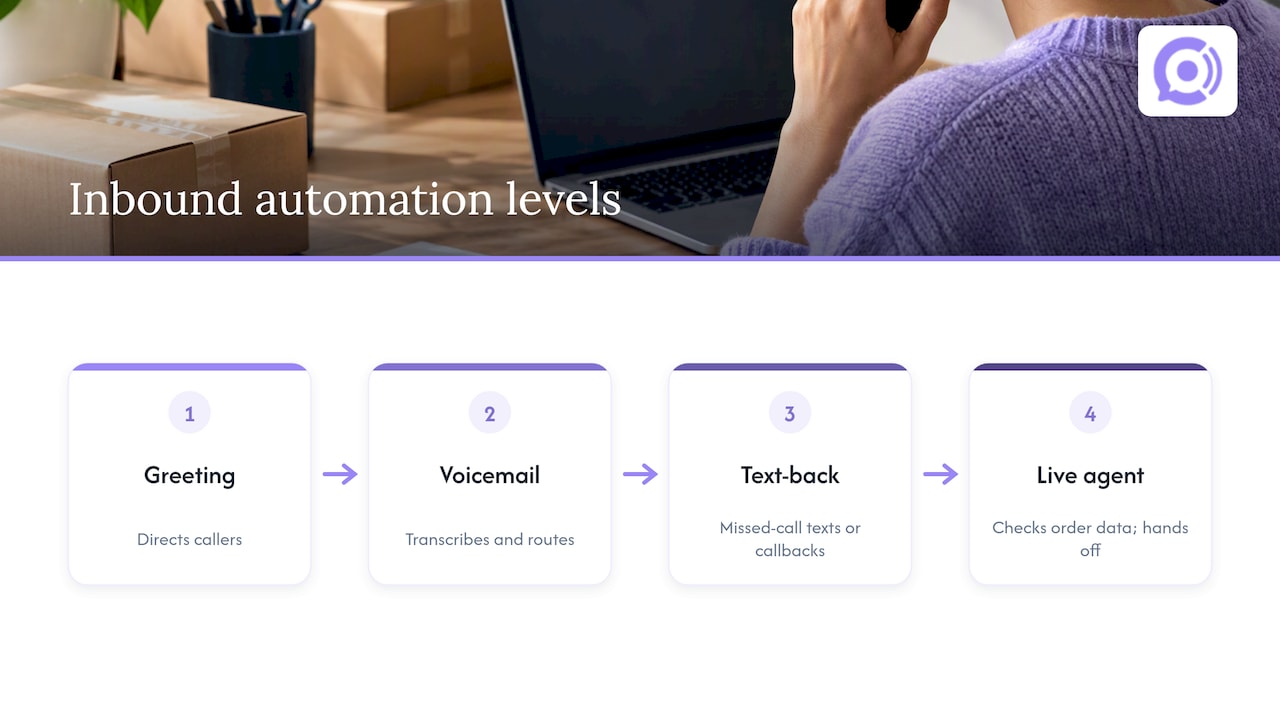
- There are three levels of voicemail automation: a scripted greeting, a voicemail that transcribes and routes messages, and a voice agent that answers the call live and resolves it.
- For a store, most calls are “where is my order?” and “how do I return this?” Those are answerable in seconds if the system can read your order data.
- Ringless voicemail drops and AI callbacks are outbound calling. They fall under the TCPA and need consent. Answering inbound calls is a different job.
- Whatever you automate, give callers a clean path to a human, with the context passed along.
- With Orphora AI, an agent costs 9.99 USD per month plus 0.10 USD per conversation minute.
Table of Contents
- What voicemail automation actually covers
- The four levels of inbound call automation
- Callback vs voicemail: which should you offer?
- Turn missed calls into resolved tickets
- What a store’s calls actually look like
- The rules: when automation needs consent
- What to look for in a voice agent
- Our perspective
- What it costs: a worked example
- Set it up in five steps
- When a managed service is the better fit
- Try it on your own store
- FAQ
- Sources
What voicemail automation actually covers
Search results for this phrase are a mix of two different things, and it helps to separate them early.
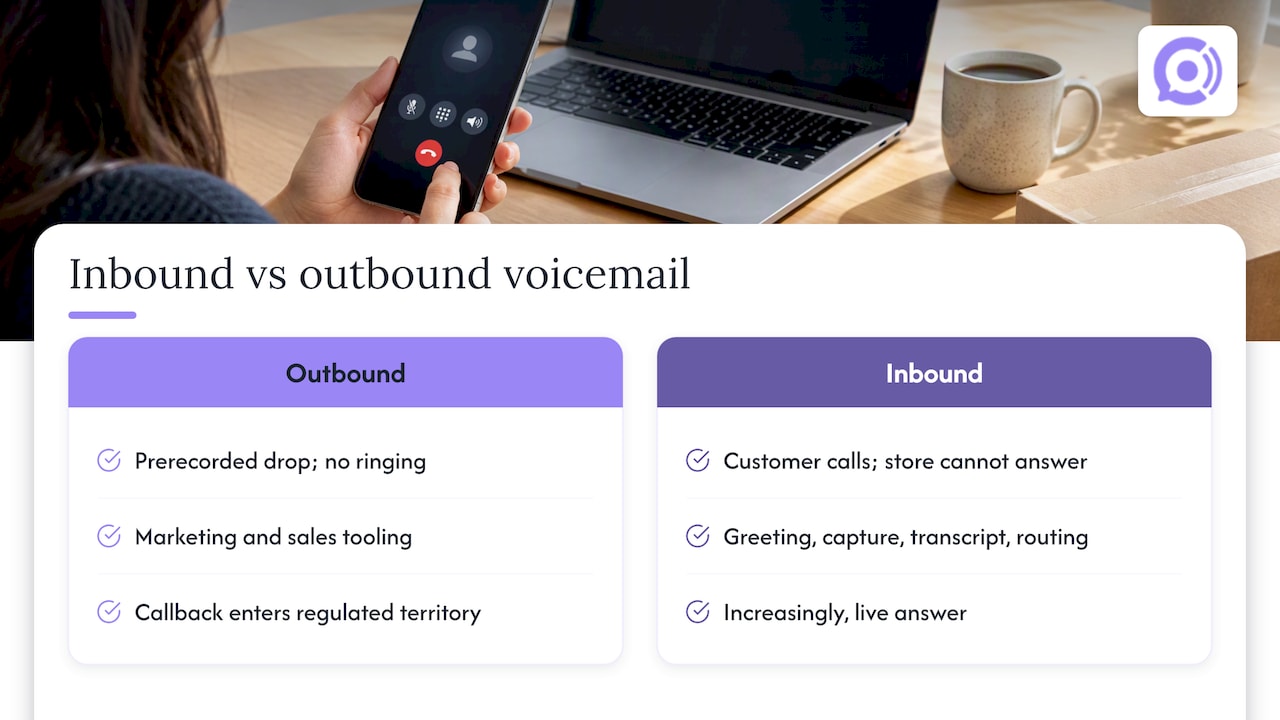
Outbound. Ringless voicemail drops and voicemail drop buttons let a sender place a prerecorded message in someone’s mailbox without the phone ringing. This is marketing and sales tooling. It is not support.
Inbound. This is what a store owner usually means: what happens when a customer calls and you cannot pick up. Here automation covers the greeting, the message capture, the transcript, the routing, and increasingly the live answer.
This article is about the inbound side, with a clear note on where the outbound rules start, because the moment your automation calls someone back, you have crossed into regulated territory.
The four levels of inbound call automation
Level 1: A better greeting
The simplest step is a short greeting that tells callers what to do. It can filter spam, ask for an order number, and point to self-service. It costs almost nothing and takes an afternoon. The limit is obvious: it still ends in a mailbox someone has to check.
Level 2: Voicemail with transcripts and routing
Most business phone systems can transcribe a message and email it to a shared inbox or open a ticket. This helps because text is searchable and can be triaged. Callers still wait for a response, though, and for an order question that wait is the whole problem. A shopper who calls about a late package wants an answer now, not a callback tomorrow.
Level 3: Missed-call text-back and callbacks
Some systems send an automatic text after a missed call asking how they can help, or schedule a callback. This narrows the gap, but it still needs a person to do the actual work. If the callback is placed by software using an artificial voice, it is also an outbound call with legal requirements, covered below.
Level 4: A voice agent that answers the call
Here the call never becomes a voicemail. The agent answers on the first ring, asks what the caller needs, checks the order in your store, and gives the status, return window or shipping answer. If it cannot resolve the issue, it hands off. This is the level our product operates at.
Callback vs voicemail: which should you offer?
Stores often ask whether to leave callers a voicemail box or promise a callback. The honest answer is that both are fallbacks for a call you could not answer. Compare them on what matters to the customer and to you:
| Criteria | Plain voicemail | Scheduled callback | Live voice agent |
|---|---|---|---|
| Caller gets an answer on the call | No | No | Yes, for routine questions |
| Staff time per call | Listen, research, reply | Research, dial, talk | Only escalations |
| Works after hours | Message only | Callback next business day | Yes, around the clock |
| Order data on the call | No | Only after staff look it up | Yes, with store integration |
| Outbound consent issues | None | If automated, yes | None for inbound answering |
A callback is a good choice when the issue truly needs a person, such as a damaged high-value item or a billing dispute. For the routine majority, a callback is a slow way to deliver a two-sentence answer.
Turn missed calls into resolved tickets
One of the other questions people type is how to get a support ticket out of a phone call. The pattern that works:
- Capture the identity. Ask for the order number or the email or phone number on the order.
- Capture the reason. A short, open question works better than a phone menu.
- Resolve if it is routine. Status, tracking, return eligibility and shipping times are all lookups.
- Escalate with context. If a human must step in, the ticket should carry the transcript and the order details, so the customer does not repeat themselves.
That last step is where many setups break. An analyst writing about call software for online brands points to context surfacing as the real challenge: tools work best when a human can take over without losing the history of the interaction. We wrote our own rules for this in AI to human escalation for ecommerce.
What a store’s calls actually look like
We will not quote a call-mix statistic we cannot source. But think about your own phone log or helpdesk tags for a month. For most WooCommerce stores, a handful of question types account for the bulk of calls: order status, delivery delays, returns and exchanges, address changes, and product questions. These are repetitive and data-driven, which is exactly the shape of work automation handles well. Count yours before you buy anything. If 70 percent of your calls fall into five categories, you know where automation pays off.
Phone is also not the right channel for everything. If you are deciding what to route where, our piece on chat vs phone support explains routing by issue type rather than by what is cheapest for staff.
The rules: when automation needs consent
This is the part most voicemail automation articles skip, and it is where businesses get into trouble. This is general information, not legal advice. If you plan outbound automated calling, talk to a telecom or consumer-protection attorney.
AI voices count as artificial voices
In February 2024 the FCC confirmed that the Telephone Consumer Protection Act applies to AI technologies that generate human voices. In practice, a call that uses an AI-generated voice is treated like a call with an artificial or prerecorded voice, and the consent requirements follow. A consumer-law firm summarizing the ruling notes that for marketing calls to mobile phones, prior express written consent is the standard, and that consent can be revoked.
Opt-out on prerecorded messages
The FTC has required since 2008 that telemarketing calls delivering a prerecorded message include an automated, interactive opt-out mechanism, such as a keypress, so recipients can join your do-not-call list. The FTC’s page on the Telemarketing Sales Rule is the place to start for the overall framework, including the National Do Not Call Registry.
Revoking consent
The FCC’s rules on revoking consent for robocalls and robotexts took effect on April 11, 2025. Build your systems so that a customer who says “stop calling me” in any reasonable way is actually removed, across every channel you use.
What this means for inbound answering
The consent rules above govern calls you place. A customer who dials your number and reaches an agent that answers is in a different position from a person who receives an unrequested prerecorded message. That said, disclosure and consent practices matter wherever you use AI voices, and recording rules apply separately. We cover the recording side in our 6 step compliance plan for support call recording.
A practical rule of thumb: automate answering freely, and treat anything outbound, including callbacks and voicemail drops, as a compliance project that starts with documented consent. If you collect that consent on your website, the way you present the request matters; good consent interface design makes choices clear rather than buried.
What to look for in a voice agent
Whether you choose our product or evaluate another type of tool, test the following before you commit:
- Live order data. The agent should read order status from your store, not recite generic policy.
- Conversation speed. Delays make callers hang up or talk over the agent. Natural pacing matters more than a clever script.
- A guarded set of actions. Looking up an order is low-risk. Cancelling or refunding one should follow explicit rules.
- A clear handoff. Transcripts and order context should travel with the escalation.
- Transcripts and analytics. You need to see what callers asked and where the agent failed.
- A small, clean knowledge base. Long, messy FAQs slow answers down. We suggest keeping the knowledge base under 200 FAQs.
- Pricing you can forecast. Per-minute billing is easy to model once you know your call volume.
For a launch checklist specific to the platform, see our WooCommerce voice bot safety checks.
Our perspective
We built Orphora AI around a simple observation: a store’s phone line is usually the least staffed channel and the one with the angriest callers, because people phone when something has gone wrong with an order. A voicemail greeting does not fix that. It politely postpones it.
So we do not think of this as voicemail automation at all. We think of it as not needing a voicemail. The agent answers, reads the order from WooCommerce, and resolves the common cases. That is also why we have put effort into conversation flow, so callers are not waiting on a pause between each sentence, and into guardrail workflows, so the agent only takes the order actions you have allowed.
We are also direct about limits. Some calls need a person: an angry customer with a damaged order, an unusual wholesale request. For those, the agent’s job is to collect the details and hand off cleanly, so your team starts from the facts rather than from “can you repeat that?”. Start with the routine calls, review the transcripts for a couple of weeks, and widen the scope as you gain confidence. Our guide on what to configure first lays out that order.
— Orphora AI
What it costs: a worked example
Our pricing has two parts, published on our site: the AI Voice Agent at 9.99 USD per month per agent, and a conversation minute at 0.10 USD per minute. Enterprise is available without a published price.
Here is how that looks for an imaginary store with one agent and 400 minutes of calls in a month. That is not a benchmark, only arithmetic to show the model:
- Agent: 9.99 USD
- 400 minutes at 0.10 USD: 40.00 USD
- Total: 49.99 USD for the month
Double the minutes and the usage part doubles. The fixed part does not. Compare that figure with the cost of the staff hours spent listening to voicemails and calling back, and with the sales you lose when a shopper with a pre-purchase question gives up on a ringing phone.
Set it up in five steps
- Audit a month of calls. Tag them by reason and note the hours when you miss most.
- Write the answers. Return window, shipping times, carriers, exceptions. Keep them short.
- Connect your store. The agent needs order access to be useful. Our features page lists what the integration covers.
- Define the handoff. Who gets escalations, during which hours, and what the ticket must contain.
- Review transcripts weekly at first. Fix the gaps you find, then expand.
If you also run chat, email and social support, keep the order context consistent between them. We explain why in omnichannel support for ecommerce.
When a managed service is the better fit
Not every business wants to configure software. A local service business with a small team and no online store may prefer a managed AI receptionist for missed and after-hours calls, where someone else handles setup. For WooCommerce stores, where the value comes from reading order data, a tool built around the store is a closer match.
Try it on your own store
If your phone goes to voicemail while customers wait on order answers, Orphora AI gives your WooCommerce store a voice agent that answers around the clock, looks up orders in real time and hands off when a person is needed. It starts at 9.99 USD per month per agent, plus 0.10 USD per conversation minute.
FAQ
How do I make my voicemail automated?
Start with a short greeting that asks for the caller’s name, order number and reason for calling, and turn on transcription so messages arrive as text. Route those transcripts into your helpdesk so each one becomes a ticket. If you want callers to get answers instead of leaving messages, use a voice agent that picks up the call.
Is a callback better than voicemail?
A callback is better when the issue needs a person and the customer will wait. For routine questions such as order status, neither is ideal, because the customer still waits for an answer. Answering the call live removes the wait.
Can I use AI to call customers back automatically?
You can, but an AI-generated voice on an outbound call is treated like an artificial voice under the TCPA, so you need the right consent first, and an easy way to opt out. Check the FCC’s ruling and speak with an attorney before launching outbound automation.
How do I turn a phone call into a support ticket?
Capture the order identifier and the reason for the call, save the transcript, and attach both to a ticket in your helpdesk. If a human takes over, they should see everything the caller already said.
Sources
- FCC: TCPA applies to AI technologies that generate human voices
- FTC: automated voice or keypress opt-out for recorded message telemarketing calls
- FTC: Telemarketing Sales Rule overview
- FCC: TCPA rules on revoking consent
- The Digital Merchant: call center software for ecommerce brands
- Ginsburg Law Group: AI robocalls and TCPA consent rules