

AI Support Customization: What to Configure First
AI support customization for WooCommerce stores: what to tune in voice, knowledge, guardrails and handoff, plus the pricing math and compliance checks.


AI support customization means deciding five things before a single customer talks to your agent: what it knows, how it sounds, what it may do with an order, when it hands off to a person, and who is accountable for it. Get those right and a small WooCommerce store can answer the phone around the clock without sounding like a script. Get them wrong and you get a confident agent that invents order statuses.
This guide walks through each layer in the order we’d configure it, with the checks that matter for stores running WooCommerce.
TL;DR
- Customize in layers: knowledge, voice and tone, order actions, escalation, then ownership. Branding is the least important layer.
- Keep the knowledge base short and current. An agent that reads real order data should never guess when the data is missing.
- Set explicit confidence thresholds and a human handoff. Most failures come from skipped thresholds, not from the model.
- Disclose that callers are talking to AI. The FTC expects it.
- On Orphora AI, an agent costs $9.99 per month plus $0.10 per conversation minute, so you can price your setup before you build it.
Table of Contents
- Why customization decides whether AI support works
- The five layers of AI support customization
- What to disclose and record
- Our perspective: customize for the first month, not the first minute
- Pricing your customized agent
- Try it on your store
- A launch checklist
- FAQ
- Sources
Why customization decides whether AI support works
Customers already expect a lot. A 2026 Zendesk figure reported by Stealth Agents says 88% of consumers expect faster responses than a year earlier, and the same research notes 74% expect round-the-clock service. An eMarketer summary of a Cint and Omnisend survey found that 48% of US digital shoppers want AI-driven service added or improved on ecommerce sites.
Expectations are also specific. The same eMarketer piece reports that 84% of consumers believe interactions should reflect their previous behavior and preferences. A generic agent that cannot see the order, does not know your return window and talks like a call-center script fails that test on the first question.
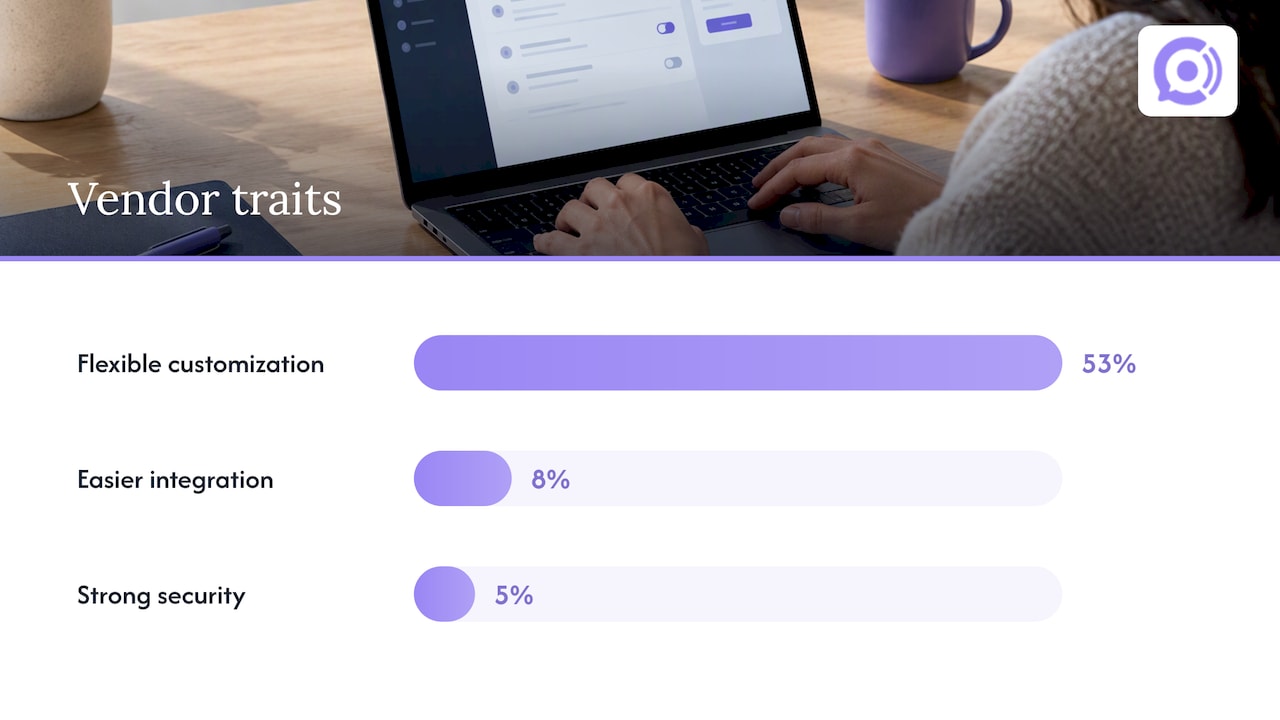
Vendors know this. In a CMSWire analysis of CX leaders, flexible customization was the top vendor trait for 53% of respondents, well ahead of easier integration (8%) and strong security (5%). The reason given is that agents must be trained on proprietary company data to give answers that fit the business.
So the question is not whether to customize. It is which settings change outcomes and which are decoration.
The five layers of AI support customization
| Layer | What you decide | Typical failure when skipped |
|---|---|---|
| Knowledge | Policies, FAQs, shipping and return rules | Outdated or contradictory answers |
| Voice and tone | Greeting, pace, vocabulary, how it handles frustration | Agent sounds robotic or off-brand |
| Order actions | What it can look up, and what it may change | Wrong status, unauthorized changes |
| Escalation | When and how a human takes over | Customers repeat themselves, or get stuck |
| Ownership | Who answers for the agent’s behavior | No one reviews calls or can switch it off |
Layer 1: Knowledge that stays small and current
The instinct is to upload everything. Resist it. Long knowledge bases slow retrieval and create conflicting answers, which on a phone call shows up as awkward pauses or wrong policy. We wrote up the reasoning in our guide to keeping a voice bot knowledge base under 200 FAQs.
A practical way to build it:
- Pull your last 100 support tickets or call notes and group them by question.
- Write one short answer for each of the top 30 to 50 questions, in the words a customer would hear spoken aloud.
- Put policy numbers in plain form: days, dollar amounts, carriers.
- Delete anything that depends on a promotion that has ended.
- Give one person the job of reviewing the list monthly.
Shipping and returns are where stores most often contradict themselves. Before calls go live, run through the three WooCommerce checks for shipping policy automation.
The knowledge layer is also where your team’s own skills matter. If humans and AI will both handle calls, practicing realistic scenarios helps both sides find gaps. AI role-play platforms for contact center practice let you rehearse difficult calls against configurable scenarios, which is a useful way to discover which answers your knowledge base is missing.
Layer 2: Voice and tone
On the phone, tone is mostly rhythm. Customers judge an agent in the first few seconds by how quickly it responds and whether it sounds like it is listening. Three settings carry most of the weight:
- Greeting. Say it is an AI assistant for your store, name the store, and offer a clear next step. This is also your disclosure (more on that below).
- Vocabulary. Use your own product and policy terms. If you say “store credit” and not “refund balance,” the agent should too.
- Handling frustration. Define what the agent says when a caller is upset: acknowledge, state what it can do, and offer a person quickly. Do not let it keep apologizing in a loop.
The training data behind a voice model matters here too. Agents tuned only on read speech tend to falter with interruptions and half-sentences, a problem we cover in why read speech falls short for voice bot training.
Layer 3: Order actions and guardrails
This is the layer where WooCommerce stores gain the most, and where mistakes cost real money. An agent connected to your store can read live order data through the WooCommerce REST API orders endpoint, which lets software view, create, update and delete orders. That power is exactly why you want boundaries.
Start read-only. A useful first version answers:
- Where is my order?
- What is in my order?
- What is your return policy, and does my order qualify?
Only after reviewing real calls should you allow actions that change something, and each action should have a rule attached: verify the caller first, limit amounts, and log the result. Our eight checks for a safer WooCommerce voice bot launch lists what we confirm before going live.
One warning from WooCommerce practitioners is worth repeating: many store owners never define what the AI should do when it lacks data, so the system fills the gap with a plausible-sounding answer. The remedy is a pre-set confidence threshold below which the agent says it does not have that information and moves to assist-only mode or a human handoff. Write that rule down before launch.
If callers might read out card numbers, treat that as its own risk. PCI DSS guidance for AI chatbots explains why payment interactions raise compliance questions. The simplest customization is to instruct the agent never to take card details by voice and to point callers to your checkout instead.
Layer 4: Escalation that does not make callers start over
American Express research reports that U.S. consumers want AI that enhances human interaction rather than replacing it, and it cites a 60% acceptance rate for AI using personal data for tailored recommendations, as long as empathy is kept. In practice, that means handoff is a feature, not a failure.
Define triggers in advance:
- The caller asks for a person, once.
- The agent’s confidence falls below your threshold.
- The topic is sensitive: a damaged high-value item, a billing dispute, a safety concern.
- The conversation loops after two attempts to resolve it.
Then define what the human receives: a transcript summary, the order number and what has already been tried. Nothing frustrates a customer more than repeating the story. Our escalation rules for AI to human handoff go into the details.
Layer 5: Ownership and review
Forrester analysts argue that the explicit designation of who is accountable for an AI agent matters as much as which model you pick, because it creates a clear chain of command for escalation and emergency shutdowns. For a five-person store, this can be one name: the person who reads flagged calls weekly and can pause the agent.
The broader principle is often called human-in-the-loop governance: AI speeds up search, drafting and routing, while people stay accountable for decisions and exceptions. Pair it with a review routine. Our guidance on call quality monitoring with AI triage shows how to sort calls so you read the risky ones first, not all of them.
What to disclose and record
The FTC’s AI guidance for businesses says companies should be transparent about AI chatbots, avoid misrepresenting what the AI can do, avoid using it to manipulate behavior such as inducing extra purchases or blocking cancellations, and protect privacy. Violations can bring fines, mandatory refunds or bans on marketing the AI service.
For your customization, that translates into three settings:
- The greeting states that the caller is speaking with an AI assistant.
- The agent never claims abilities it lacks, such as promising a refund it cannot issue.
- The agent does not push upsells or discourage cancellations.
If you record or transcribe calls, consent rules vary by state, so check the requirements where your customers live. We lay out a six-step compliance plan for support call recording. For legal questions specific to your business, talk to an attorney familiar with your state’s rules.
Our perspective: customize for the first month, not the first minute
We build Orphora AI voice agents for WooCommerce stores, and the pattern we see is consistent: store owners spend their energy on the voice and greeting and too little on the boring rules. We think that order is backward.
The things that protect your customers are narrow. Give the agent real-time order data. Give it a short knowledge base. Decide what it must never do. Decide when it steps aside. Those choices are what make an agent feel trustworthy, and the sound of the voice is secondary to them.
We also believe a store should launch smaller than it wants to. Start with order status and return questions, which are the repetitive calls that eat staff time, listen to the first batch of transcripts, and then widen the agent’s remit. Customization is a loop, not a setup screen. Our agents are built for small and mid-sized stores precisely because that loop has to be cheap enough to run every week.
— Orphora AI
Pricing your customized agent
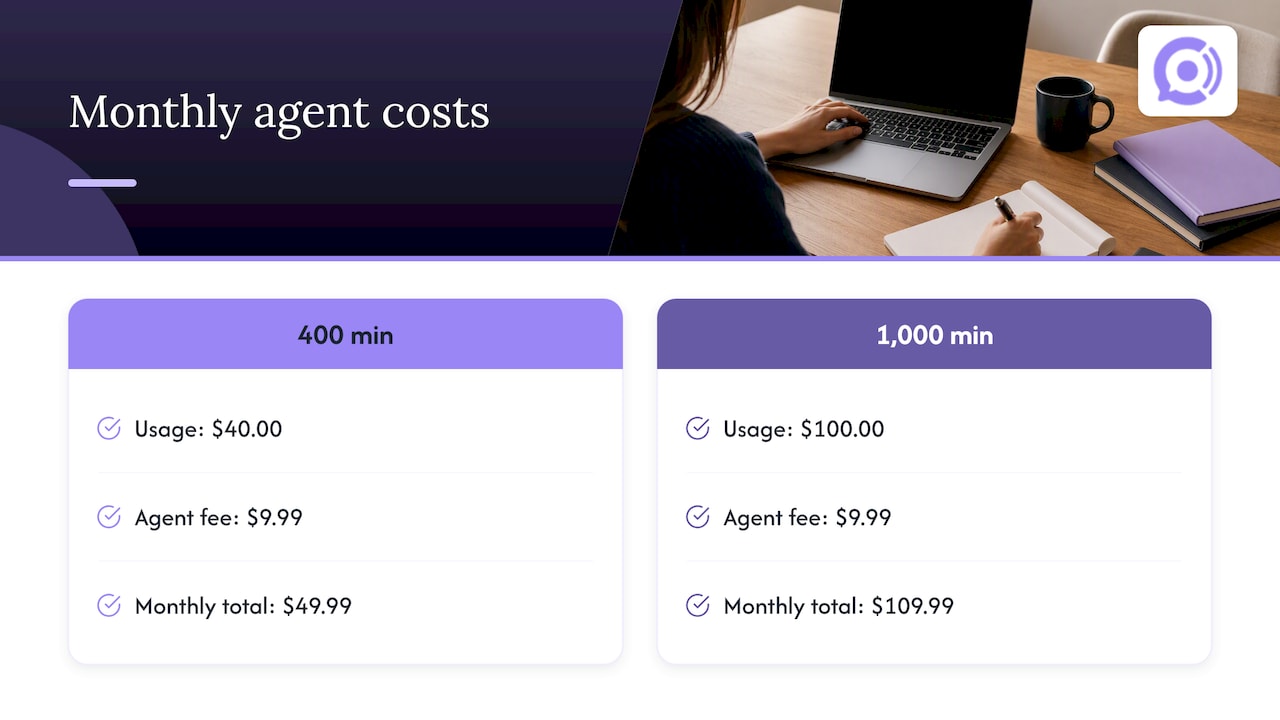
Customization has a cost side, and with voice it is mostly minutes. Orphora AI’s published pricing is $9.99 per month per agent and $0.10 per conversation minute. There is also an Enterprise plan with no published price.
Here is the arithmetic for a store that expects 400 minutes of calls in a month: 400 × $0.10 = $40.00 in usage, plus $9.99 for one agent, for $49.99 in total. At 1,000 minutes it would be $100.00 plus $9.99, or $109.99. Those are illustrations of the published rates, not quotes. To turn this into a payback estimate against your current support costs, use our seven-input AI voice ROI calculation.
Two customization habits keep minutes down: short, direct answers in the knowledge base, and a greeting that gets to the point.
Try it on your store
If you run WooCommerce and want to see these layers in practice, Orphora AI gives you a voice agent that reads real order data, can be customized to your policies and tone, and runs 24/7. Start with one agent on order status and returns, then expand from what the transcripts show.
A launch checklist
- Knowledge base of 30 to 50 spoken-style answers, reviewed by one named owner.
- Greeting that discloses AI and names your store.
- Read-only order access at launch, with action rules written before any are enabled.
- A confidence threshold and a handoff to a person with a transcript summary.
- No card numbers taken by voice.
- A weekly review of flagged calls for the first month.
- A named person who can pause the agent.
FAQ
What can I customize in an AI support agent?
The main settings are the knowledge base, greeting and tone, the order data the agent can access, the actions it may take, and the rules for handing off to a human. On Orphora AI you can customize agents and connect a knowledge base for your store. Start with knowledge and escalation rules, because they affect accuracy the most.
How long does a knowledge base need to be?
Shorter than most owners expect. For voice, we recommend staying under 200 FAQs, and a first launch works well with 30 to 50 answers covering your most common questions. Long, overlapping content slows retrieval and raises the chance of conflicting answers.
Do I have to tell callers they are talking to AI?
The FTC’s business guidance calls for transparency about AI chatbots and warns against misrepresenting what they can do. The safest approach is to say it in the greeting. For specific legal advice on your situation, consult an attorney.
Should the AI be allowed to change orders?
Not at first. Launch with read-only lookups for order status and return eligibility, review the transcripts, and then enable specific actions with verification and limits. Keep a human handoff for anything outside those rules.
Sources
- Ecommerce Support Response Time Statistics 2026, Stealth Agents
- Shoppers want AI-based customer service to improve, eMarketer
- What data tells us about the future of chatbots in CX, CMSWire
- WooCommerce REST API: Orders
- AI Chatbots for PCI DSS Compliance, Avahi
- Consumers Want Gen AI with Empathy, Personalization, and a Human Touch, American Express
- Agentic commerce and conversational commerce, Forrester
- Human in the loop AI governance for customer service, Customer Science
- Artificial intelligence, FTC business guidance