

Voicebot vs Chatbot: Which Fits Your WooCommerce Store?
Voicebot or chatbot for your online store? See how they differ on support, cost and customer experience, and how to pick or combine them for WooCommerce.


A chatbot answers customers in text on your website, app or messaging channels. A voicebot answers them out loud, on a phone call. For an online store, the practical choice comes down to where your customers already ask for help and what they ask. Shoppers browsing products tend to suit chat. Customers who pick up the phone, often with an order problem, suit voice. Most stores end up wanting both, with shared order data behind them.
This guide compares the two on the things a store owner pays for and feels: how each handles common questions, what customers experience, what it costs to run, and when to combine them.
TL;DR
- A chatbot is text-based and lives on your site or in messaging. A voicebot talks with customers by speech, usually over a phone line.
- Chat fits product discovery, links, images and quick text answers. Voice fits order-status questions and routine support from customers who would rather call.
- Neither works well without live access to order data. The bot that can look up the order wins, whatever the channel.
- Customers still want a human for complex problems, so build a clean handoff into whichever bot you choose.
- For WooCommerce stores, the sensible path is often to start with the channel where your support volume already is, then add the other.
Table of Contents
- What a chatbot and a voicebot actually are
- Voicebot vs chatbot at a glance
- Where each one earns its keep in an online store
- How customers experience each channel
- Handling common support questions
- Cost and operations: what to plan for
- 24/7 coverage without adding staff
- So which one should you choose?
- Perspective
- Putting a voice agent on your WooCommerce phone line
- FAQ
- Sources
What a chatbot and a voicebot actually are
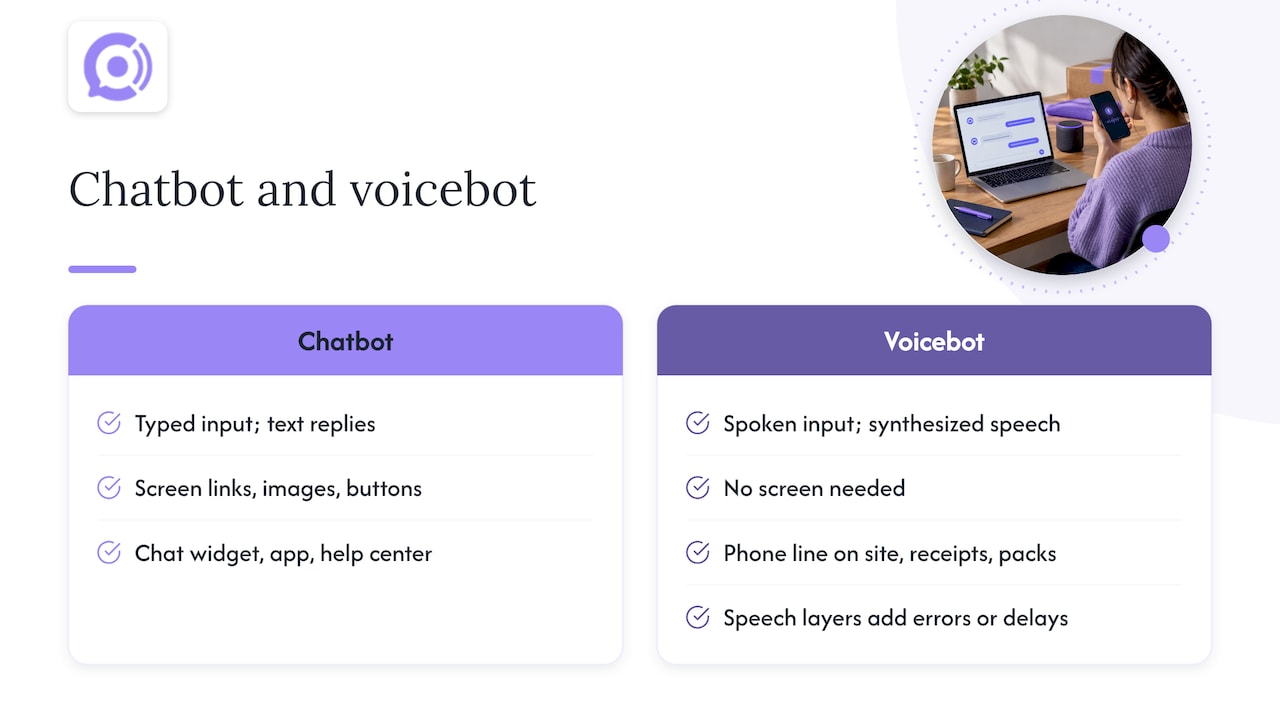
A chatbot reads typed messages and replies in text. It sits in a chat widget, a messaging app or a help center. Because the reply is on a screen, it can include product links, images, buttons and order-tracking links.
A voicebot listens to speech, works out what the caller wants, and answers in a synthesized voice. The caller never needs a screen. The usual place for it is the phone number printed on your site, receipts and packaging.
Under the hood, both need to understand intent and produce an answer. The difference is the layers around that. A voicebot has to turn speech into meaning and meaning back into speech, and a comparison of the two for e-commerce notes that speech recognition and synthesis can introduce errors or delays that a text bot does not face. That is the central engineering trade-off: voice is natural for the customer, but it is less forgiving of lag and misheard words.
Older phone systems made callers press numbers through menus. A modern voicebot replaces the menu with a conversation: “Where is my order?” instead of “Press 2 for shipping.” That is the shift most people mean when they talk about an AI voicebot today.
Voicebot vs chatbot at a glance
| Factor | Chatbot | Voicebot |
|---|---|---|
| Channel | Website widget, app, messaging | Phone call, smart devices |
| Input and output | Typed text, replies with text, links, images | Spoken words, replies with synthesized speech |
| Best for | Product discovery, comparisons, links, quick text answers | Order-status questions, returns, routine support by phone |
| Customer effort | Needs a screen and typing | Hands-free, no typing |
| Main technical risk | Misreading short or vague messages | Misheard speech, response lag |
| Showing information | Visual: pictures, tables, links | Audible only, so answers must be short and clear |
| Handoff to a person | Transcript passes to an agent easily | Needs call summary and context passed along |
The row that matters most for stores is “showing information.” A chatbot can send a size chart. A voicebot cannot, so it should not be asked to walk someone through a visual decision. It can, however, read out a tracking status or confirm a return in seconds.
Where each one earns its keep in an online store
What chatbots do well
Per the same e-commerce comparison, chatbots are suited to product search, comparisons, links, images, purchase guidance and order tracking. Think of a shopper deciding between two jackets. They want photos, a link to the size guide and a short answer on materials. Text does that better than speech ever will.
Chat also suits customers who are at their desk or on their phone but not in a position to talk: at work, on a train, in a shared space.
What voicebots do well
Voicebots suit voice-based product advice, order-status questions and routine support. The customers who call tend to be in one of three situations:
- They have an order that has not arrived and want an answer now.
- They are driving, cooking or otherwise busy, so typing is not an option.
- They are not comfortable with chat widgets, or find speaking faster than typing.
These are exactly the calls that drain a small team: “Where is my order?”, “How do I return this?”, “Did my refund go through?” They are repetitive, they depend on a single data lookup, and they arrive whenever customers feel like calling. We cover the tracking side in detail in stopping WISMO calls with order tracking automation.
Why order data matters more than the channel
A voicebot that cannot see the order is a fancy menu. A chatbot that cannot see the order is a FAQ page with a text box. In both cases the customer ends up repeating themselves to a human. The question to ask any vendor is not “voice or chat?” but “what can the bot look up, and what can it do with it?” For WooCommerce stores that means order status, shipping details, return eligibility and customer history, pulled live.
How customers experience each channel
Customer experience is where the debate gets emotional, so it helps to anchor on what is measured.
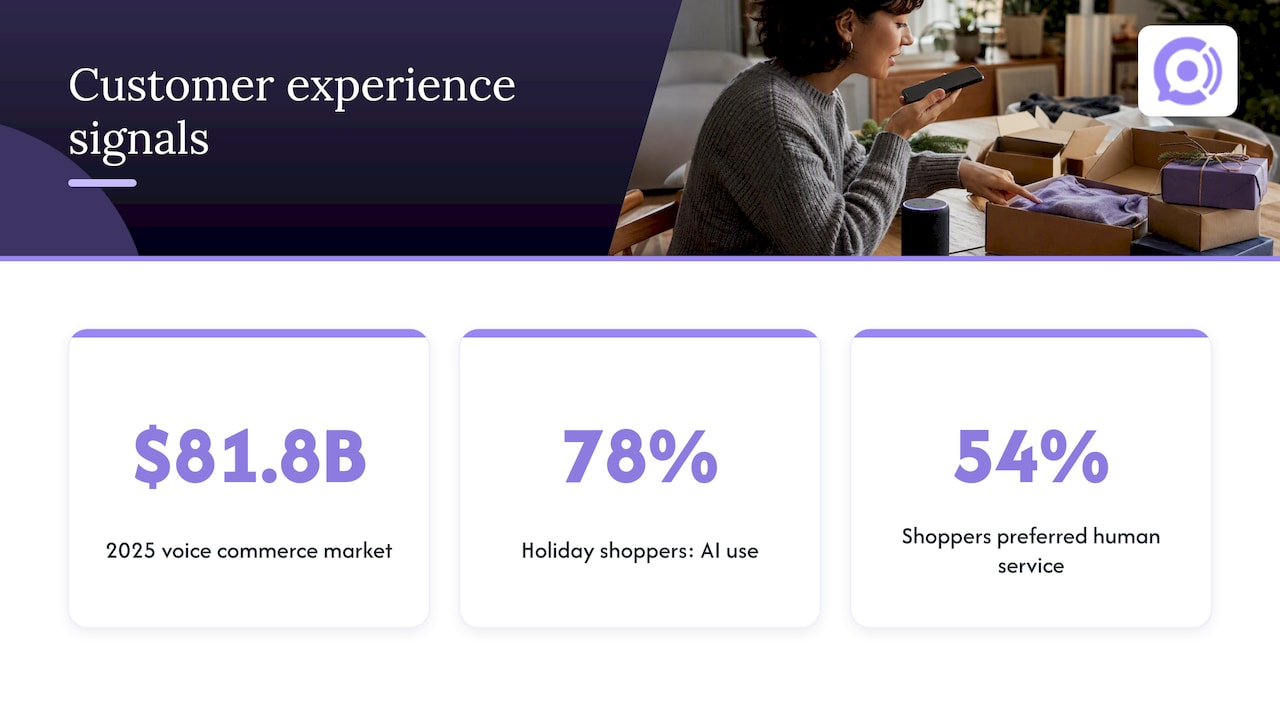
Voice shopping is no longer a fringe habit. One accessibility-focused company reports that the voice commerce market is reaching $81.8 billion in 2025, with nearly half of U.S. consumers shopping by voice. Treat that as a signal of comfort with speaking to technology, not as a forecast for your store.
The same company argues that voice should not be seen only as a convenience feature, since its roots in accessibility tools mean that designing for everyone drives both inclusivity and measurable business results. For a store, that is a practical point: a phone line answered by a competent voicebot serves customers who cannot easily use a chat widget, including people with visual impairments or limited dexterity, and people who simply prefer to talk.
Then there is the caution. In a survey of U.S. adults who completed most or all of their 2025 holiday shopping, 78% interacted with AI, yet 54% said humans provided better service than AI. The report’s authors conclude that consumers still expect humanity to lead when complex issues arise.
Read that honestly: customers use AI, and they accept it for simple things. They want a person when the problem is messy. That is not an argument against either bot. It is an argument for designing the handoff well, which we walk through in our rules for AI to human escalation.
Designing for the medium
A voicebot is not a chatbot with a microphone. Speech is ephemeral: the caller cannot scroll back. Answers need to be short, one idea at a time, with confirmation of key details (“I found order 4821, shipped Tuesday. Is that the one?”). Callers also interrupt, hesitate and say things in unpredictable order. Training matters here, and read-aloud scripts do not capture how people really talk, which is the subject of our piece on why read speech falls short for voice bot training.
Chat has its own craft: short messages, clear buttons, and a visible way to reach a person. But the failure modes are milder. A typo is easier for software to handle than a mumbled order number over a bad cell connection.
Handling common support questions
Here is how the two compare on the questions that fill a store’s inbox and phone line.
| Question | Chatbot | Voicebot |
|---|---|---|
| Where is my order? | Returns status and a tracking link | Reads status aloud; the caller may want it texted afterward |
| How do I return this? | Shows policy, starts a return, links to a label | Explains the steps and confirms eligibility by voice |
| Which product should I buy? | Strong: images, comparisons, links | Limited to spoken advice |
| Wrong item or damaged item | Collects photos easily | Collects the description; photos need a follow-up channel |
| Discount or code problem | Customer can paste the code | Customer has to read out a code, a common error point |
That last row is worth a pause. Spoken letters and digits are where voice systems stumble most: order numbers, email addresses, promo codes. If you are evaluating a voice agent, test those exact cases before launch. Our write-up on testing orders, returns and codes against benchmarks shows how, and the pre-launch testing playbook turns it into a checklist for WooCommerce.
Cost and operations: what to plan for
Both bot types change your cost structure, but in different ways.
Chatbots usually sit on top of your website and knowledge base. Setup is mostly content: product data, policies, FAQs. They add a channel without adding a phone line.
Voicebots add telephony. You need a phone number, call routing, and a plan for what happens when the bot cannot help. Pricing often follows call minutes, which makes costs track your call volume.
With that in mind, here is how we price ours, as published on our site: an AI voice agent is $9.99 per month per agent, and conversation minutes are $0.10 per minute. As simple arithmetic on those two numbers, one agent handling 300 minutes of calls in a month would come to $39.99 (the $9.99 subscription plus $30.00 in minutes), and 1,000 minutes would come to $109.99. Your own total depends on call length and volume. Our guide to calculating WooCommerce payback with seven inputs shows how to plug in your own numbers.
Operational requirements to plan for, whichever you choose:
- Data access. Connect the bot to live order and customer data, or it will only answer generic questions.
- A knowledge base. Returns policy, shipping times, warranty terms. The bot is only as accurate as what it is given.
- Guardrails. Decide what the bot may do on its own (look up status) and what needs a human or a verification step (refunds, address changes).
- Escalation. A defined path to a person, with the conversation summary passed along so the customer does not start over.
- Testing and monitoring. Review transcripts and call analytics after launch, not just before.
For a store launching voice, eight checks for a safer WooCommerce voice bot launch covers the list in more depth.
24/7 coverage without adding staff
Both bot types can answer at any hour, which is their obvious operational advantage over a small team. A customer in a different time zone, or one who finds a problem at 11 p.m., gets an answer instead of a voicemail.
The difference is where the after-hours demand lands. If your customers write in, a chatbot catches it. If they call, and many order-problem customers do, only a voice agent answers the phone. Scaling also differs: a voicebot can take several calls at the same time, where a single staffer takes one. That is the logic behind our own claims of faster responses and higher satisfaction. We state an 85% faster response time and a 95% satisfaction rate for Orphora AI as our own figures, and we encourage every store to measure its own results in a pilot rather than rely on anyone’s averages.
So which one should you choose?
Use these criteria rather than a gut feeling.
Start with chat if:
- Most of your support requests arrive through your site and are about products, sizing or comparisons.
- Your customers need to see images, links or tables to decide.
- You do not publish a phone number, or hardly anyone calls it.
Start with voice if:
- Your phone line is busy with repeat questions about orders, shipping and returns.
- Callers get voicemail after hours, or wait on hold.
- Your customers skew toward people who prefer to talk, such as older shoppers or those buying on the go.
- You run a lean team and every call that interrupts the owner costs real time.
Use both if:
- You have meaningful volume on both channels and can share one knowledge base and one source of order data.
The e-commerce comparison we cited earlier recommends the same split: chatbots for product visuals, links, discovery and quick text answers, voicebots for voice-based advice or support, with the channels integrated and staff given customer data and conversation history so context carries over. That last point is the one most stores miss. If a customer chats in the morning and calls in the afternoon, the second conversation should not begin from zero. Our piece on omnichannel support and order context explains how shared context reduces repeat contacts, and routing chat versus phone support by issue type helps you decide which problems go where.
A practical way to decide: pull a month of support tickets and call logs, and tag each contact by type and channel. If order-status and return questions dominate the calls, voice will pay back first. If product questions dominate the chats, a chat assistant will.
Perspective
We built Orphora AI around a simple observation: when a store’s customers pick up the phone, they usually have an order question, and they want the answer now, not a menu and not a callback.
That is why we focused on voice, and on WooCommerce specifically. Our agents read real-time order and customer data, so a caller asking about a shipment gets the status of their shipment, not a generic policy. We designed conversations to flow naturally without speech-to-text lag, and we add guardrail workflows so that actions on orders follow rules you set.
We do not think of voice and chat as rivals. A store that already has a way to handle text can add a voice agent to cover the channel where urgency lives. For small and mid-sized stores that cannot staff a phone line around the clock, we think voice is the channel where an AI agent changes the most about daily operations.
Orphora AI
Putting a voice agent on your WooCommerce phone line
If your calls are mostly order status, returns and shipping questions, an AI voice agent is built for that work. Orphora AI connects to WooCommerce, looks up orders in real time, answers by phone around the clock, and records calls with transcripts and analytics so you can see what customers ask. Pricing is published: $9.99 per month per agent plus $0.10 per conversation minute, and an Enterprise plan is available without a published price.

See how it works on our features page, or start from orphoraai.com to set up an agent. For background on the wider picture, our guide to AI customer service for e-commerce is a good next read.
FAQ
Is a voicebot the same as a chatbot?
No. A chatbot works in text on a website, app or messaging channel. A voicebot works by speech, usually on a phone call. They can share the same knowledge base and the same order data, but each is designed for its own medium.
Are voicebots better than chatbots for customer service?
It depends on the question and the customer. Voicebots suit order-status and routine support from people who prefer to call. Chatbots suit product discovery and anything that benefits from images or links. Many stores find the strongest setup uses both.
Can a voicebot replace my support team?
It can take over the repetitive calls, such as order status and return steps, so your team spends time on harder cases. Customers still expect a person for complex issues, so set up a clear handoff that passes the conversation context along.
What does a voicebot cost for a small store?
That depends on the vendor and your call volume. With our published pricing of $9.99 per agent per month and $0.10 per minute, 300 minutes of calls in a month would total $39.99 for one agent. Use your own call logs to estimate your minutes.
What should I test before launching a voicebot?
Test the cases that go wrong most often: order numbers, email addresses, promo codes, accented or fast speech, and interruptions. Also test the escalation path, so a caller who needs a person reaches one without repeating the story.
Sources
- Chatbot vs voicebot for e-commerce? | Firmbee
- Voice Commerce Is No Longer a Niche Channel | accessiBe
- Voice Commerce: Accessibility to eComm Must-Have | accessiBe
- The Liveops 2025 Holiday AI & Customer Service Report