

How to Reduce Support Costs in an Ecommerce Store
A practical guide for WooCommerce store owners: measure cost per contact, cut repeat order questions, automate after-hours calls and track whether savings hold.


The fastest way to reduce support costs in an ecommerce store is to stop paying people to answer the same few questions. Order status, shipping times and returns usually make up the bulk of contacts. Put that information where shoppers look, automate the answers that need only an order lookup, and keep your people for the conversations that need judgment. Do that, then measure cost per contact and satisfaction together so you know the savings are real.
This guide is written for WooCommerce owners and ecommerce managers who run lean teams. It walks through what your support actually costs, where avoidable contacts come from, what to automate, and how to check the result.
TL;DR
- Work out your cost per contact first: total support spend divided by contacts handled in the same period. You cannot cut what you have not measured.
- Most avoidable contacts are “where is my order?” and returns questions. Clear policy pages, tracking emails and self-service stop many of them before they reach a person.
- Phone and after-hours coverage is where labor costs climb fastest. A voice agent with live order access can take routine calls without adding headcount.
- Track first-contact resolution, repeat contacts and customer satisfaction next to cost. A cheaper contact that needs a second contact is not a saving.
- Keep a clear handoff to a human for refunds with exceptions, damaged goods and upset customers.
Table of Contents
- What your support actually costs
- Find the contacts you can avoid
- Fix the information problem first
- Decide what to automate and what to keep human
- Cover calls and after-hours without hiring
- Measure whether the savings are real
- A 30-day plan
- Our perspective
- Put a voice agent on your phone line
- FAQ
- Sources
What your support actually costs
Most small stores underestimate support spend because it hides in several places. The obvious line is payroll. The rest is help desk software, a phone line, training time, the owner’s own hours spent answering email at night, and the cost of tools that do not talk to each other.
A useful starting point is wages. The U.S. Bureau of Labor Statistics reports a median hourly wage of $21.53 for customer service representatives in May 2025. That is pay only. Payroll taxes, benefits, software seats, supervision and downtime come on top, so the real hourly cost of a staffed seat is higher than the wage.
A short list of what to add up for one month:
- Salaries or contractor invoices for everyone who answers customers, including the share of your own time
- Help desk, live chat and phone subscriptions
- Outsourced or overflow support fees
- Training and onboarding for new agents
- Refunds and goodwill credits caused by slow or wrong answers
How to calculate cost per contact
The standard formula is simple: divide total support costs by the number of contacts received in the period. Contacts means every email, chat and call, not only the ones that became tickets.
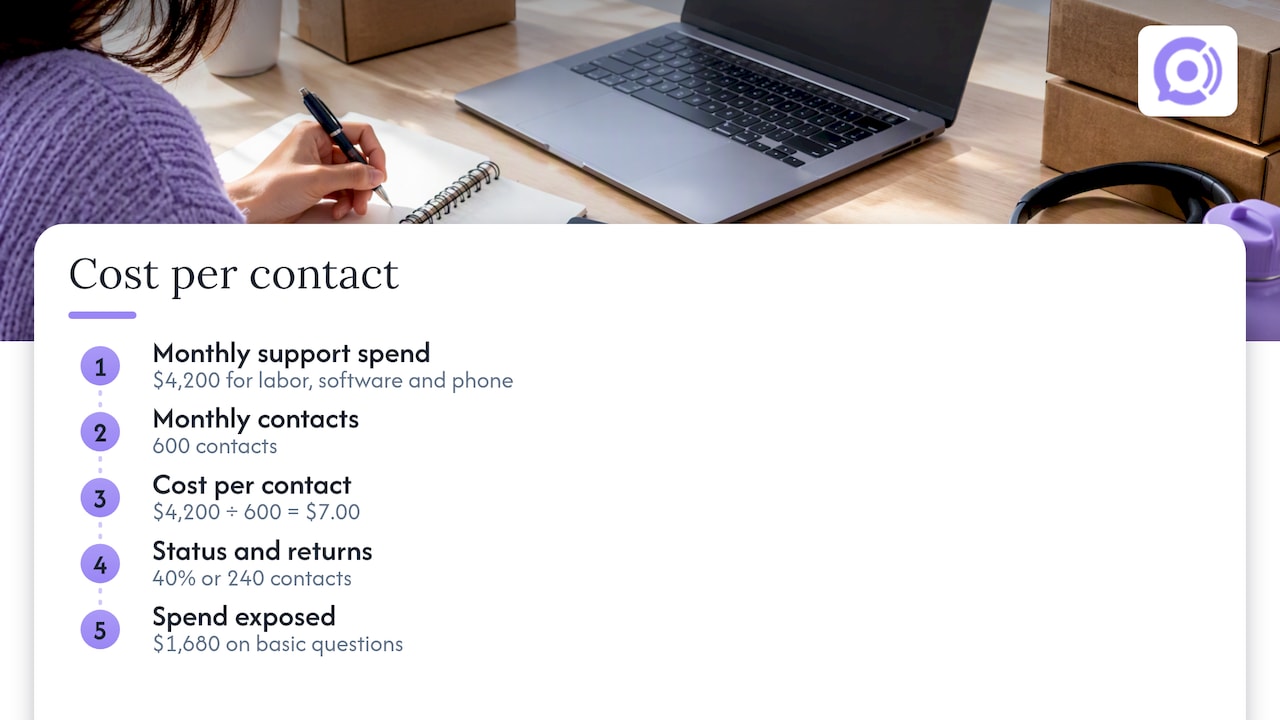
Here is an illustrative example, not a benchmark. A store spends $4,200 in a month on support labor, software and phone service, and receives 600 contacts. Cost per contact is $4,200 / 600 = $7.00. If 40% of those contacts, or 240, are order status and basic returns questions, then roughly $1,680 of the month’s spend goes to questions that need nothing more than a lookup.
That last number is your opportunity. It is not a promised saving, but it tells you how much spend is exposed to automation and how much effort is worth putting into it.
Find the contacts you can avoid
Before you buy anything, tag one month of contacts by reason. A spreadsheet is enough. Most stores see the same pattern: a handful of reasons account for most of the volume.
Typical categories for a WooCommerce store:
- Order status and tracking
- Shipping cost and delivery time before purchase
- Return and exchange policy
- Return status and refund timing
- Address or order changes
- Damaged or wrong items
- Product questions
Categories 1 to 4 are mostly informational. They have a correct answer sitting in your order data or policy pages. Categories 5 and 6 need rules and sometimes judgment. Category 7 often benefits from a human, or from a well-built knowledge base.
Fix the information problem first
The cheapest contact is the one that never happens. Research from Nielsen Norman Group on ecommerce customer service finds that finding information quickly is less expensive than contacting the company for help, and that shoppers expect service information at the right time and place. Discoverability is a cost control.
Make shipping and returns easy to find
Baymard Institute found that 20% of ecommerce sites lacked a simple footer link to shipping and return information, even though shipping cost, delivery timing and return policy are central customer questions. Check your own store:
- Separate footer links for shipping and returns, not one buried “Policies” page
- Delivery estimates on the product page and in the cart
- A returns page that states the window, the condition required and who pays for postage
- Policy text in plain language, with the three or four most common edge cases answered
Our guide on shipping policy automation for WooCommerce covers the checks worth making before an automated channel starts quoting your policy to customers.
Answer “where is my order?” before it is asked
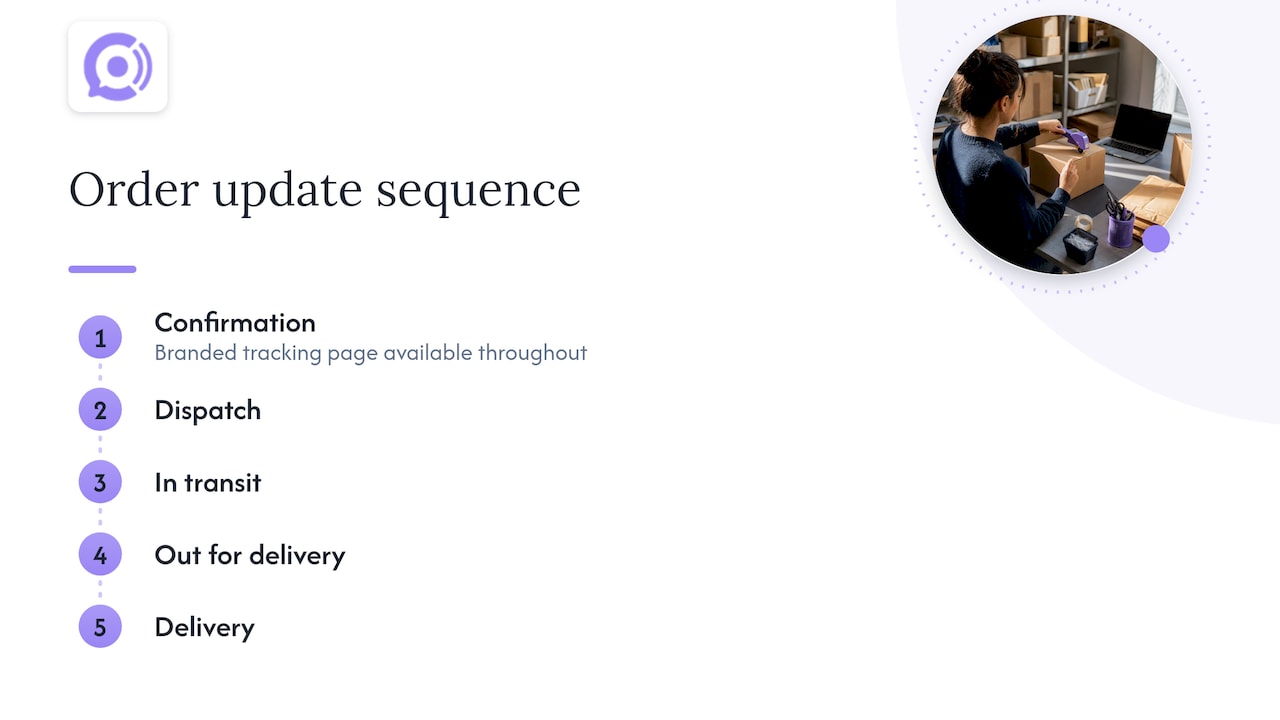
Delivery uncertainty is the classic avoidable contact. Ecommerce logistics firm Elogy recommends confirmation, dispatch, in-transit, out-for-delivery and delivery notifications, plus branded tracking pages, so customers have an answer before they think to ask. Plain language matters as much as frequency: “Your parcel left our warehouse today and usually arrives in 3 to 5 business days” prevents more contacts than a raw carrier code.
If you want the full playbook for this one category, see how to stop WISMO calls with order tracking automation.
Build a short, findable FAQ
Ryder’s guidance on self-service recommends FAQs that are easy to find, concise, organized by categories such as returns, payment and shipping, and paired with escalation options. Build yours from your tagged contact data, not from guesses. Start with the top five reasons and write each answer in under 100 words.
Decide what to automate and what to keep human
Self-service content does not catch everyone. Some shoppers want to call, and phone contacts tend to be the most expensive because they take a live person’s full attention. Our comparison of chat and phone support argues for routing by the type of issue rather than by what is cheapest to staff, and that is the right frame here.
Good candidates for automation
Automate when the answer comes from data you already hold and the rules are clear:
- Order status and estimated delivery
- Tracking number and carrier
- Return eligibility and how to start a return
- Shipping methods, costs and cut-off times
- Store hours, contact details and policy summaries
Keep these with a person
- Damaged, missing or wrong items where the customer is upset
- Refund exceptions outside your stated policy
- Fraud concerns and chargeback threats
- High-value or wholesale orders
- Anyone who asks for a human, at any point
Write the handoff rule down before you launch anything: which phrases or situations trigger a transfer, who receives it, and what context travels with it. A customer who repeats their order number to a second agent has had a worse experience than one who never used automation.
Cover calls and after-hours without hiring
Staffing for nights, weekends and peak season is where support budgets balloon. Ryder’s guidance is to use self-service tools such as FAQs, chatbots, real-time order tracking and self-service returns, with escalation options, so queries can be answered when live chat is not staffed around the clock.
Phone is the gap in that list. A chatbot does nothing for the shopper who dials your number at 9 p.m. A voice agent connected to your store fills that gap. It answers the call, looks up the order in real time and gives the status or starts the return steps, with no hold queue.
Our article on scaling customer support without scaling headcount goes deeper on the staffing math, and the one on AI customer service for ecommerce covers the wider landscape of tools.
A worked example with voice
This is an illustration using our published pricing, not a forecast. Suppose a store receives 400 phone calls a month and the average call lasts 4 minutes. That is 1,600 minutes.
| Item | Calculation | Monthly cost |
|---|---|---|
| One AI voice agent | $9.99 per agent per month | $9.99 |
| Call usage | 1,600 minutes at $0.10 per minute | $160.00 |
| Total | $169.99 |
For comparison, 1,600 minutes is about 26.7 hours of live talk time. At the BLS median wage of $21.53 an hour, that is roughly $574 in wages alone, before taxes, benefits, idle time between calls and software. Real call volumes, call lengths and the share of calls an agent resolves without a person will differ in your store, so run the same math with your own figures.
Measure whether the savings are real
Cutting cost per contact while customers get angrier is a false economy. Track cost next to quality from the first week.
Shopify’s omnichannel guide recommends tracking CSAT, customer-effort score, first-contact resolution, average handling time, deflection, resolution time and repeat-contact rate. For a small store, five are enough:
| Metric | What it tells you | How to calculate |
|---|---|---|
| Cost per contact | Whether unit cost is falling | Total support cost / contacts |
| First-contact resolution | Whether answers stick | Contacts resolved in one interaction / total contacts x 100 |
| Repeat-contact rate | Whether people come back for the same issue | Customers contacting twice or more on one issue / total contacts |
| CSAT | Whether customers are happy | Post-contact survey score |
| Share handled without a person | How much volume is automated | Automated resolutions / total contacts |
Watch repeat contacts closely. If order context is missing, customers bounce between channels and your volume rises even as each contact looks cheap. We explain this in how order context reduces repeat contacts.
For phone specifically, response speed matters too. Our notes on service level for calls and reducing response time in ecommerce support show how to set targets.
A caution on old benchmarks: you will see per-contact figures such as $8.01 for live channels versus about $0.10 for self-service, cited from a 2019 Gartner poll. They come from a service desk context, not ecommerce, and are years old. Treat them as a sense of scale and rely on your own numbers.
A 30-day plan
- Week 1: Tag every contact by reason and total your support costs. Calculate cost per contact.
- Week 2: Fix the information gaps: footer links, delivery estimates, a short FAQ, plain-language shipping emails.
- Week 3: Choose the two or three reasons that are pure lookups and automate them, including the phone line if calls are a large share.
- Week 4: Review first-contact resolution, repeat contacts and CSAT against week 1. Adjust handoff rules and knowledge base answers.
If you run WooCommerce and want to see the options for connecting phone support to your store, our overview of four WooCommerce phone paths to test is a good next step. And once calls are automated, AI triage for call quality monitoring helps you review a sample without listening to everything.
Our perspective
Most support cost advice tells store owners to train agents better or squeeze their software bill. Those help at the edges. The bigger lever is that the majority of calls an online store gets are lookups: where is my order, can I return this, when will it arrive.
We built Orphora AI for exactly that pattern. Our voice agents connect to WooCommerce, read order and customer data in real time and answer in a natural voice without a speech-to-text delay, so the caller gets an answer rather than a menu. You set guardrail workflows for order actions, customize the agent and connect your knowledge base, and every call is recorded with a transcript and analytics so you can see what customers actually ask.
We think small and mid-sized stores should not have to choose between answering every call and keeping payroll under control. Pricing is usage-based on purpose: you pay for the minutes your customers actually use, not for seats that sit idle overnight.
Orphora AI
Put a voice agent on your phone line
Our AI Voice Agent costs $9.99 per month per agent, plus $0.10 per conversation minute. It answers calls around the clock, looks up orders in your WooCommerce store and helps with returns and shipping questions. An Enterprise plan is available for larger needs. Look at the details and set up your first agent at Orphora AI.

FAQ
What are support costs?
Support costs are everything you spend to help customers after and before a sale: agent pay, help desk and phone software, training, outsourcing fees and your own time. Add them for a month and divide by contacts to get cost per contact. Include refunds and credits that result from slow or wrong answers.
What is an example of a customer support cost reduction?
A common one is moving order status questions out of email and phone queues. A store that sends proactive tracking updates and answers status calls with an automated agent removes the most repetitive contacts from its agents’ day. Measure the result with cost per contact and repeat-contact rate before and after.
Will automation hurt customer satisfaction?
Not if it is used on questions with clear answers and a fast route to a person for everything else. Track CSAT and first-contact resolution alongside cost, and review recorded conversations in the first weeks. If satisfaction drops on a category, tighten the handoff rule or move it back to staff.
How do I handle after-hours support cheaply?
Combine self-service pages, tracking notifications and an automated channel for the calls and chats that arrive when nobody is working. Reserve a next-morning queue for cases that need a human. This covers nights and weekends without extra shifts.
Sources
- Customer Service: E-commerce UX, Nielsen Norman Group
- Have Direct Links to Returns and Shipping Info, Baymard Institute
- Customer self-service: Why it matters + 8 tips, Ryder
- Cut e-commerce support costs while boosting customer satisfaction, Elogy
- Customer Service Representatives, U.S. Bureau of Labor Statistics
- Support Cost per Contact: Formula and Benchmarks, Count
- Omnichannel Customer Service, Shopify
- 5 Key Service Desk Reporting Metrics, TOPdesk