

Ecommerce Call Analytics: Metrics, Setup and Privacy
Learn what ecommerce call analytics measures, which metrics to track, how to attribute calls to marketing, and how to handle US recording consent.

Ecommerce call analytics turns your phone conversations into data: why customers call, how fast you answer, whether the problem gets solved, and which marketing brought the call. For a WooCommerce store, the useful version ties each call to an order, so you can see which questions repeat and which ones you can stop answering by hand.
This guide covers what to measure, how to calculate it, how to connect calls to marketing channels, and what US stores need to handle around recording and customer data.
TL;DR
- Call analytics records, transcribes and categorizes calls so you can see reasons, outcomes, and trends instead of guessing from a few memorable conversations.
- Track five core numbers together: first contact resolution, average handle time, cost per contact, customer satisfaction, and service level. Improving one in isolation can hurt another.
- Contact rate (support contacts per order) tells you whether your store creates avoidable questions. Segment it by reason, not just in total.
- Call attribution links a call to the ad, page, or campaign that produced it. It has real blind spots, so treat it as directional.
- In the US, recording rules vary by state. Announce recording at the start of every call and follow the strictest rule that could apply.
Table of Contents
- What ecommerce call analytics actually is
- How the data gets produced
- The metrics worth tracking
- Contact rate: the benchmark question
- Using call analytics to cut repetitive work
- Call attribution: connecting calls to marketing
- US privacy and recording: what to put in place
- Perspective: why analytics should start with the call itself
- Choosing a call analytics setup for a WooCommerce store
- Orphora AI for WooCommerce call analytics
- FAQ
- Sources
What ecommerce call analytics actually is
Call analytics is the practice of capturing call data (recordings, transcripts, timestamps, outcomes) and analyzing it for patterns. The top-ranking explainers on the topic describe the same core idea: collect call data, run it through speech-to-text and classification, then report on it.
In ecommerce, the calls look different from a sales-led business. Most are not buying decisions. They are post-purchase questions: where is my order, how do I return this, why was I charged twice, can I change the address. That shapes what you should measure.
There are two families of call analytics, and stores often confuse them:
- Support analytics. What did customers call about, was it resolved, how long did it take, how did they feel afterward.
- Marketing and sales analytics. Which ad, keyword, or page drove the call, and did it end in an order.
Most stores need the first family before the second. Support calls are higher volume and the savings are easier to measure.
How the data gets produced
A typical pipeline has four steps:
- Capture. The call is recorded, or an automated agent handles it and logs the full exchange.
- Transcribe. Audio becomes text, with timestamps and speaker labels.
- Classify. Each call gets a reason tag (order status, return, damaged item, billing, product question) and an outcome (resolved, escalated, abandoned).
- Join. The call is matched to a customer and order record, so you can see order value, shipping status, and past contacts next to the conversation.
The fourth step is where ecommerce differs from generic tools. A transcript that says “my package never came” is a small insight. A transcript matched to an order shipped nine days ago with no carrier scan is a process problem you can fix.
AI is changing the scale here. GoDaddy described how it built an interaction analytics system that analyzes thousands of support interactions to find friction in products and websites and to size the cost of that friction. You do not need that scale. A store with a few hundred calls a month gets value from the same approach, because the top three reasons usually account for most of the volume.
The metrics worth tracking
One ecommerce-focused guide names five headline KPIs: first contact resolution, average handle time, cost per contact, customer satisfaction, and service level, and it stresses reading them together because improving one can damage another. The definitions below follow that guide.
| Metric | Formula | What it tells you |
|---|---|---|
| First contact resolution (FCR) | Issues resolved on first contact ÷ total contacts × 100 | Whether customers get fixed answers or have to call back |
| Average handle time (AHT) | (Talk time + hold time + after-call work) ÷ calls handled | How much effort each call takes |
| Cost per contact | Total support cost ÷ total contacts | What each conversation costs you |
| Customer satisfaction (CSAT) | Satisfied responses ÷ total responses × 100 | How customers rate the experience |
| Service level | Calls answered within your threshold ÷ calls offered × 100 | Whether people reach you fast enough |
Why you read them together
Push AHT down and agents rush, so FCR drops and callers phone again. Push FCR up and calls get longer, so cost per contact climbs. This is why a dashboard with one headline number misleads. Pick a target for each and watch for trade-offs.
Average speed of answer is the practical companion to service level. If you want the formula and how to set a realistic target, see our guide to average speed of answer.
Metrics specific to ecommerce
Beyond the standard five, add these:
- Calls by reason. The single most useful cut. Order status, returns, and shipping changes typically dominate for online stores.
- Repeat contact rate. The share of customers who contact you again about the same order. High repeat rates point to unclear answers or missing order context. Our piece on omnichannel support and order context covers how to reduce them.
- Self-service or automation rate. The share of calls resolved without a person. See self-service rate for the formula.
- Escalation rate and reason. How often a call moves to a human and why. Done well, the customer should not have to repeat themselves, which we cover in AI to human escalation rules.
- Abandoned and missed calls. Calls that ring out or hang up before an answer, especially after hours.
Contact rate: the benchmark question
Contact rate answers a different question from the metrics above. Instead of asking how well you handle calls, it asks how many calls your store generates.
The simplest definition: total support contacts divided by total orders in the same period. Some teams divide by active customers instead. Either works if you pick one and keep it consistent. Multiply by 100 to express it as contacts per 100 orders.
Worked example. You shipped 1,200 orders in a month and received 96 phone calls, 60 emails and 24 chats. That is 180 contacts, or 15 per 100 orders. Phone alone is 8 per 100 orders.
A few cautions about benchmarks:
- Published averages mix channels, product types, and order sizes. A store selling apparel with size exchanges will not look like one selling consumables.
- Your own trend beats someone else’s average. If your rate was 9 per 100 orders last quarter and is 6 now, that is progress regardless of any industry figure.
- Total contact rate hides the cause. Split it by reason and you will often find that one or two avoidable reasons, such as missing tracking updates, drive most of it.
What moves the rate up: late or silent shipping, confusing return policies, unclear product pages, and checkout errors. What moves it down: proactive shipping notifications, self-serve order lookup, and clear policies on the order confirmation page.
Using call analytics to cut repetitive work
The payoff of analytics is deciding what to stop doing manually. A reasonable routine:
- Tag a month of calls by reason. Even a manual sample of 100 calls gives you a ranking.
- Find the top three. For most online stores, this is where-is-my-order, return initiation, and address or order changes.
- Ask whether each is a data lookup or a judgment call. Order status is a lookup. A damaged high-value item may need judgment.
- Automate the lookups. Send tracking links, publish clear return steps, or put an automated agent on the phone line.
- Re-measure. Check reason volumes and CSAT the next month.
Order-status questions in particular are fixable. We break down the tactics in stopping WISMO calls with order tracking automation.
Quality monitoring is the other use. Instead of listening to a random handful of calls, analytics can flag calls with negative sentiment, long silences, or repeated transfers for review. We cover that approach in call quality monitoring with AI triage.
Call attribution: connecting calls to marketing
Call attribution links a phone call to the source that produced it: a paid ad, an organic search, an email, a specific page. The usual mechanism is dynamic number insertion, where visitors from different sources see different tracking numbers on your site, so an incoming call can be matched to the visit.
For ecommerce, this matters mainly when phone is a real sales channel: high-consideration products, custom orders, wholesale inquiries, or customers who call before buying. If your phone line is almost entirely post-purchase support, attribution adds little. Start with support analytics.
If you do run ads that drive calls, the practical setup steps are covered well in a guide to call tracking for marketing, and a separate walkthrough explains call tracking setup and optimization for ad campaigns.
Limitations to plan for
- Offline gaps. A customer who sees an ad, then calls the main number a day later, will not be matched to the ad.
- Multiple touches. A caller may have clicked three campaigns. Last-touch attribution credits only one.
- Order matching. A call that leads to an order placed later on the site needs a customer identifier to connect the two.
- Number management. More tracking numbers mean more to maintain, and displaying the wrong one hurts local trust signals.
Use attribution to compare channels directionally. Do not use it to make fine budget calls from small call counts.
US privacy and recording: what to put in place
This is the part stores skip and regret. Analytics depends on recording and transcribing, and recording rules in the US are set at the state level.
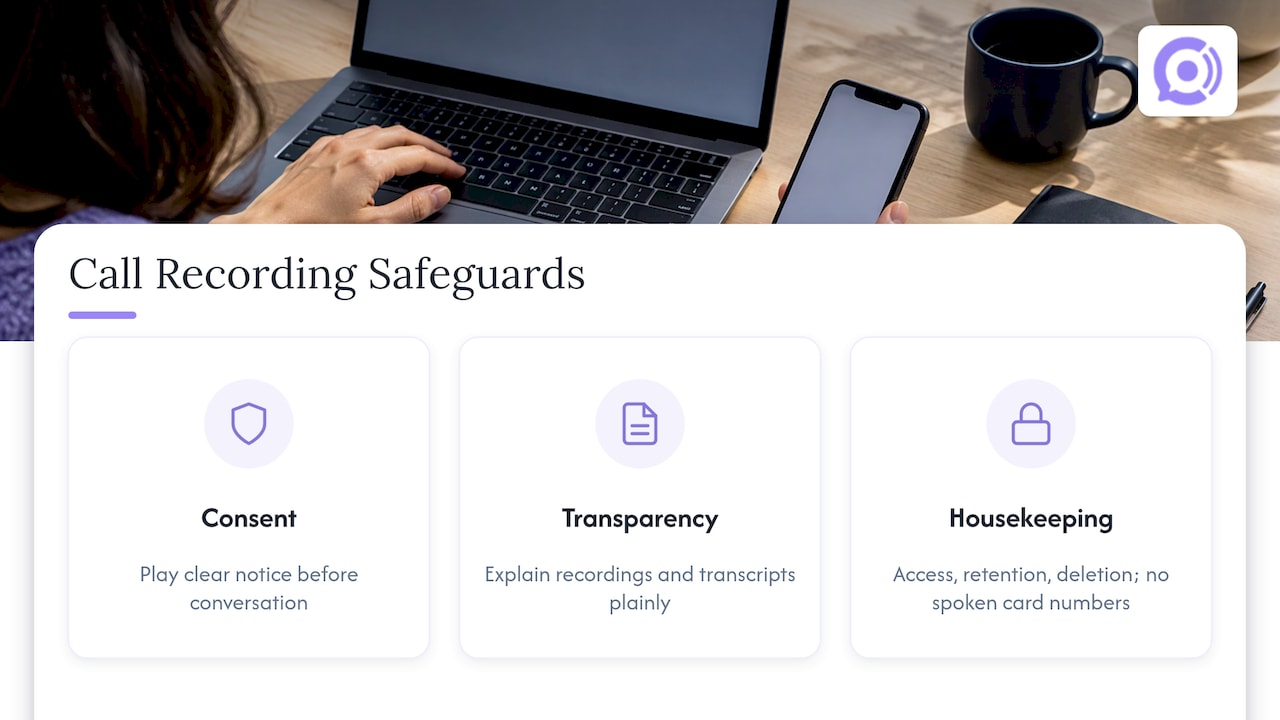
Consent. Some states require only one party’s consent to record, others require everyone on the call to agree. Because phone calls cross state lines, more than one state’s recording law can apply to a single call, and the Reporters Committee recommends following the most restrictive rule that could apply or getting everyone’s consent. The practical approach for a store serving customers nationwide: play a clear recording notice at the start of every call, before any substantive conversation.
Transparency. The FTC has recommended building privacy protections in from the start and explaining how data is collected, used and shared at or near the point of the transaction, not only in a privacy policy. For calls, that means the notice on the line plus a plain-language mention in your privacy policy of recordings and transcripts.
Housekeeping. Decide who can access recordings, how long you keep them, and what you do when a customer asks for deletion. Do not ask callers to read out full card numbers where a secure payment link can do the job.
Our six-step compliance plan for support call recording walks through notice wording, retention, and access. If you operate in a regulated category or are unsure which state rules apply to your customer base, ask a privacy attorney. This article is not legal advice.
Perspective: why analytics should start with the call itself
We build voice agents for WooCommerce stores, so we see a particular pattern: most store owners treat call analytics as a reporting layer added after the fact, bolted onto a phone system that still sends every question to a person.
We think that order is backwards. When an agent answers with live access to order and customer data, the call data it produces is already structured. Every conversation arrives with a reason, an order, an outcome, a recording and a transcript. There is nothing to reconcile.
That is why we designed Orphora AI around the store, not around a generic call center. Our agents are built for WooCommerce, look up order status in real time, and help with returns and shipping. Guardrail workflows control what the agent can do with an order, and your own knowledge base shapes what it says. You get call analytics and usage analytics as a by-product of the support itself.
The result we aim for is simple: the repetitive lookups get answered instantly, at any hour, and your team sees exactly which questions remain for people.
Orphora AI
Choosing a call analytics setup for a WooCommerce store
Use these criteria when you compare options of any type, whether a call tracking tool, a phone system with built-in reporting, or an automated voice agent:
- Order data connection. Can calls be matched to WooCommerce orders and customers?
- Reason tagging. Does it categorize calls automatically, and can you edit the categories?
- Transcripts and recordings. Are they searchable, and can you control retention?
- Consent handling. Can you play a notice at the start of calls?
- Pricing model. Per-seat, per-minute, or both? Model your real call volume before you commit.
- Escalation. What happens when a call needs a human?
If you are still working out how phone support fits with the rest of your store, our overview of WooCommerce phone paths compares several approaches, and the AI customer service guide for ecommerce covers the wider picture.
Orphora AI for WooCommerce call analytics
Orphora AI provides AI voice agents that answer your store’s phone line around the clock, with real-time access to order and customer data. Each call produces a recording and transcript, and you get call analytics and usage analytics in the same place. Agents handle order status, returns and shipping questions, and you can customize them and connect your knowledge base. US telephony provisioning is part of the service.
Pricing is published: $9.99 per month per agent, plus $0.10 per conversation minute. As an illustration, a store with 500 calls averaging 4 minutes would use 2,000 minutes, which comes to $200 in minutes plus the $9.99 agent fee. An Enterprise plan is available without a published price.

See the plans and set up an agent on the Orphora AI site.
FAQ
What is the difference between call analytics and call tracking?
Call tracking identifies where a call came from, usually through tracking numbers tied to ads or web pages. Call analytics looks at what happened during the call: the topic, outcome, sentiment and duration. Many tools combine both, but a store focused on support should prioritize analytics of the conversation.
Which call metrics should a small store start with?
Start with calls by reason, first contact resolution, and average handle time. Add customer satisfaction once you have a simple way to collect it. Three numbers you review monthly beat a dozen you ignore.
How do I calculate contact rate for my store?
Divide total support contacts by total orders for the same period, then multiply by 100 to get contacts per 100 orders. Track phone separately from email and chat, and split each by reason. Use your own trend as the main benchmark.
Do I need to tell customers I am recording their calls?
Yes, in practice. Recording laws differ by state and a single call can touch more than one, so the safe approach is an announcement at the start of every call. Follow the strictest rule that could apply, and confirm details with an attorney for your situation.
Can call analytics show which ads drive phone orders?
Yes, through call attribution with tracking numbers tied to campaigns or pages. It works best for stores where customers call before buying. It will miss calls where the customer dials the main number later, so read it as directional.
Sources
- Call Center Metrics for eCommerce: 5 KPIs That Matter
- How GoDaddy built Lighthouse, an interaction analytics solution
- Newsgathering Torts, Reporters Committee for Freedom of the Press
- FTC statement on privacy programs