

How to Reduce Response Time in E-commerce Support
Benchmarks by channel, how to measure first-response time, and the changes that cut it in a WooCommerce store without hurting resolution quality.


You reduce customer support response time by doing four things in order: measure first-response time per channel, find where the waiting happens, move the repetitive questions (order status, returns, shipping) off your human queue, and cover the hours when nobody is at a desk. Most stores get the biggest gain from the third step, because a small set of routine questions usually makes up most of the inbox and the phone line.
This guide is about customer service response time for online stores, not server or API latency. If you run WooCommerce and want faster answers without hiring another shift, the sections below give you benchmarks, a measurement method and a practical order of work.
TL;DR
- Measure first-response time as a median, per channel, so a few slow tickets don’t hide the real picture.
- Reasonable targets: under a minute for chat, about an hour for email, and a couple of minutes at most on hold for phone.
- Map where cases actually stall (queues, handoffs, after-hours gaps) before buying anything.
- Automate the repetitive, data-driven questions first, and keep clear escalation rules so sensitive issues reach a person.
- After-hours coverage is where per-use automation is cheapest compared with extra staff.
Table of Contents
- What response time means in customer support
- Response time benchmarks by channel
- Find out where the waiting actually happens
- Changes that cut response time, in order of impact
- Covering nights and weekends without extra headcount
- Our perspective: speed on the phone is a design problem
- Automating safely: how complex issues still reach a human
- Where Orphora AI fits
- A four-week plan
- FAQ
- Sources
What response time means in customer support
Two numbers get confused. First-response time (FRT) is the time from when a customer submits a request to when someone gives a first substantive reply. Resolution time is how long it takes to actually fix the problem. Shopify’s guide to first response time recommends tracking requests across all channels, using the median rather than the average so outliers don’t distort the result, and counting within business hours so the figure reflects when agents were actually available.
A few practical notes on that definition:
- An auto-reply is not a response. “We got your message” confirms receipt. It doesn’t answer the question, and customers know the difference. Track the first reply that moves the case forward.
- Phone works differently. Calls are measured by how long someone waits before being answered, not by a ticket timestamp. Abandoned calls and voicemails need their own line in your report.
- Speed is not the only goal. A fast wrong answer produces a second contact, which doubles the work. Pair FRT with first-contact resolution.
Response time benchmarks by channel
There is no single “good” number, because customers expect different things from different channels. Published figures come from different surveys and platforms, so treat them as starting targets and replace them with your own baseline once you have a few weeks of data.
| Channel | Reasonable starting target | Where the figure comes from |
|---|---|---|
| One hour or less | Replying within an hour met the expectations of 88% of surveyed consumers (Toister Performance Solutions, 2020) | |
| Live chat | Under a minute for the first reply | LiveChat platform data shows a 35-second average first response after pickup |
| Phone | Two minutes or less on hold | SQM Group, 2023, reports average waits of two minutes or less |
| Social media | Within 24 hours | A common starting target for lower-urgency channels |
The table follows TextExpander’s roundup of response time benchmarks, which collects these figures and their original sources.
Two cautions when you read benchmarks. First, averages are skewed: one email that waits eight days drags the mean far above what most customers experience, which is why the median is the better working number. Second, a benchmark for an enterprise software help desk is not your benchmark. A store selling a $40 item has different stakes than a software vendor, but a shopper asking “where is my order?” still expects the answer immediately.
Find out where the waiting actually happens
Before changing tools or staffing, map the full life of a case: where it arrives, who sees it first, who it gets handed to, and where it sits. One case study on service automation describes the same starting point: map the end-to-end lifecycle and document escalation paths so delays and redundant steps become visible.
For a WooCommerce store, run this as a one-week audit:
- Export a week of contacts from every channel: email inbox, chat, contact form, phone log, social messages.
- Tag each one by reason. Expect a handful of categories to dominate: order status, shipping delays, returns and exchanges, address changes, product questions, payment problems.
- Record three timestamps for each: when it arrived, when the first real reply went out, when it was closed.
- Mark the stall points. Is the delay at the first look (nobody monitoring), at a handoff (waiting for the warehouse), or overnight and on weekends?
- Count repeat contacts. Customers who write twice about the same order are a sign the first answer was slow, incomplete or missing order context.
The result is usually humbling and useful. Many stores find that their average is fine during the day and terrible between 6 p.m. and 9 a.m., or that one category (typically order tracking) accounts for a third or more of volume. Those numbers are specific to your store, so count them rather than assume.
If your help desk supports SLA timers and alerts, switch them on at this stage. Alerts on cases about to breach a target show you which cases are going stale and who is overloaded. Staffing visibility matters here too: schedule adherence tracking for contact center supervisors covers how to check whether the people you scheduled are actually available when contacts arrive.
Changes that cut response time, in order of impact
1. Remove the repetitive questions from the human queue
The fastest reply is the one nobody has to write. Questions like “where is my order?”, “how do I return this?” and “when will it ship?” have answers that live in your order system. If a customer can get them instantly, your team’s queue shrinks and everything left in it gets answered sooner.
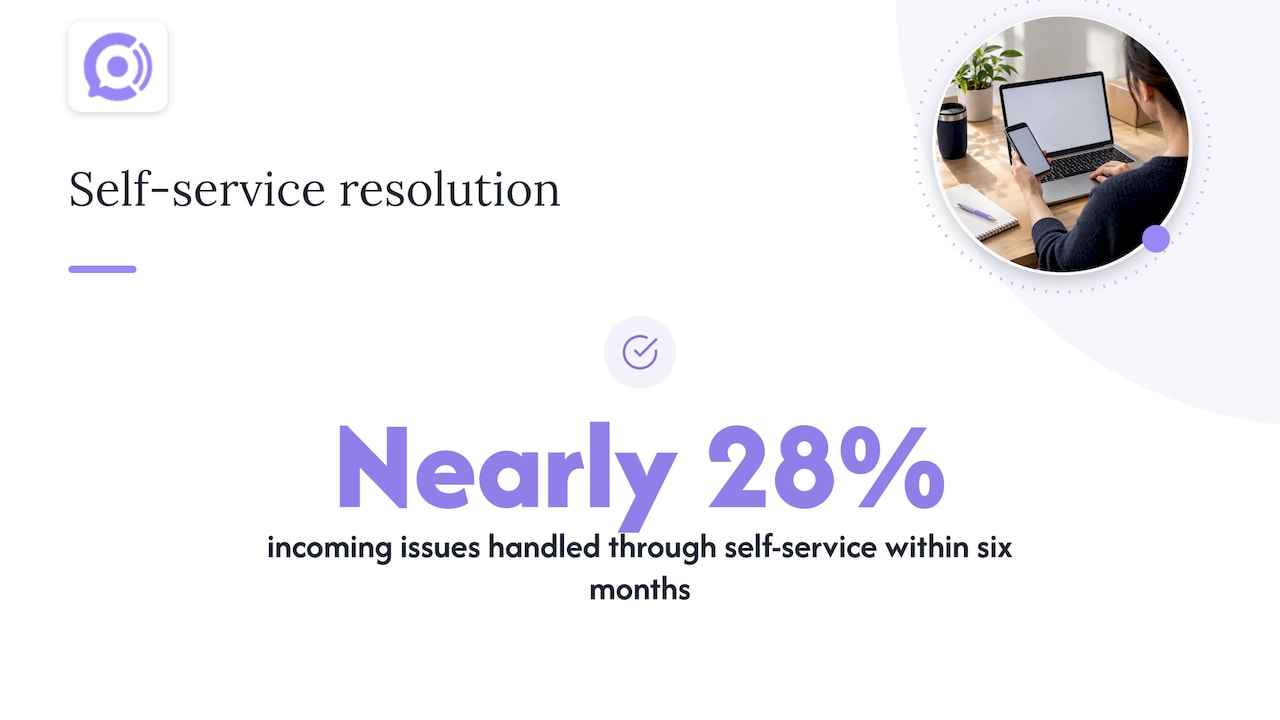
That can happen through a self-service knowledge base and order lookup page, through chat automation, or through a voice agent on the phone line. In the case study above, a knowledge base and customer portal let customers resolve issues themselves, and within six months nearly 28% of incoming issues were handled that way. That’s one company’s result, not a promise, but it shows the scale of what self-service can absorb.
If order-status contacts dominate your audit, our guide to order tracking automation for ecommerce operations goes through how to stop those calls and messages at the source.
2. Route by skill and urgency
A single shared inbox treats a damaged-item claim and a shipping-time question the same. Skill-based routing sends the first to someone who can authorize a replacement and the second to automation or a junior agent. AI classification can suggest a category and priority when a case arrives, so triage doesn’t depend on someone reading every message. The same case study lists skill-based routing and AI-suggested categories among the changes that shortened handling time.
3. Give agents the order context up front
Half of a slow reply is the lookup: opening the order, checking tracking, finding the previous conversation. When the order and customer history appear alongside the message, the agent skips the digging and the customer doesn’t repeat themselves. We cover this in more depth in how order context reduces repeat contacts across channels.
4. Raise first-contact resolution
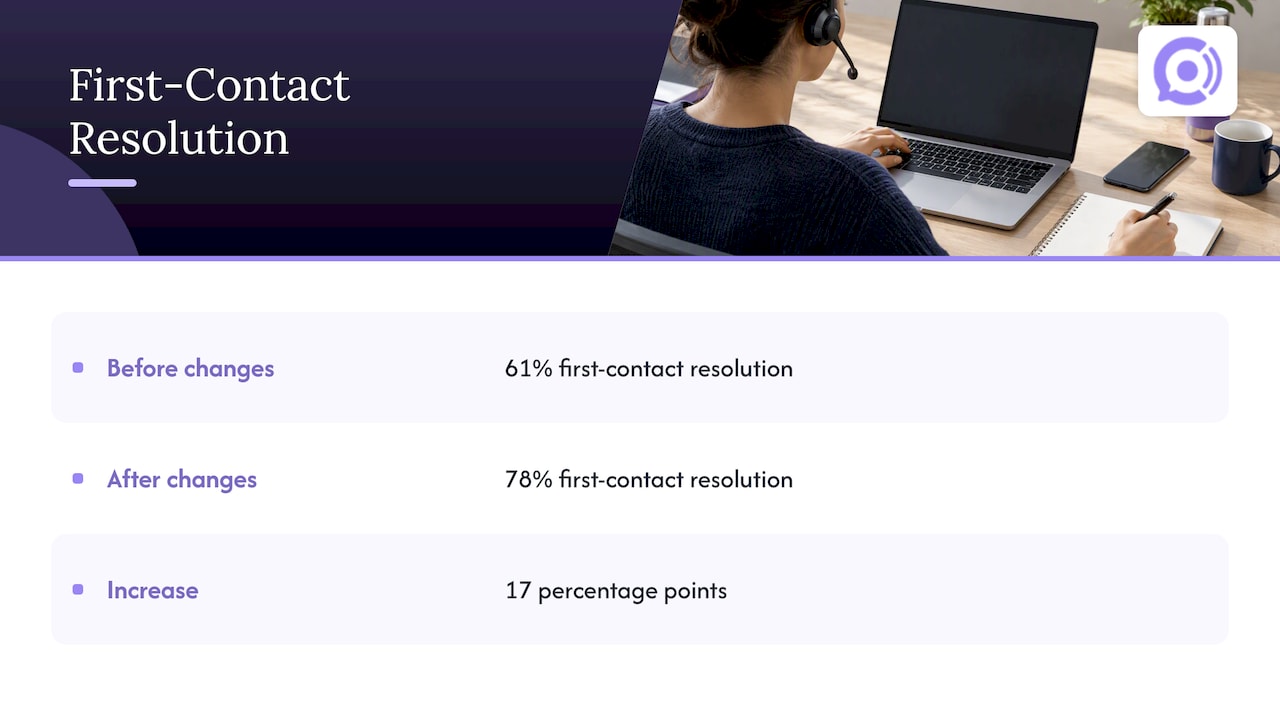
Response time and resolution quality pull on each other only if you chase speed alone. When more issues are solved on the first contact, there are fewer follow-ups, and agents have time for harder cases. The same case study reports first-contact resolution rising from 61% to 78% and describes how that frees up agent time for complex inquiries. To get there, write complete answers, give agents authority to act (refund, reship, update an address) within clear limits, and keep your policies in one place they can find quickly.
5. Choose the channel by the issue
Not every question belongs on every channel. A tracking question suits chat or self-service; a billing dispute or an upset customer with a damaged product often needs a call. Pushing everything to email creates the slowest possible path. Our piece on chat versus phone support explains how to route by the nature of the issue rather than by what’s cheapest to staff.
Covering nights and weekends without extra headcount
After-hours coverage is where most stores feel the gap, because a human shift at 2 a.m. is expensive for the few contacts it receives. The realistic options, from lightest to heaviest:
- Honest auto-replies with a real time commitment. “We’ll reply by 10 a.m. Eastern” is better than silence, as long as you keep the promise.
- Self-service content that answers the top five questions from your audit, linked from order confirmation emails.
- Automated agents that answer in real time using live order data, and hand off to a person when the case needs one.
- A staffed overnight or offshore shift. Fully human, fully flexible, and the most expensive per contact.
The cost logic differs between them. Staffing is a fixed cost whether the phone rings or not. Usage-priced automation costs more only when customers actually contact you, which suits small and mid-sized stores with uneven volume. For a framework on the economics, see how to scale customer support without scaling headcount.
Our perspective: speed on the phone is a design problem
We build voice agents for WooCommerce stores, so we spend a lot of time on the channel that most stores treat as the hardest to speed up. Our view comes from that work.
Phone is where response time is most visible. A caller can’t wait in a queue the way an email can, and they hang up. At the same time, the questions people call about are mostly narrow: where is my order, can I return this, when does it arrive. Those are answers a system can give the moment it can see the order. That is why we built the agents around live order and customer data from WooCommerce, and around natural voice conversation without the lag that makes automated phone systems feel slow.
Speed without control is a risk, though. We think an automated agent should be allowed to look things up freely, but should act on orders only through guardrail workflows with defined limits, and should pass anything sensitive or ambiguous to a person with the context attached. We lay out that thinking in our rules for AI-to-human escalation. Configuration matters just as much as the technology, and what to configure first in an AI support agent is where we’d start any rollout.
Our own published claims are an 85% faster response time and a 95% satisfaction rate. Treat those as our figures for our product, and measure your own baseline before and after any change, ours included.
— Orphora AI
Automating safely: how complex issues still reach a human
Automation lowers response time only if it doesn’t create new problems. Build these rules in before you switch anything on:
- Define what the automation may do. Reading order status and explaining a return policy is low risk. Issuing refunds or changing addresses needs limits, confirmation steps and a log.
- Name the escalation triggers. Angry or distressed customers, high-value orders, suspected fraud, legal or safety complaints, repeated failed attempts, and any request the system can’t answer.
- Pass the context along. The person who picks up should see the conversation so far, so the customer doesn’t start over.
- Review transcripts weekly. Call and chat transcripts show where the automation misunderstood a question or where your policy text is unclear. If you record calls, check the consent rules in your states first; our compliance plan for support call recording walks through that.
- Keep a way out. Customers should be able to reach a person without a maze.
The same case study describes automating routine tasks with workflows while using AI to suggest categories, priorities and solutions for the cases that remain. The pattern holds in any support setup: automate the predictable, assist on the rest, and keep humans on judgment calls.
Where Orphora AI fits
If phone calls are a significant part of your support load, or you lose calls after hours, Orphora AI provides AI voice agents that connect to WooCommerce, look up orders in real time, and handle order status, returns and shipping questions around the clock. The AI Voice Agent plan costs $9.99 per month per agent, and conversations are billed at $0.10 per minute. Larger operations can talk to us about the Enterprise plan, which has no published price. Features include call recordings and transcripts, call analytics, knowledge base integration, agent customization and US phone number provisioning.
To estimate what that would mean for your store, work through the seven inputs in our payback calculation with your own call volume.
A four-week plan
| Week | Focus | Output |
|---|---|---|
| 1 | Audit contacts and timestamps | Median FRT per channel, top contact reasons, after-hours gap |
| 2 | Fix the basics | Accurate auto-replies, SLA alerts, routing rules, updated help pages |
| 3 | Automate the top reason | Order status or returns handled without a human, with escalation rules |
| 4 | Review and tune | Transcript review, new median FRT, repeat-contact rate |
Keep the targets modest at first. Getting email to a median under four hours and chat under a minute is a real improvement for most small stores, and each gain is easier to hold than a leap.
For a wider view of how AI fits into store support, see our guide to AI customer service for e-commerce.
FAQ
What is a good first-response time for an online store?
It depends on the channel. A common starting point is under a minute for chat, about an hour for email, and no more than a couple of minutes on hold for phone. Use these as first targets, then compare against your own median.
Should I use the average or the median?
Use the median. A handful of cases that sit for days can pull the average well above what most customers experience. The median shows the typical wait, and you can add the 90th percentile to see how bad your slowest cases get.
Will faster responses hurt the quality of support?
Not if you track resolution alongside speed. Watch first-contact resolution and repeat-contact rate. If speed improves but repeat contacts rise, your answers are incomplete or your agents lack the context or authority to solve the problem the first time.
How can a small store answer customers outside business hours?
Start with clear auto-replies and self-service content, then automate the highest-volume routine questions so they are answered at any hour. Usage-based tools cost money only when customers contact you, whereas an overnight staff shift is a fixed cost either way.
Sources
- First Response Time: Calculate and Improve Your FRT, Shopify
- Service Cloud Automation That Cut Resolution Time by 40%
- Average response time: customer service benchmarks, TextExpander
- Schedule Adherence Tracking for Contact Center Supervisors